17 18
English /
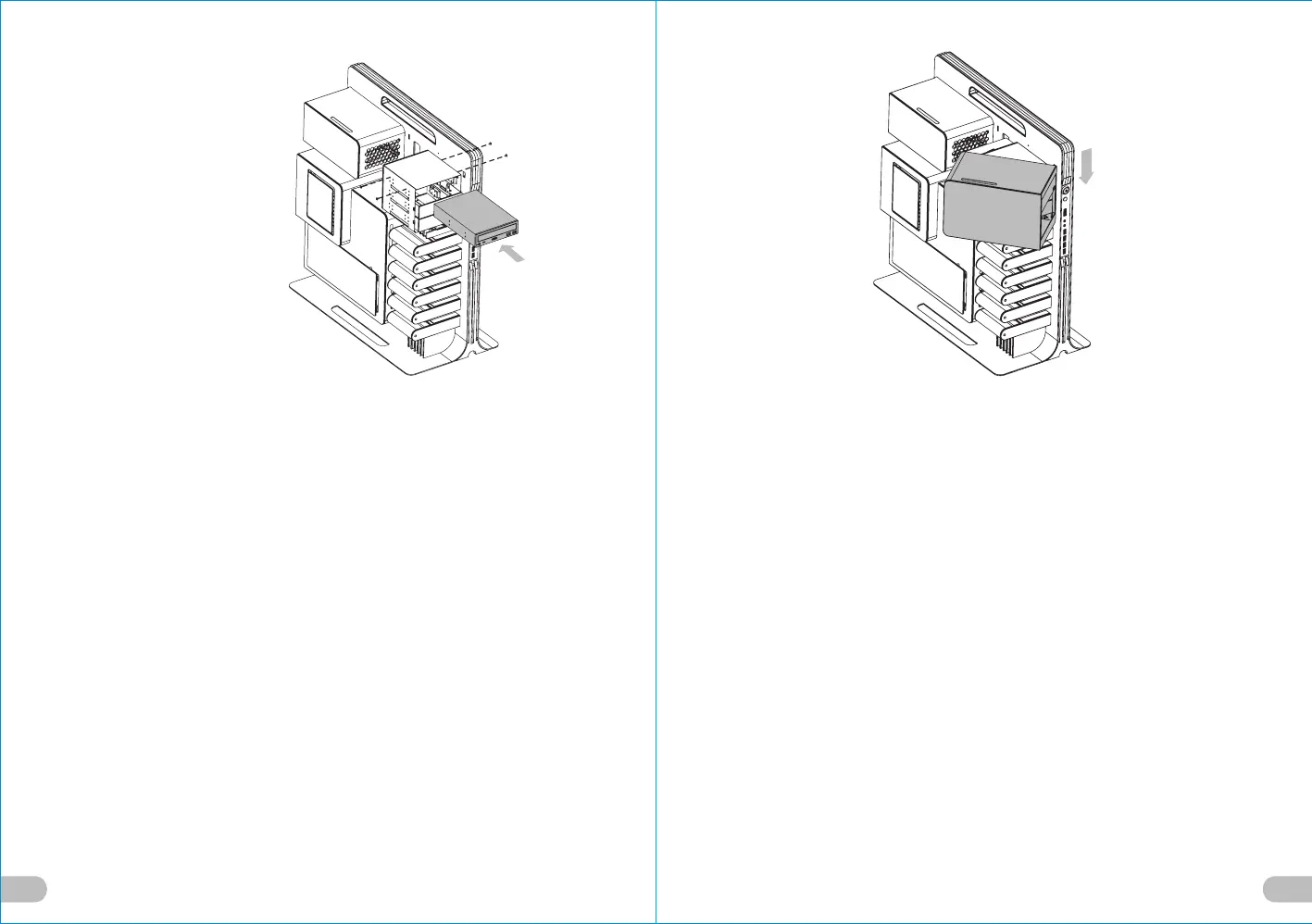
4. Insert the 5.25” device into the slot and
screw the device.
Deutsche /
4. Setzen Sie die 5,25” Einheit in den
Schacht ein und befestigen Sie die
Einheit mit Schrauben.
Français /
4. Insérez le périphérique 5,25” dans le slot
puis fixez le périphérique à l’aide des vis.
Español /
4. Inserte el dispositivo de 5,25'' en la
ranura y atorníllelo.
Italiano /
4. Inserire il dispositivo da 5,25” nello slot
e avvitare il dispositivo.
繁體中文 /
4. 將5.25”裝置插入插槽並用螺絲鎖上.
日本語 /
4. 5.25”デバイスをスロットに差し込み、
デバイスをねじで取り付けます.
Русский /
4. Установите 5,25-дюймовое устройство
в разъем и закрепите устройство
винтом.
简体中文 /
4. 将5.25”装置插入插槽并用螺丝锁上.
Türkçe /
4. 5.25” cihazı yuvasına yerleştirin ve
cihazı sıkıştırın.
Device Group 1
(Please screw it at rear screw hole)
English /
5. Put back the 5.25” device cover.
Deutsche /
5. Bringen Sie die Abdeckung für die
5,25” Einheit wieder an ihren Platz.
Français /
5. Replacez le couvercle du p
ériphérique 5,25”.
Español /
5. Vuelva a colocar la cubierta del
dispositivo de 5,25''.
Italiano /
5. Riposizionare il coperchio del
dispositivo da 5,25”.
繁體中文 /
5. 將5.25”裝置外蓋放回.
日本語 /
5. 5.25”デバイスカバーを元に戻します.
Русский /
5. Установите крышку 5,25-дюймового
устройства на место.
简体中文 /
5. 将5.25”装置外盖放回.
Türkçe /
5. 5.25” cihaz kapağını geri yerleştirin.






 To Next Page