7 8
English /
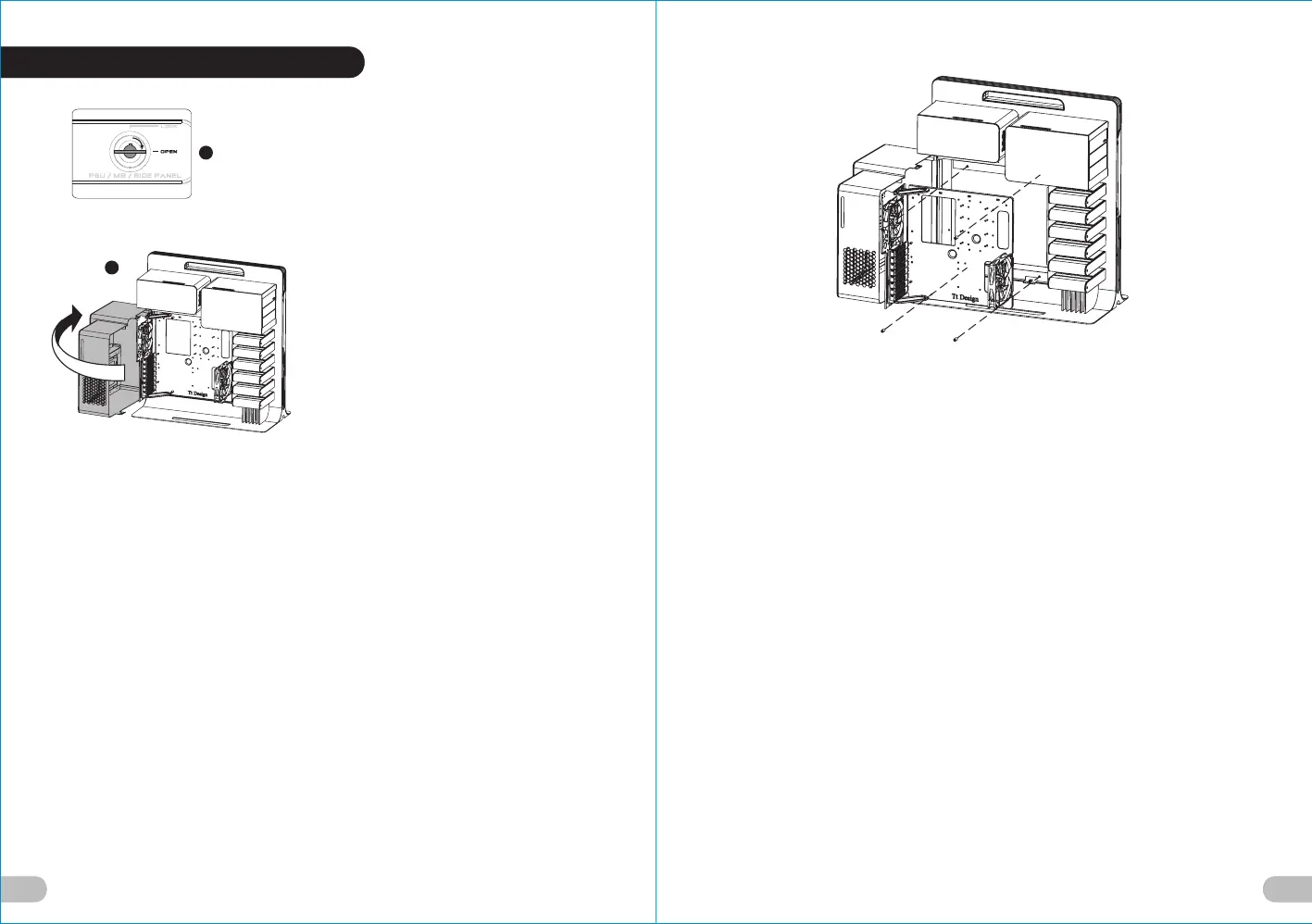
1.Turn the keyhole of the side panel PSU/
MB/SIDE PANEL into the OPEN position
using the key.
2.Open the motherboard cover.
English /
3. Unscrew the four thumbscrews from the
motherboard tray.
Deutsche /
1. Drehen Sie die Schlüsselaufnahme an
der Seite des Gehäuses PSU/MB/SIDE
PANEL mithilfe des Schlüssels in die
Position OPEN.
2. Öffnen Sie die Hauptplatinenabdeckung.
Deutsche /
3. Entfernen Sie die vier Flügelschrauben
vom Hauptplatinenschacht.
Français /
1. Tournez la boutonnière du panneau
latéral BLOC D’ALIMENTATION/CARTE
MERE/PANNEAU LATERAL dans la
position OUVERTE à l’aide de la clé.
2. Ouvrez le couvercle de la carte mère.
Français /
3. Dévissez les quatre vis à serrage à main
du plateau de la carte mère.
Español /
1. Gire la cerradura del panel lateral PSU/MB/
SIDE PANEL a la posición OPEN utilizando
la llave.
2. Abra la cubierta de la placa madre.
Español /
3. Desatornille los cuatro tornillos de mano
de la bandeja de la placa madre.
Italiano /
1. Ruotare l'incavo per la chiavetta del
pannello laterale PSU/MB/SIDE PANEL in
posizione OPEN (APERTO) usando la chiave.
2. Aprire la copertura della scheda madre.
Italiano /
3. Svitare le quattro viti ad aletta dal
vano della scheda madre.
繁體中文 /
1.用鑰匙將側板PSU/MB/SIDE PANEL鎖孔
轉至OPEN位置.
2.轉開主機板裝置外蓋.
繁體中文 /
3. 取下主機板拖盤上的四顆拇指螺絲.
日本語 /
1. キーを使って、側面パネルのPSU/MB/SIDE
PANELのキー穴を「開放」位置まで回します.
2. マザーボードカバーを開けます.
日本語 /
3. マザーボードトレイから4本の蝶ね
じを外します.
Русский /
1. 4. Поверните отверстие под ключ на
боковой панели PSU/MB/SIDE PANEL
(БП/МП/БОКОВАЯ ПАНЕЛЬ) в положение
OPEN (ОТКРЫТО) с помощью ключа.
2. Откройте крышку материнской платы.
Русский /
3. Открутите четыре винта с
накатанной головкой из лотка для
материнской платы.
简体中文 /
1. 用钥匙将侧板PSU/MB/SIDE PANEL锁孔转
至OPEN位置.
2. 转开主机板装置外盖.
简体中文 /
3. 取下主机板拖盘上的四颗拇指螺丝.
Türkçe /
1. Anahtarı kullanarak yan panelin PSU/MB/
SIDE PANEL deliğini OPEN (açık)
konuma getirin.
2. Anakart kapağını açın.
Türkçe /
3. Anakart tepsisindeki dört kelebek
vidayı gevşetin.
1
2
2.2 Motherboard Installation





 To Next Page