
 Need help?
Do you have a question about the Thermaltake suppressor f31 and is the answer not in the manual?
Critical warnings regarding CPU cooler height and VGA length limitations.
Instructions for removing the chassis side panels for access.
Guide on how to correctly install the power supply unit.
Steps to install the motherboard into the chassis.
Instructions for installing 5.25-inch devices like optical drives.
Procedures for mounting 3.5-inch and 2.5-inch hard drives.
Guide on installing PCI expansion cards into slots.
Instructions for using the security lock for peripherals.
Details on installing fans for air cooling.
Steps for setting up liquid cooling systems.
How to install dust filters into the chassis.
Guide to installing sound-dampening covers.
Instructions for mounting flexible covers for airflow and sound.
How to use the door lock feature of the chassis.
Connecting case LEDs and power/reset switches to the motherboard.
Guide for connecting USB 2.0 devices to the motherboard.
Instructions for connecting USB 3.0 devices to the motherboard.
Steps for connecting front panel audio to the motherboard.
 General
| Type | PC |
|---|---|
| Material | SPCC |
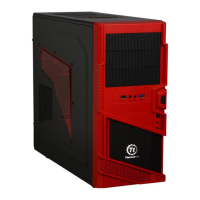
| Form factor | Midi Tower |
| Side window | No |
| Product color | Black |
| Maximum PSU length | 220 mm |
| Built-in speaker(s) | - |
| Number of 3.5\" bays | 6 |
| Number of 5.25\" bays | 2 |
| Maximum CPU cooler height | 180 mm |
| Number of expansion slots | 8 |
| Maximum graphics card length | 420 mm |
| Supported motherboard form factors | ATX, Micro ATX, Mini-ITX |
| Fan speed | 1000 RPM |
| Front fans installed | 1x 120 mm |
| Side fans diameters supported | 120, 140 mm |
| Front fans diameters supported | 120, 140, 200 mm |
| Number of top fans supported (max) | 3 |
| Number of side fans supported (max) | 1 |
| Audio input | Yes |
| USB 2.0 ports quantity | USB 2.0 ports have a data transmission speed of 480 Mbps, and are backwards compatible with USB 1.1 ports. You can connect all kinds of peripheral devices to them. |
| Power supply location | Bottom |
| Supported HDD sizes | 2.5, 3.5 \ |
 Weight and Dimensions
| Depth | 515 mm |
|---|---|
| Width | 250 mm |
| Height | 497 mm |
| Weight | 10500 g |




 To Next Page