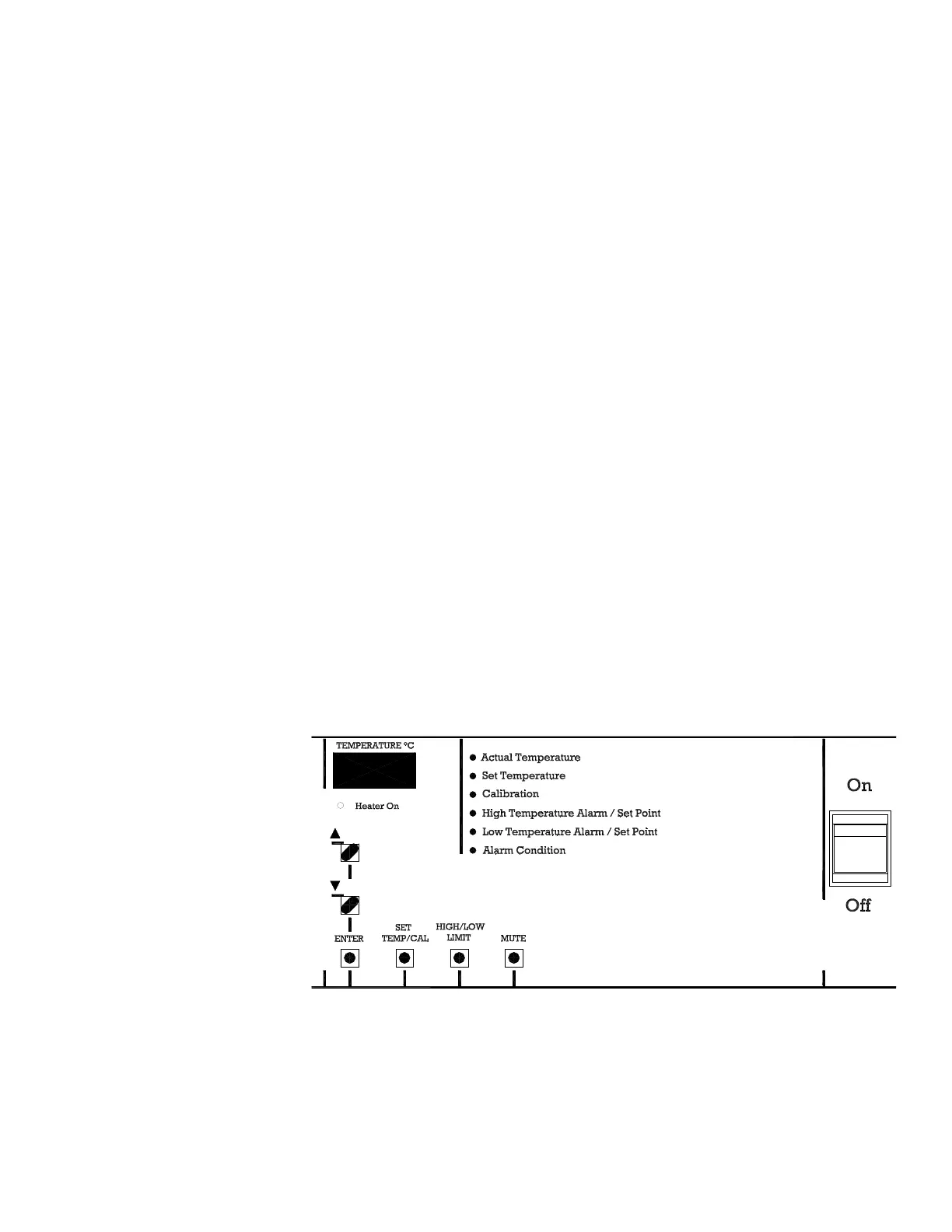
Heater On Lamp - The "Heater On" lamp is illuminated when power is
applied to the heater.
LED Display - Four digits are used to display the actual, set, calibrate,
high limit and low limit values.
Indicator Lamps - There are five (5) green indicator lamps that are used to
inform the user which parameter the display is indicating. The sixth
indicator is for a high or low temperature alarm condition. An internal
audible alarm will also operate when this alarm indicator illuminates.
On/Off Switch - The On/Off switch provides the main power to the incu-
bator.
Mute Key - This key is used to silence the internal audible alarm and to
also de-activate the external alarm device if one is being used.
High/Low Limit Key - This key is used to view the high or low tempera-
ture alarm setpoint The first depression of the key selects the high limit.
The second depression selects the low limit. The respective green indica-
tor lamp will light.
Set Temp/Cal Key - This key is used to view the operating setpoint tem-
perature or calibrate the unit to a certified/traceable thermometer. The
first depression of the key selects the operating setpoint and the second
depression selects the calibration mode. The respective green indicator
lamp will light.
Enter Key - This key is used after any setpoint selection is made to enter
the value into memory.
Up/Down Arrow keys - These keys are used to increase or decrease the
desired setpoint value.
Low Temp Incubator 1-3Thermo Scientific
Section 1
Installation and Start-Up
Explanation of Front
Panel Controls





 To Next Page