EasyManua.ls Logo

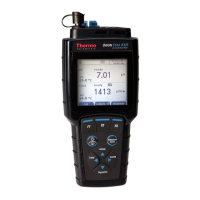
Thermo Scientific Orion Star A211 - User Manual

Thermo Scientific Orion Star A211
110 pages
Print Icon
To Next Page IconTo Next Page
Loading...
Thermo Scientific
Orion Star A210 Series
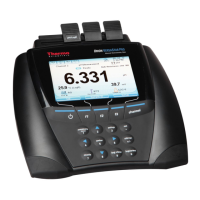
Electrochemistry Benchtop Meters
68X000441 Revision A June 2015
User Manual

Table of Contents

Other manuals for Thermo Scientific Orion Star A211

Questions and Answers

  • B
    Bethany ClaytonAug 13, 2025
    Why does the measurement value freeze and not change on my Thermo Scientific Orion Star A211?
    • C
      christineallenAug 13, 2025
      If the measurement value freezes on your Thermo Scientific Measuring Instruments and doesn't change, it might be because the read type is set to Auto-Read mode (indicated by the AR icon on the display). To resolve this, press the measure (esc) key to initiate a new measurement. Alternatively, you can navigate to the setup menu and change the read type to continuous.
  • P
    Paula SloanAug 16, 2025
    What to do if the Thermo Scientific Orion Star A211 Measuring Instruments meter keypad is unresponsive when using the Star Com computer software?
    • A
      Ashley CollinsAug 17, 2025
      If your Thermo Scientific Measuring Instruments meter keypad is unresponsive when using the Star Com computer software, it's likely because the keypad lock option is enabled within the Star Com program. To disable it, open the Star Com program, click the Settings icon, uncheck the box next to Keypad Lock, and then click the Save icon.
  • R
    Reginald MartinAug 20, 2025
    Why doesn't my Thermo Scientific Measuring Instruments meter automatically recognize the pH buffer during calibration?
    • C
      Cameron DuncanAug 20, 2025
      If your Thermo Scientific Measuring Instruments meter does not automatically recognize the pH buffer during calibration, it could be due to the electrode aging or becoming dirty, which causes its mV readings to drift. To fix this, first verify that you've selected the correct buffer set in the setup menu. Then, check the buffers and clean the electrode according to the instructions in the electrode manual, as the meter relies on raw mV readings to recognize the buffer.
  • J
    Joel ArmstrongAug 25, 2025
    What to do if the Thermo Scientific Orion Star A211 meter display goes blank, shows random lines or intermittently freezes?
    • H
      huntdeanAug 25, 2025
      If your Thermo Scientific Measuring Instruments meter display goes blank, shows random lines, or intermittently freezes, ensure you are using the correct power supply specifically designed for the Star A series meter. Note that this power supply differs from the one provided with Thermo Scientific Orion Versa Star meters. It's also recommended to use a surge protector or uninterruptible power supply (UPS). Additionally, try performing a factory reset on the meter.
  • R
    ronald77Aug 27, 2025
    What to do if the Thermo Scientific Orion Star A211 Measuring Instruments meter locks up while connected to a computer via the USB cable?
    • U
      ukentAug 27, 2025
      If your Thermo Scientific Measuring Instruments meter is locking up while connected to a computer via the USB cable, try disconnecting the USB cable from both the meter and the computer. Then, disconnect and reconnect the power adapter from the meter. Finally, reestablish the USB connection between the meter and the computer.
  • J
    jamespattersonAug 31, 2025
    Why doesn't the Thermo Scientific Measuring Instruments meter recognize the conductivity standard during calibration?
    • K
      Kathleen MooreAug 31, 2025
      If your Thermo Scientific Measuring Instruments meter does not recognize the conductivity standard during calibration, verify that the correct nominal cell constant is entered in the setup menu for the conductivity sensor you are calibrating. Also, make sure that the conductivity standard is one that the meter can automatically recognize. Try recalibrating the conductivity sensor using a fresh conductivity standard.
  • C
    Christopher JonesSep 4, 2025
    How to fix a Thermo Scientific Orion Star A211 Measuring Instruments that is flashing 9999 and displaying Over Range or Under Range?
    • W
      wmckenzieSep 4, 2025
      If the measurement value on your Thermo Scientific Measuring Instruments is flashing 9999 and displaying Over Range or Under Range, verify that the correct channel is selected on the meter display. Also, ensure that the electrode or sensor is securely and fully connected to the meter.
  • R
    Robert MurraySep 8, 2025
    What to do if the Thermo Scientific Orion Star A211 meter does not recognize an RDO optical or polarographic dissolved oxygen sensor?
    • B
      Benjamin RileySep 8, 2025
      If your Thermo Scientific Measuring Instruments meter does not recognize an RDO optical or polarographic dissolved oxygen sensor, ensure that the dissolved oxygen sensor is fully connected to the meter and confirm that the correct channel is displayed on the meter. After connecting the dissolved oxygen sensor, wait approximately 15 seconds for the meter to recognize the DO sensor type. Press the measure (esc) key to initiate a new measurement and update the meter display.

Summary

Meter Basics

Meter Setup Menus

Instrument Settings

Configures data transfer, data logging, date/time, language, sounds, and other system parameters.

Using the pH or pH;ISE Channel

pH Calibration Procedures

Guides through pH calibration, editing, and related procedures.

ORP Calibration Procedures

Covers ORP calibration in Relative mV mode and EH Units.

ISE Calibration Procedures

Guides through ISE calibration and editing for ion concentration measurements.

Using the Conductivity Channel

Conductivity Calibration Procedures

Guides through conductivity calibration, editing, and cell constant entry.

Using the DO;RDO Channel

Dissolved Oxygen Calibration

Covers DO calibration methods: Air, Water, Manual (Winkler), and Set Zero.

Measurement Procedure

Steps for taking dissolved oxygen measurements after sensors are prepared and calibrated.

Data Transfer and Software Updates

Meter Software Upgrade

Step-by-step guide for updating the meter's firmware using a computer.

Customer Services and Specifications

Troubleshooting and Resets

Lists common issues, troubleshooting tips, and procedures for factory/user resets.

Meter Specifications

Lists operating conditions, dimensions, and general specifications for all A210 series meters.

Model-Specific Specifications

Detailed specifications for each Orion Star A211, A212, A213, A214, A215, A216 meter model.

Thermo Scientific Orion Star A211 Specifications

General IconGeneral
Measurement TypepH, mV, Temperature
mV Resolution0.1 mV
Temperature Resolution0.1 °C
Temperature Accuracy±0.1 °C
DisplayLCD
Data LoggingYes
Calibration PointsUp to 5
Memory5000 data points
pH Resolution0.01
pH Accuracy±0.01 pH
mV Accuracy±0.2 mV or ±0.05% of reading
Temperature Range-5.0 to 105.0°C
Power SupplyAC adapter
InputsTemperature
OutputsUSB
Battery Life800 hours
mV Range±2000.0 mV

Related product manuals