11
Upgrade Equipment
Upgrading a Stand Alone TRACE 1300/TRACE 1310 to MS Version
566 TRACE 1300 and TRACE 1310 Hardware Manual Thermo Scientific
10. If other external modules are present, plug the power cable to the AC Input connector of
each external module, and to the wall outlet.
11. Power on the GC.
a. Plug the power cable to the AC Input connector into the back of the GC and to the
wall outlet.
b. Flip up the power switch (breaker), located at the back of the instrument, to the
position I.
12. Tune the DSQ II and set its working conditions. Set the GC working conditions
accordingly. For details please refer to the TRACE 1300 and TRACE 1310 User Guide and
to the DSQ II User and Hardware manuals.
Coupling with the ITQ Mass Spectrometer
To update the GC for the coupling with the ITQ mass spectrometer
1. Make sure that the preliminary operations have been carried out. See “Preliminary
Operations” on page 556.
2. Remove the left side panel.
a. Open the front door of the GC.
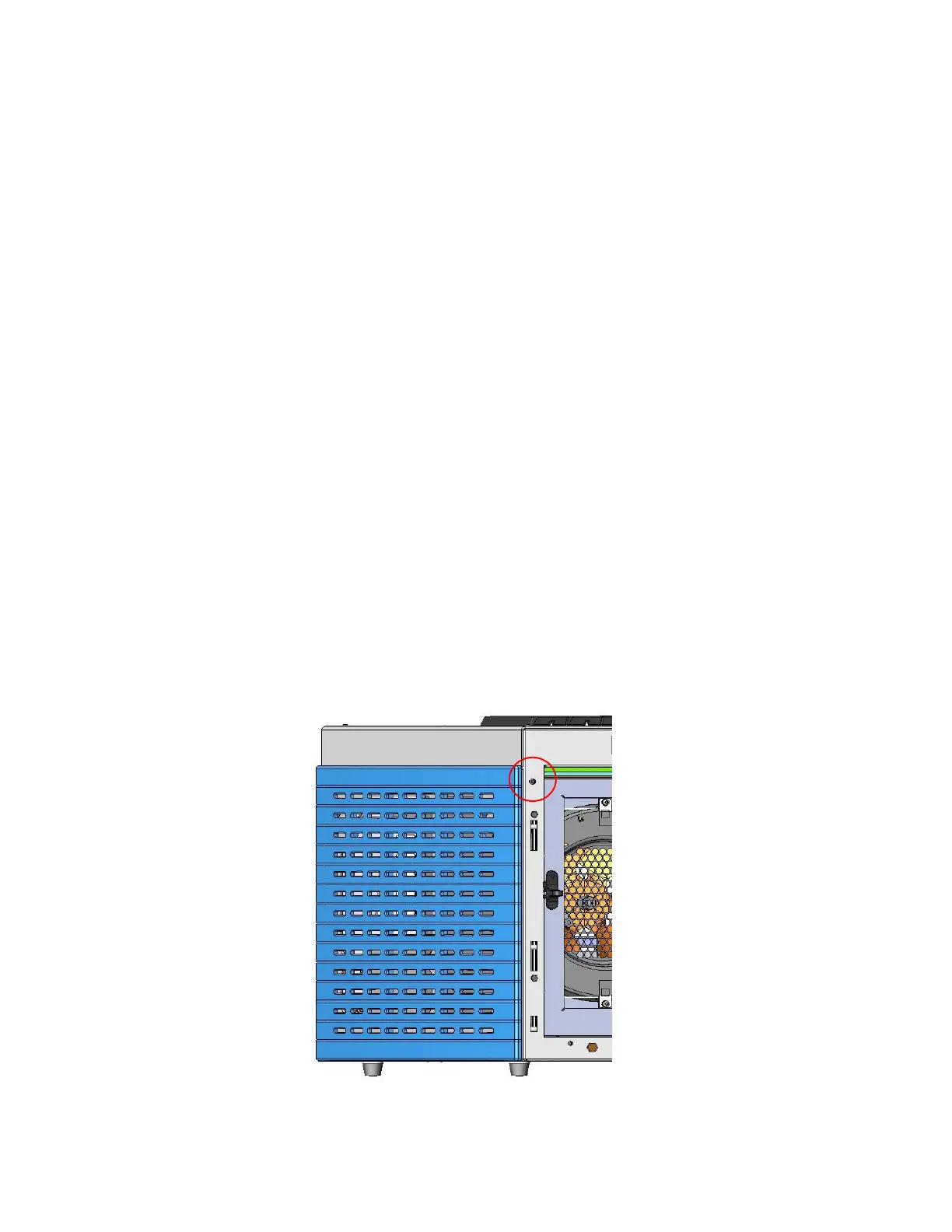
b. Using a T20 Torxhead screwdriver, unscrew the left side panel screw from the interior
front panel. See Figure 623. Save the screw because it will be reused later.
Figure 623. Left Side Panel Fixing Screw
c. Slide the panel towards the back of the instrument up to the stop.






 To Next Page