H7 TURCK Inc. 3000 Campus Drive Minneapolis, MN 55441 Application Support: 1-800-544-PROX Fax: (763) 553-0708 www.turck.com
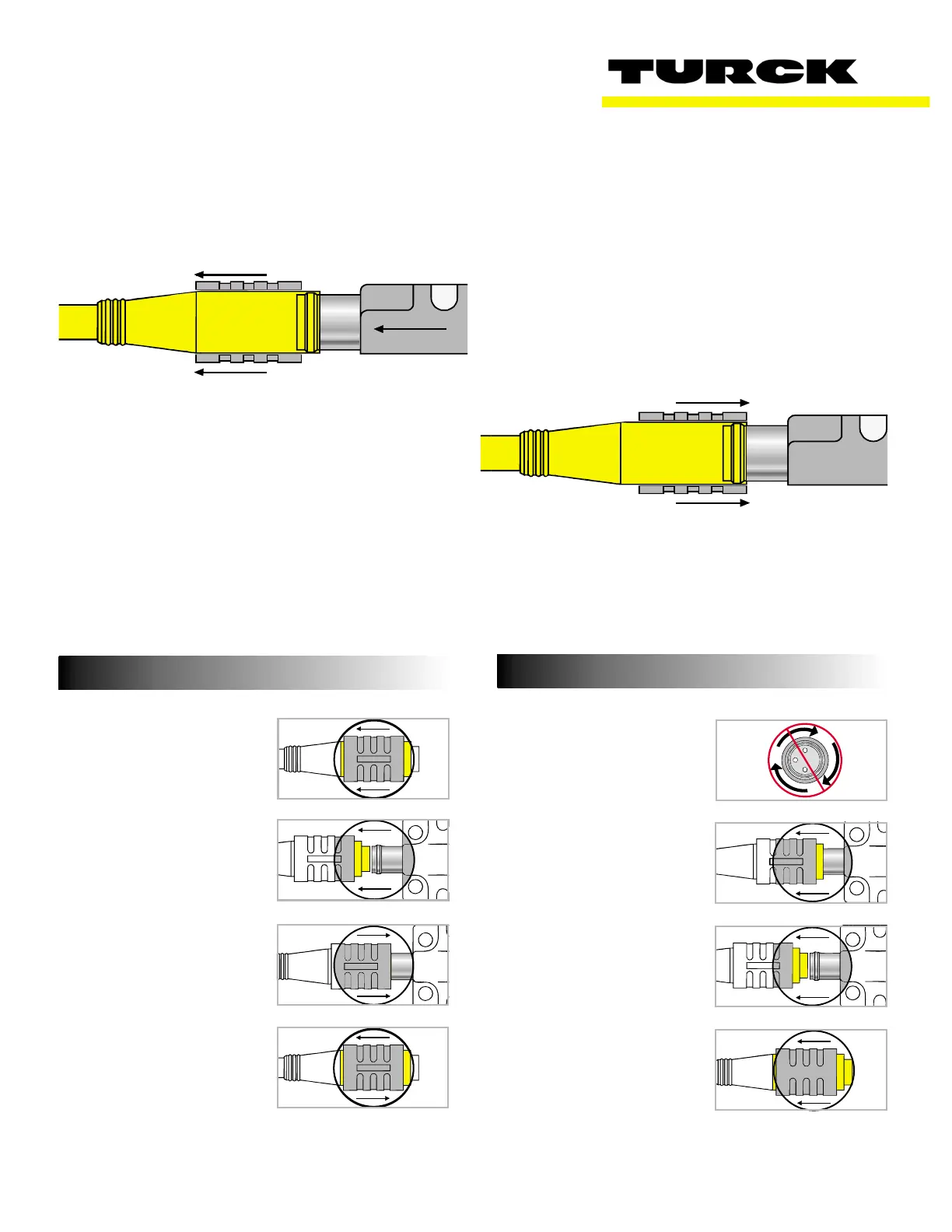
UNLOCK
LOCK
picofast “Snap Lock” Connector Instructions
Installation Instructions
To Attach:
1. Be sure black locking
sleeve is pulled back.
2. Line up pins and push
connector onto plug.
You will feel a “snap.”
Do not twist.
3. Push locking sleeve forward
on connector until it is
flush with the front of the
connector.
4. If sleeve is difficult to slide
on a new connector,
“exercise”it a few times.
Do not use tools.
With TURCK’s patented Locking Sleeve pulled back,
any picofast sensor slides on without any difficulty.
After sensor is connected, push Locking Sleeve for
-
ward to create a watertight connection. It’s a snap!
1. Do not twist.
2. Pull locking sleeve back
to “unlocked”position.
3. Pull connector
straight off.
4. Leave locking sleeve in
unlocked position.
To Detach:



 To Next Page