27
LOWERING THE TEMPERATURE IN YOUR ROOM :
HOW TO USE ECO MODE
DESCRIPTION
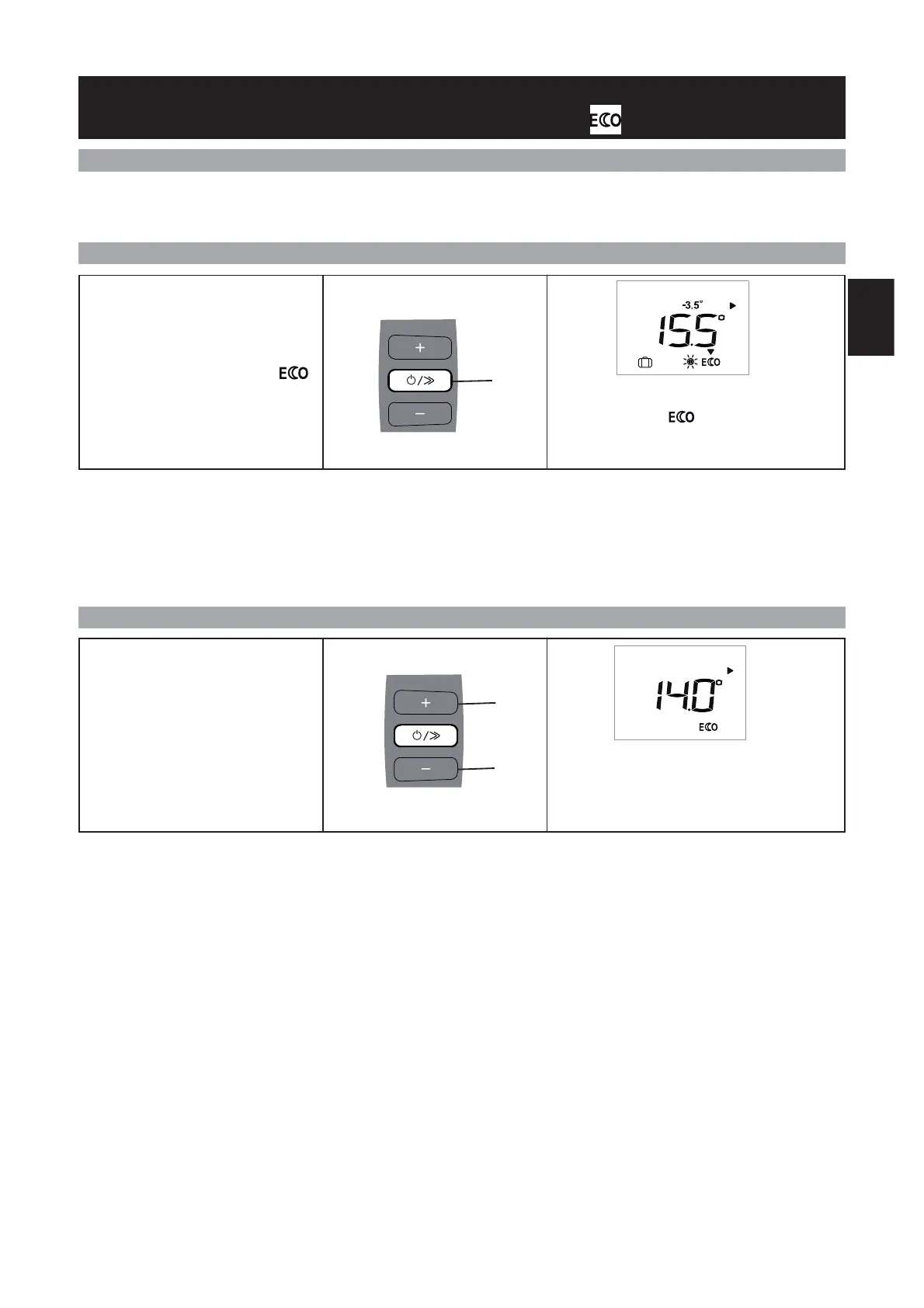
HOW TO ACTIVATE THIS MODE ?
HOW TO CHANGE THE TEMPERATURE ?
The advised Eco temperature is -3.5°C compared with the Comfort temperature (setting example: 19°C in Comfort mode and
15.5°C in Eco mode). If the -3.5°C icon does not appear on the screen, this means that the difference compared with the set Com-
for t temperature is not 3.5°C.
If you lower the Comfort temperature to below the Eco temperature, the Eco temperature lowers by -0.5°C compared with the Com-
fort mode If, however, you increase the Comfort temperature, the Eco temperature does not change.
We recommend that you use this mode when you will be absent for 2 to 24 hours, or during the night, especially in be-
drooms.
Press the scroll key (E) several times
until the selection arrow is on
mode.
The mode selection arrow flashes for several se-
conds, then just the icon remains on the dis-
play : the setting is confirmed.
If you want, you can change the tem-
perature displayed by pressing the +
(D)or–(F) keys.
The chosen Eco temperature appears on the
screen.
E
PROG
D
F
GB


 To Next Page