33
LOCKING THE CONTROLS
LOCKING THE CONTROL PANEL
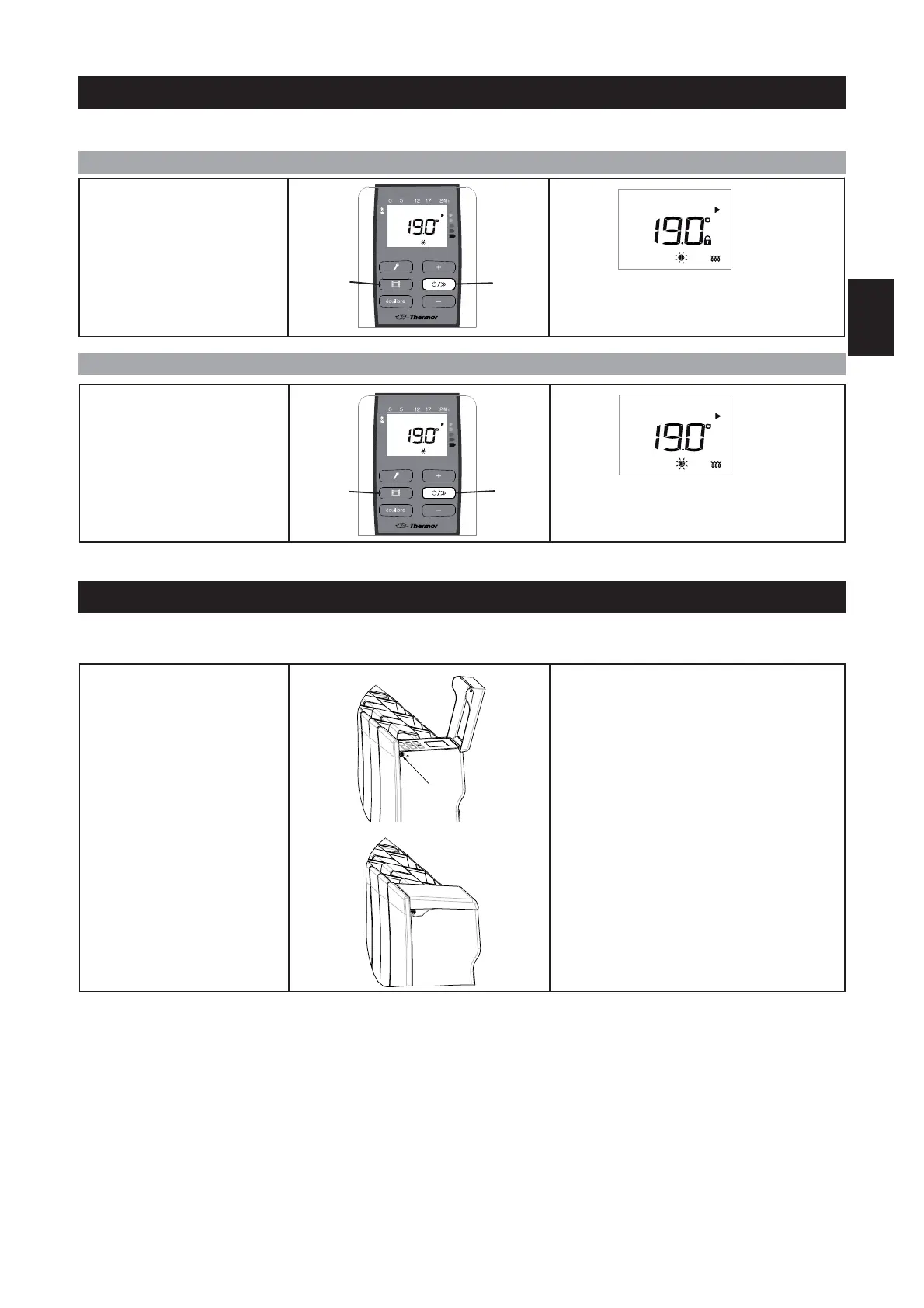
HOW TO LOCK THE CONTROLS ?
HOW TO UNLOCK THE CONTROLS ?
To avoid the control panel being used inopportunely, we advise you to lock it.
To lock the controls, press the
following keys simultaneously
for several seconds:
- Aeration (B) and
- Power on (E).
A lock appears on the screen: the settings can
no longer be changed.
E
B
To unlock the controls, press the
following keys simultaneously for
several seconds:
- Aeration (B) and
- Power on (E).
The lock disappears from the screen: the set-
tings can be changed.
You can also lock the control panel using the screw provided.
E
B
GB
Remove the screw located in-
side the control panel.
Close the control panel’s flap.
Block the flap using the screw.
The panel can no longer be opened, so the
controls cannot be accessed.


 To Next Page