• Do not touch the contact edge of the M.2 solid-state drive. Otherwise the M.2 solid-state drive might get
damaged.
• Do not make the M.2 solid-state drive subject to physical shocks or vibration. Put the M.2 solid-state drive
on a soft material, such as cloth, to absorb physical shocks.
Some computers might come with an M.2 solid-state drive installed in the wireless-WAN-card slot. To
replace the M.2 solid-state drive, do the following:
1. Disable the built-in battery. See “Disabling the built-in battery” on page 100.
2. Ensure that the computer is turned off and disconnected from ac power and all cables.
3. Close the computer display and turn the computer over.
4. Remove the base cover assembly. See “Replacing the base cover assembly” on page 102.
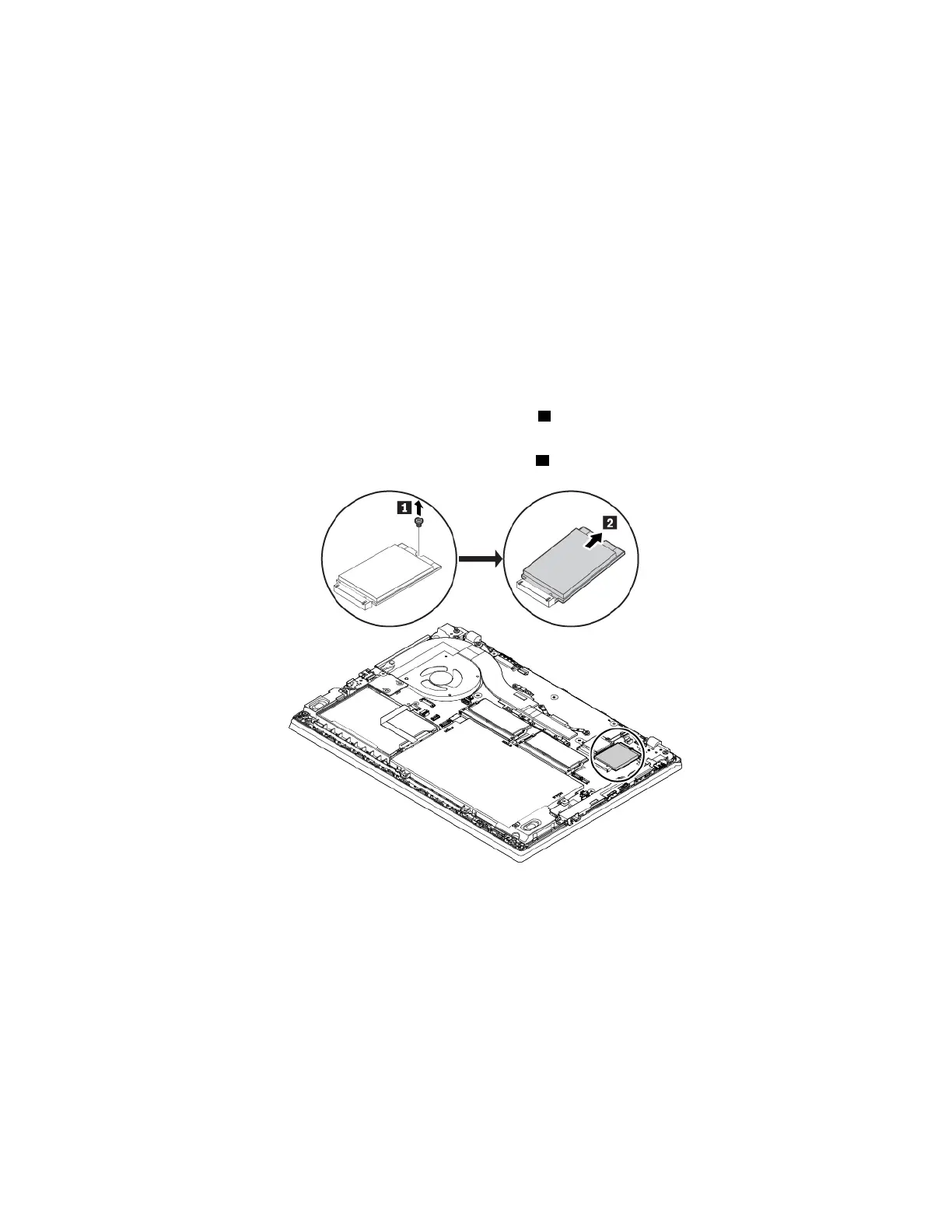
5. Remove the M.2 solid-state drive by doing the following:
Note: A film might cover the solid-state drive. To access the solid-state drive, open the film first.
a. Remove the screw that secures the M.2 solid-state drive
1 . The M.2 solid-state drive is released
from the secured position and pivots upward.
b. Carefully remove the M.2 solid-state drive out of the slot
2 .
116 L480 and L580 User Guide



 To Next Page