Touch gesture (touch models
only)
Description
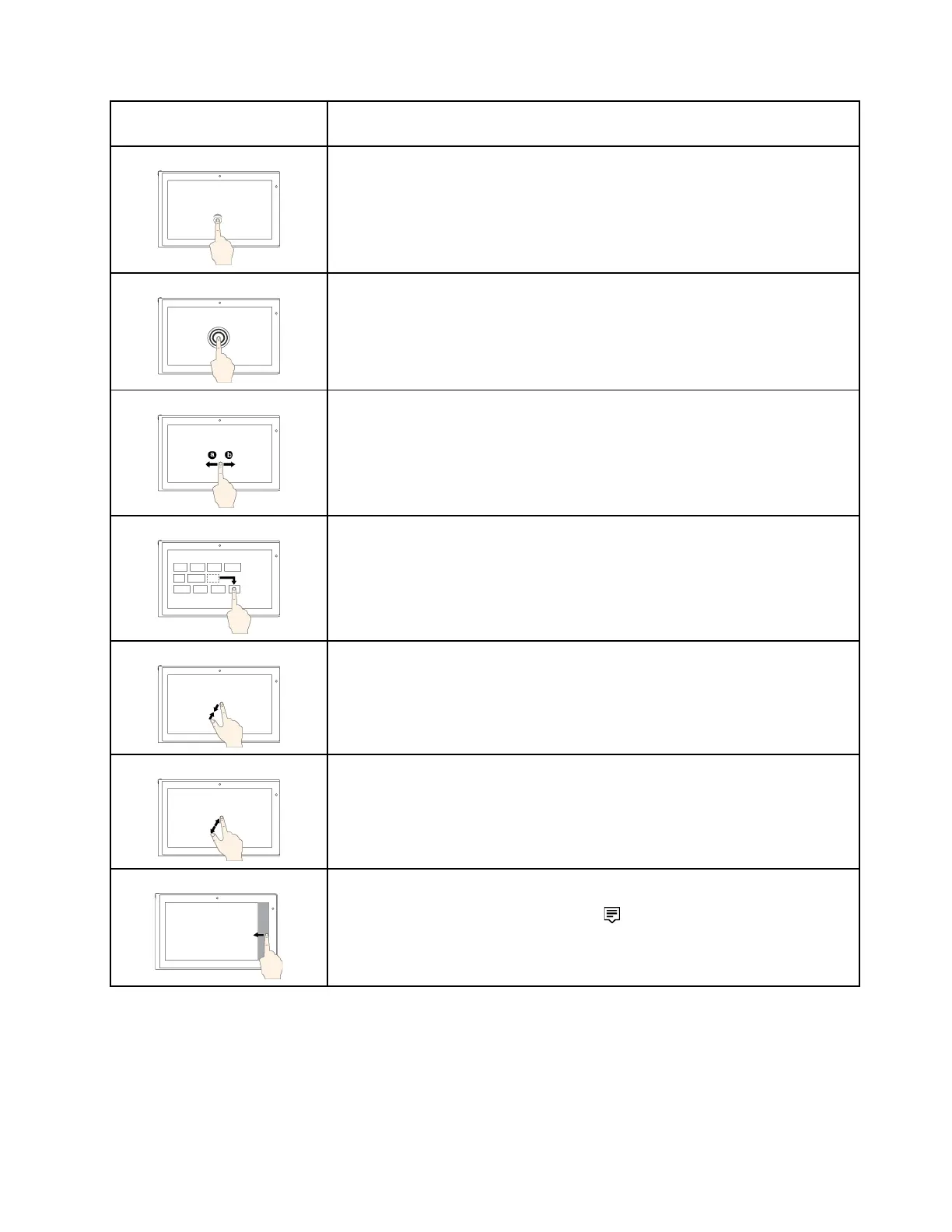
Touch: Tap.
Mouse action
: Click.
Function: Open an app or perform an action on an open app, such as Copy, Save,
and Delete, depending on the app.
Touch: Tap and hold.
Mouse action
: Right-click.
Function: Open a menu with multiple options.
Touch: Slide.
Mouse action
: Scroll the mouse wheel, move the scroll bar, or click the scroll
arrow.
Function: Scroll through items, such as lists, pages, and photos.
Touch: Drag an item to the location you want.
Mouse action
: Click, hold, and drag an item.
Function: Move an object.
Touch: Move two fingers closer together.
Mouse action
: Press the Ctrl key while scrolling the mouse wheel backward.
Function: Zoom out.
Touch: Move two fingers farther apart.
Mouse action
: Press the Ctrl key while scrolling the mouse wheel forward.
Function: Zoom in.
Touch: Swipe in from the right edge.
Mouse action
: Click the action center icon
in the Windows notification area.
Function
: Open the action center to see your notifications and quick actions.
Chapter 2. Using your computer 21



 To Next Page