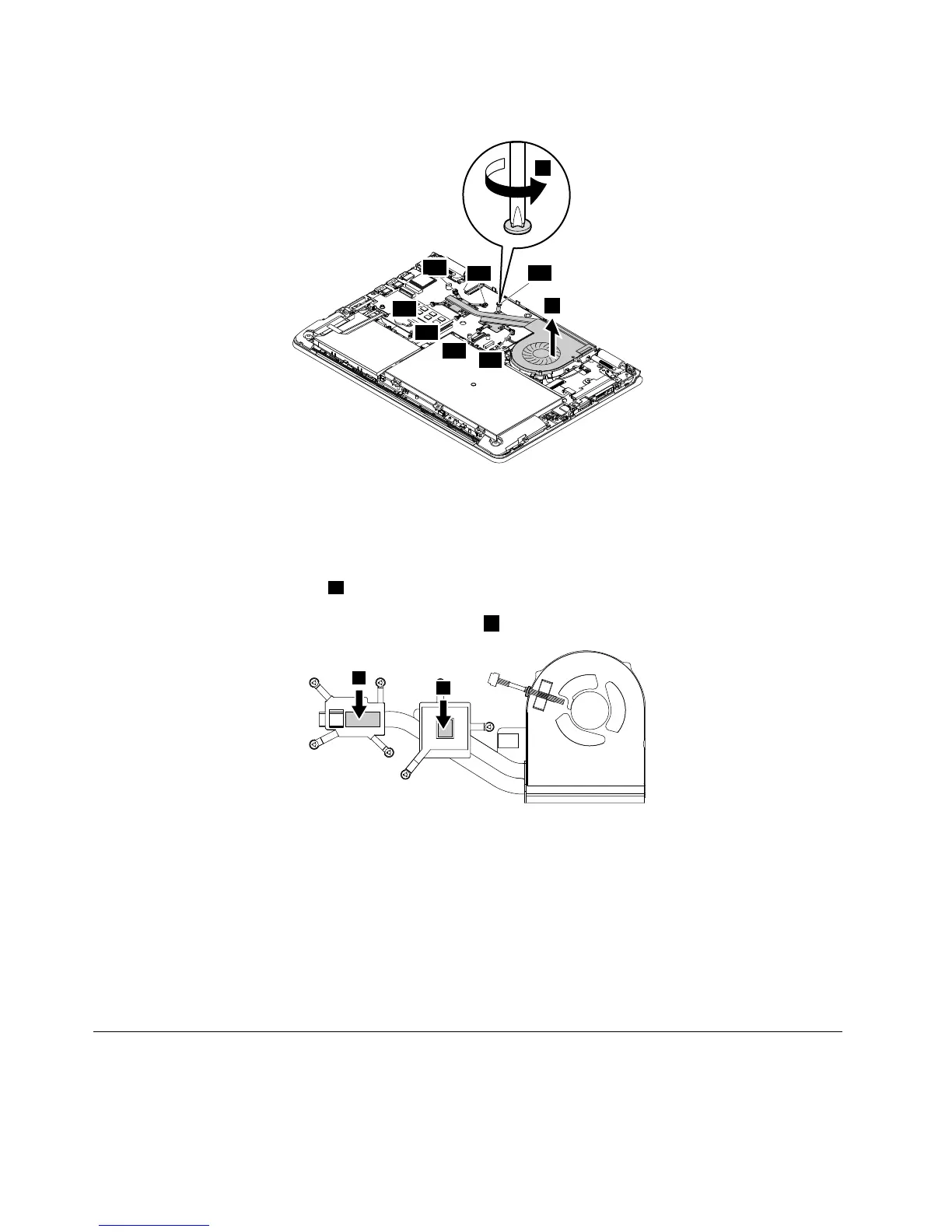
Whenyouinstallthethermalfanassembly:
•Alwayswearfingerstallswhenhandlingthethermalfanassembly.Donottouchorholdanypartofthe
thermalfanassemblywithbarefingers.
•Beforeyouattachthethermalfanassemblytothecomputer,applythermalgrease,atanamountof
0.2grams,onthepartmarked
aasshowninthefollowingillustrations.Eithertoomuchortooless
applicationofgreasecancauseathermalproblemduetoimperfectcontactwithacomponent.You
shouldpeelthethinfilmofffromtherubbersmarked
b.
•Donottouchthethermalgrease.
•Donotpress,touch,orrotatethefanimpeller.
•Donottouchthefaninlethole.
•Donottwistorpullthecableofthethermalfanassembly.
•Donotapplypressureonthetopandbottomcoversofthethermalfanassembly.
•Donotpresstheheatpipe.Holdbothsidesoftheheatpipeifyouneedtotakethethermalfanassembly.
•Donotshakeordropthethermalfanassembly.
•Ensurethatthefanconnectorisattachedfirmly.
1170KeyboardbezelassemblyandLCDunit
Foraccess,removetheseFRUsinorder:
•“1010Lenovo-OneLink-connectorcover”onpage60
•“1020Keyboard”onpage61
78HardwareMaintenanceManual



 To Next Page