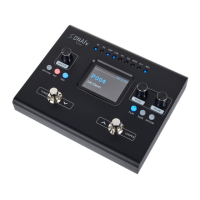
1 Display
2 [FX], [DS], [AMP], [CAB], [NS], [EQ], [MOD], [DLY], [REV] | LED indicator light for eects
The active eect blocks in the eects chain for the currently set preset light up.
3 [MODE] | Rotary control for switching on and o the respective eect modules
4 [VALUE] | Rotary control for switching menu pages and changing parameters
5 [SYSTEM] | Button for calling up the system settings
6 [SAVE] | Button for calling up the preset memory menu
7 [PLAY] | Button for calling up the preset menu screens
8
[LOOPER] | Foot switch for activating the looper
n Hold down the foot switch to activate the looper.
n With the looper activated: Press the foots witch to activate the STOP/CLEAR function.
9
[TUNER] | Foot switch for activating the tuner
n Hold down the foot switch to activate the tuner.
n With the looper activated: Press the foot switch to activate the REC/PLAY/DUB function.
10 [EXP] | Button for calling up the conguration of the expression pedals
11 [TAP] | Button for calling up the tap tempo settings
Connections and controls
DNAfx GiT Core
19
Multi Eects Unit






 To Next Page