3 SpeedTouch™ for Microsoft Windows
3EC 36714 BAAA TCZZA Ed. 02
11
Previous SpeedTouch™
installations
In case the SpeedTouch™ was already installed on your system, the SpeedTouch Setup
wizard (application) allows also an upgrade, removal or repair of the existing Speed-
Touch™ installation.
The SpeedTouch Setup
wizard (application)
installation
Step Action
1 Insert the SpeedTouch™ Installation CD-rom in your PC's CD-rom drive.
The SpeedTouch Setup wizard (application) will start automatically.
Note: In case the SpeedTouch Setup wizard (application) does not start auto-
matically, open a 'Run' window via Start > Run from the Start menu and enter
following path: D:\Setup.exe, where D stands for the drive letter of your
CD-rom drive.
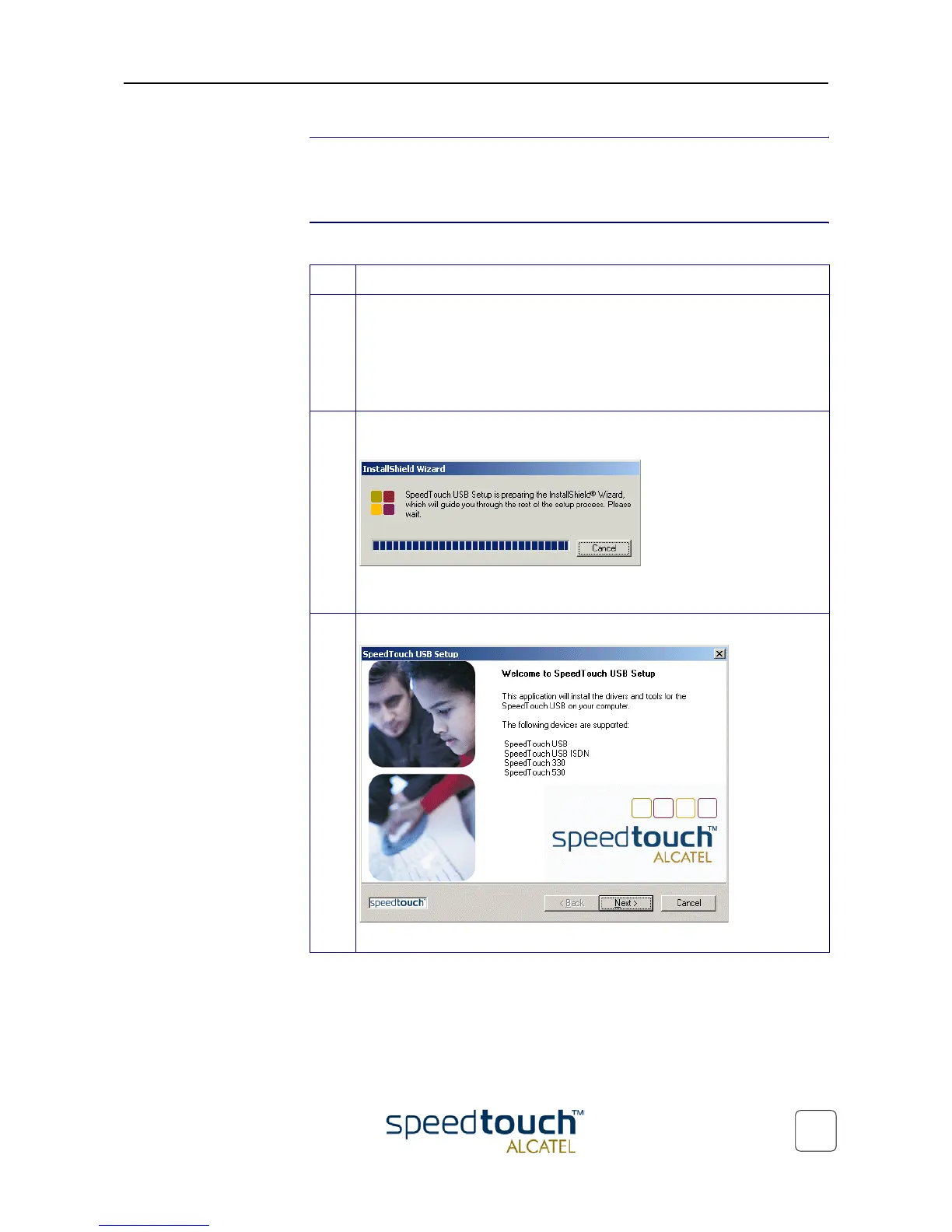
2 The SpeedTouch™ Setup program prepares the SpeedTouch Setup wizard
(application):
As soon as the preparation is finished, the SpeedTouch Setup wizard (applica-
tion) will start automatically.
3 The 'Welcome to SpeedTouch™ setup' window pops up:
Click Next to proceed.



 To Next Page