4 SpeedTouch™ for Mac OS
3EC 36714 BAAA TCZZA Ed. 02
29
Additional configuration Next to the installation of the SpeedTouch™ software, your must configure it for
Internet connectivity.
Proceed as follows:
Step Action
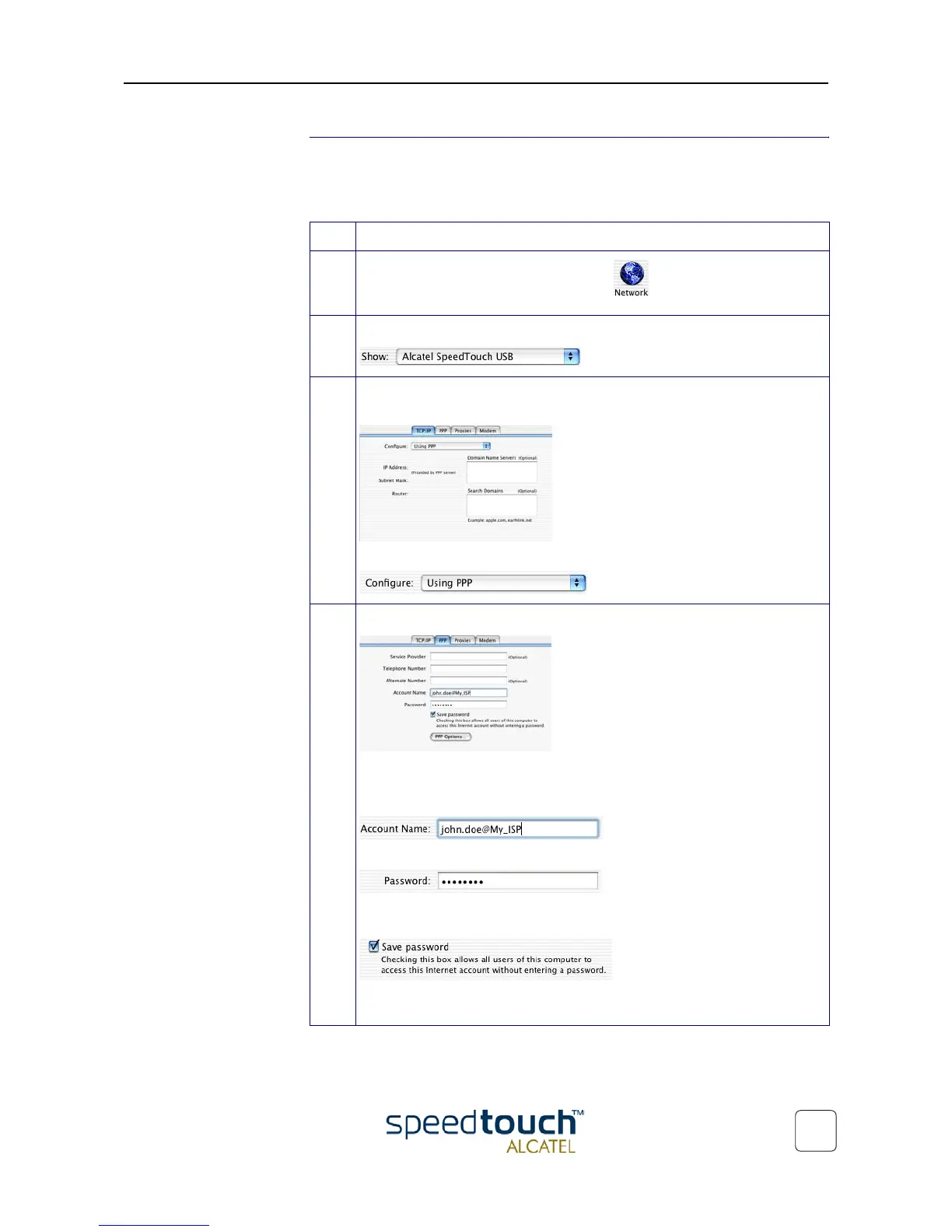
1 Open your System Preferences and click to open the network panel.
2 Select the SpeedTouch™ from the list of available network devices:
3 The first tab 'TCP/IP' of the Network panel shows the TCP/IP settings for the
SpeedTouch™ network connection:
Check that the connection is configured for PPP connectivity:
4 Click the 'PPP' tab. This panel shows the PPP configuration:
Enter the following information:
In the 'Account Name' field, your user name for your User Account at the
Internet Service Provider, e.g.:
In the 'Password' field the password for this user name.
Note: Tick 'Save password' in case you want the computer to remember your
user name, and password:
Optionally you can enter a name for this connection in the 'Service Provider'
field. All other fields may stay empty.



 To Next Page