Connections and Setup
3
EN
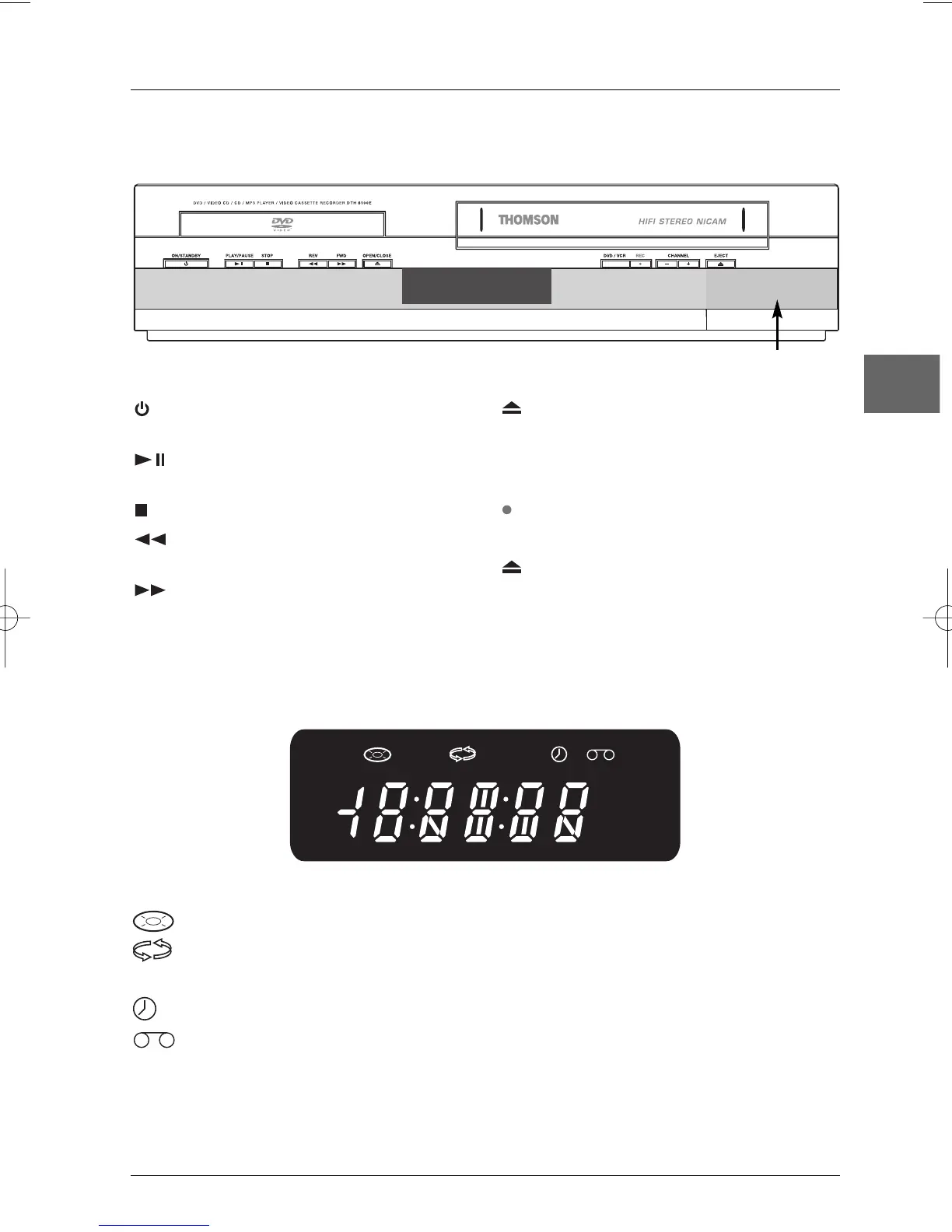
ON/STANDBY - Switch the appliance on
and off.
PLAY/PAUSE - Start playing a disc or a
cassette. Go into pause.
STOP - Stop disc or cassette playback.
REV - Start fast reverse in DVD mode
and in VCR mode.
FWD - Start fast forward in DVD mode
and in VCR mode.
OPEN/CLOSE - Open and close the
DVD player's disc tray.
DVD/VCR - Change from DVD mode to VCR
mode and vice versa.
REC - Start recording in VCR mode.
CHANNEL -/+ - Change channel in VCR mode.
EJECT - Eject the cassette from the video
recorder.
Front panel controls (buttons appear left to right below)
Front panel display
DVD Appears when the appliance is in DVD mode.
Appears when a disc is loaded.
Appears when the appliance is in repeat mode.
COPY Appears when a copy from a disc onto a tape is in progress.
Indicates that a recording is programmed or a timer recording is in progress.
Appears when a tape is inserted in the video recorder.
VCR Appears when the appliance is in VCR mode.
REC Appears when a recording is in progress.
TV Appears in TV mode.
Door to front connectors


 To Next Page