Connections and Setup
5
EN
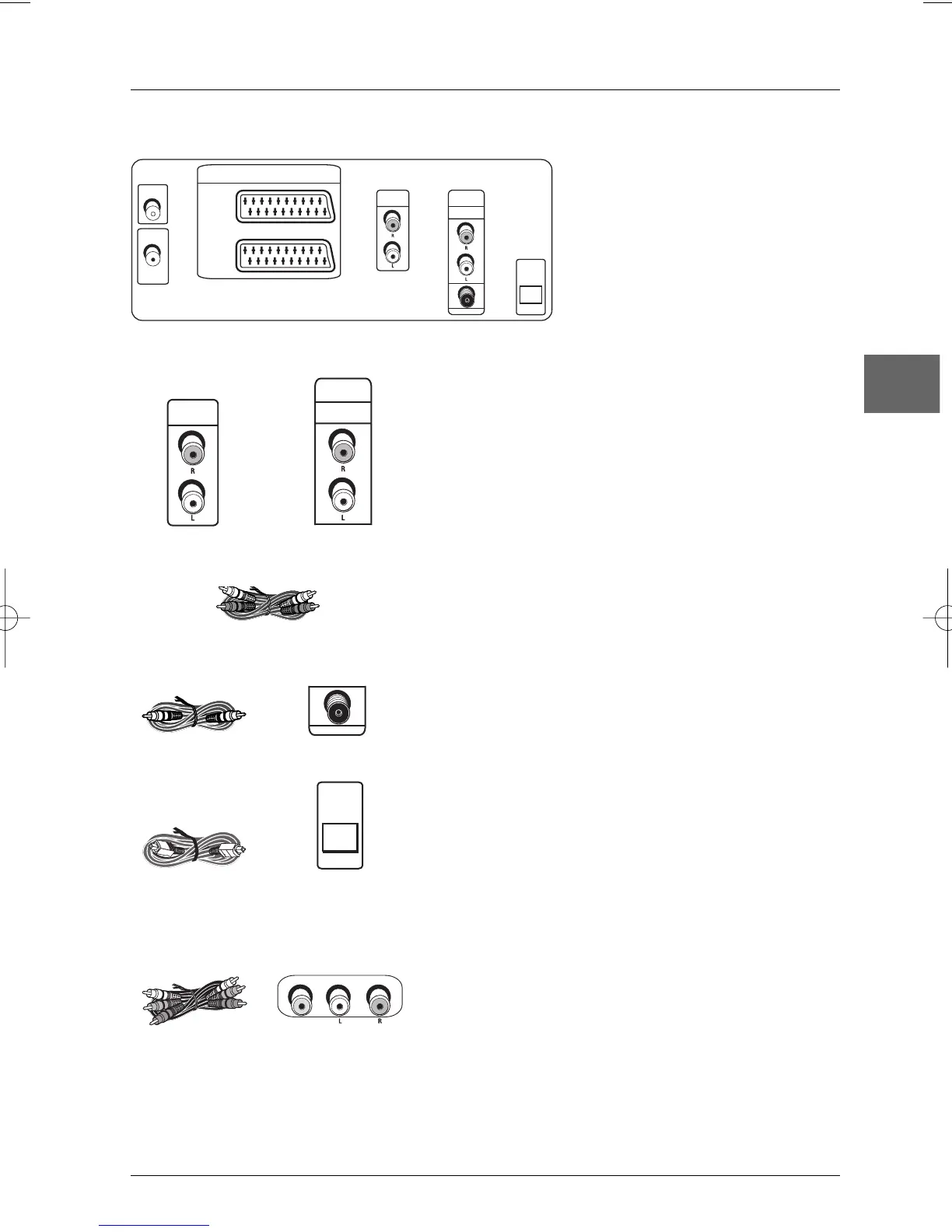
Back panel audio sockets
DVD/VCR AUDIO OUT L (left) and R (right) sockets -
DVD EXCLUSIVE AUDIO OUT L (left) and R (right) sockets
These are analogue audio output sockets.The AUDIO L
socket and cable are white, while the AUDIO R socket
and cable are red. Connect the DVD/VCR AUDIO L and
R sockets to the television set’s AUDIO L and R sockets
using audio cables (not provided).
Note: If your television set only has one audio socket connect it
to the DVD player’s left socket (white).
The DVD exclusive sockets are dedicated to the DVD
player and offer a higher level of sound quality than the
DVD/VCR ones.
Coaxial digital audio output (COAXIAL) /
Optical digital audio output (OPTICAL)
These sockets offer a higher level of sound quality
compared to that provided using an analogue audio
connection. Use one of these sockets to connect your
DVD Player to a Dolby Digital or DTS receiver or
decoder. Some receivers have only one of these sockets.
Under most conditions, optical and coaxial connections
work equally well.The coaxial and optical cables are not
supplied with the device.
Front panel audio and video sockets
Connect your camcorder to the AUDIO L (left),AUDIO
R (right) and VIDEO sockets located at the front of the
DVD/VCR using an audio/video cable (not supplied).
Back of
DVD/VCR


 To Next Page