ETC009 - ETC010
First issue 01 / 06
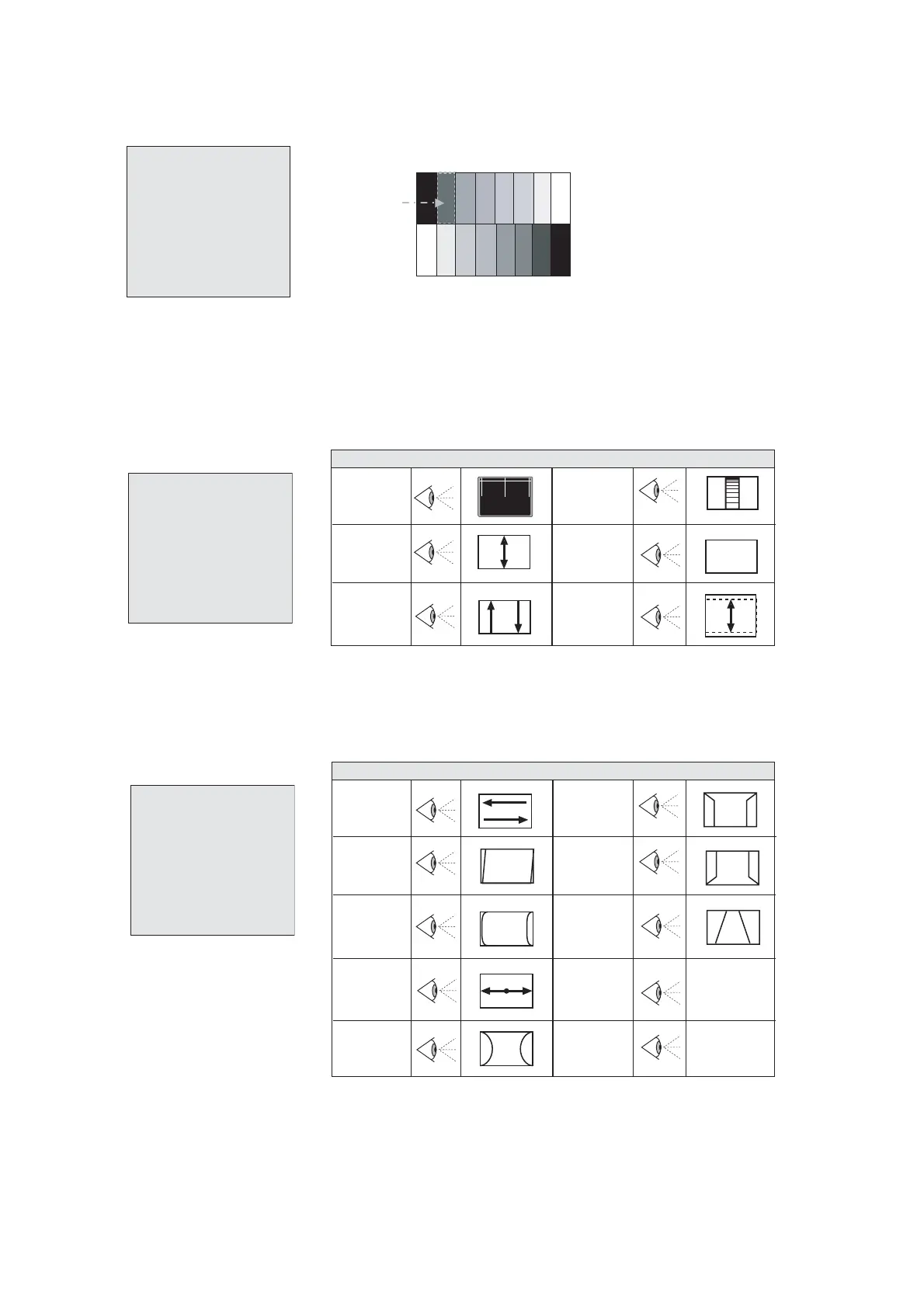
3.7. SUB BRIGHTNESS
3.7.1. Sub brightness adjustment
1) Input eight steps gray signal.
2) Press key "4" to enter sub-brightness adjustment.
3) Adjust "BRTC" until the secondary gray bar just to be seen.(Fig.7).
3.8 PICTURE GEOMETRY ADJUSTMENT
3.8.1. Vertical geometry items
- Press key "2" to enter Vertical geometry adjustment.
3.8.2. Horizontal geometry items
- Press key "3" to enter Horizontal geometry adjustment.
U0C300C 1 . 8 2005. 07 . 20-01
VOL 01 30
VOL 10 104
VOL 90 170
VOL 100 188
CNTC 31
BRTC 30
COLC 23
TNTC 35
COLP 3
COLS 23
SHPTV 32
The 2nd gray scale
page 4
Fig.7
U0C300C 1 . 8 2005. 07 . 20-01
5VPOS 24
5VAM 29
5VSL 38
5VL 30
5VSC 31
5VSCL 34
RF AGC 14 Active
AGCL 14
5VPOS
(V-Position)
5VAM
(V-Amplitude)
5VSL
(V-Slope)
*
According to Software
VERTICAL GEOMETRY ITEMS
5VL
(V-Linearity)
5SCL
(Vertical
S-Correction)
5VX*
(Vertical
Over scan)
S
page 2
U0C300C 1 . 8 2005. 07 . 20-01
5HSH 36
5PAR 24
5BOW 22
5EWW 33
5EWP 35
5UCR 42
5LCR 32
5EWT 36
5WBR 7
5WBF 7
5BOW*
(Bow Adjust.)
5HSH*
(H-Position)
5PAR*
(Parallelogram)
5EWT
(EW -
Trapezium)
5WBR**
5WBF**
5UCR
(EW-Upper
Corner)
5LCR
(EW-Lower
Corner)
5EWW
(H-Amplitude)
5EWP
(Pincushion
correct.)
HORIZONTAL GEOMETRY ITEMS
*
Only valid for ETC009 except models with Slim CRT
** Only valid with 16:9 tubes
End of
Blanking
Start of
Blanking
page 3





 To Next Page