ETC009 - ETC010
First issue 01 / 06
3.8.3. Adjustments
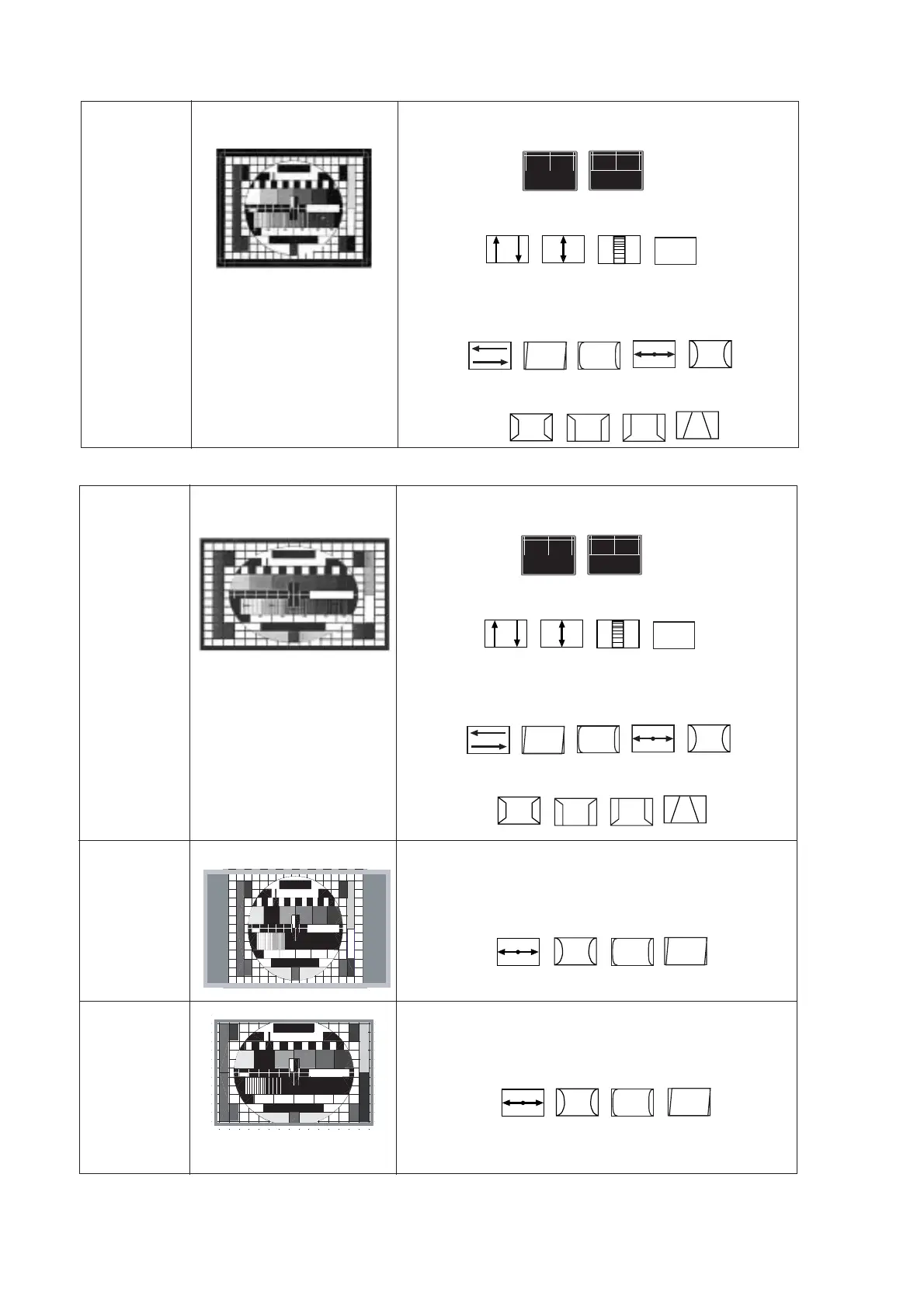
Signal : 4/3 test pattern - Cross hatch pattern (PAL or SECAM), NTSC signal to adjust NTSC geometry.
4/3 picture tube
4 / 3
standard mode
Overscan V=107% , H=107%
Vertical adjustment : press ”2”
1- Check the Factory adjust 5VSC = 31; Adjust Vertical Slope : 5VSL
Correct
No correct
2- Adjust Vertical Position (5VPOS) , Vertical amplitude (5VAM).
3- Adjust Vertical Linearity (5VL) and S correction
Horizontal adjustment : press ”3”
1- Adjust Horizontal Position (5HSH) and Horizontal parallelogram (5PAR),
2 -Adjust Horizontal Bow (5BOW)
3 -Adjust Horizontal width (5EWW) and Pincushion correction (5LCR)
4 -Adjust EW Amplitude (5EWP) , EW Upper (5UCR) / Lower Corner (5LCR)
5 -Adjust Trapezium correction (5EWT)
16/9 picture tube
Overscan V=107% , H=107%
Vertical adjustment : press ”2”
1- Check the Factory adjust 5VSC = 31; Adjust Vertical Slope : 5VSL
Correct
No correct
2- Adjust Vertical Position (5VPOS) , Vertical amplitude (5VAM).
3- Adjust Vertical Linearity (5VL) and S correction
Horizontal adjustment : press ”3”
1- Adjust Horizontal Position (5HSH) and Horizontal parallelogram (5PAR),
2 -Adjust Horizontal Bow (5BOW)
3 -Adjust Horizontal width (5EWW) and Pincushion correction (5LCR)
4 -Adjust EW Amplitude (5EWP) , EW Upper (5UCR) / Lower Corner (5LCR)
5 -Adjust Trapezium correction (5EWT)
16 / 9
standard mode
4 / 3 centered
Overscan V=107% , H=77%
1 - Check the 16 / 9 standard mode geometry.
2 - Adjust H. width 77% (5EWW) and pincushion correction (5LCR)
3 - Adjust if necessary lower/upper corner (5UCR/5LCR)
4 - Adjust if necessary the Bow correction (5BOW) and parallelogram (5PAR).
0,8MHz
0%
20%
1,8MHz
100%
3,8MHz
2,8MHz
40%
60%
80%
4,8MHz
5 - Adjust 5WBF 4/3 and 5WBR 4/3to make the castellation just un-visible.
14 / 9
Overscan V=122% , H=90%
0,8MHz
0%
20%
1,8MHz
100%
3,8MHz
2,8MHz
40%
60%
80%
4,8MHz
1 - Check the 16 / 9 standard mode geometry.
2 - Adjust H. width 90% (5EWW) and pincushion correction (5LCR)
3 - Adjust if necessary lower/upper corner (5UCR/5LCR)
4 - Adjust if necessary the Bow correction (5BOW) and parallelogram (5PAR).
5 - Adjust 5WBF 14/9 and 5WBR 14/9 to make the castellation just un-visible.
3.9 RESET TV
When all item alignment is finished, please make the TV to RESET as 1.4.4.






 To Next Page