103
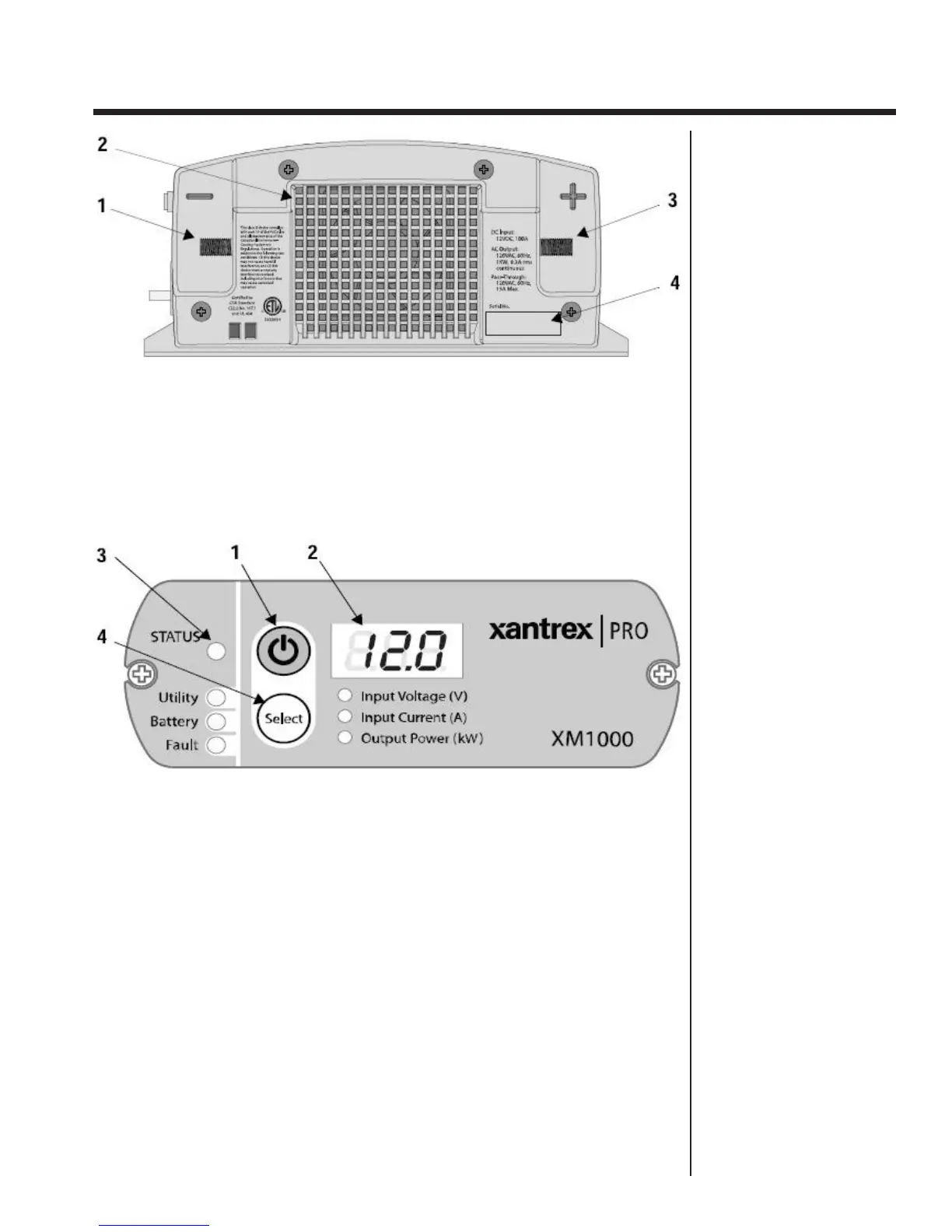
1. Negative DC cabling terminal.
2. Ventilation opening. Do not obstruct for the proper operation of the cooling fan
and inverter.
3. Positive DC cabling terminal.
4. Serial number of your unit.
Panel Operation
1. On/Off button. Press once to turn the XM Series Inverter on or off.
2. Three-digit LED display shows status information and fault codes.
3. Status LED Indicates the mode of operation with a three-color LED.
Utility (green) indicates the XM Series Inverter is in shore power mode, using
utility power to operate loads connected to the XM Series Inverter.
Battery (yellow) indicates the XM Series Inverter is in inverter mode, using the
battery to provide AC power.
Fault (red) indicates the XM Series Inverter has shut down because of a fault.
4. Select button. When the XM Series Inverter is in inverter mode, press the Select
button to choose what appears in the three-digit LED display: Input Voltage, Input
Current, or Output Power.
Electrical Systems






 To Next Page