55
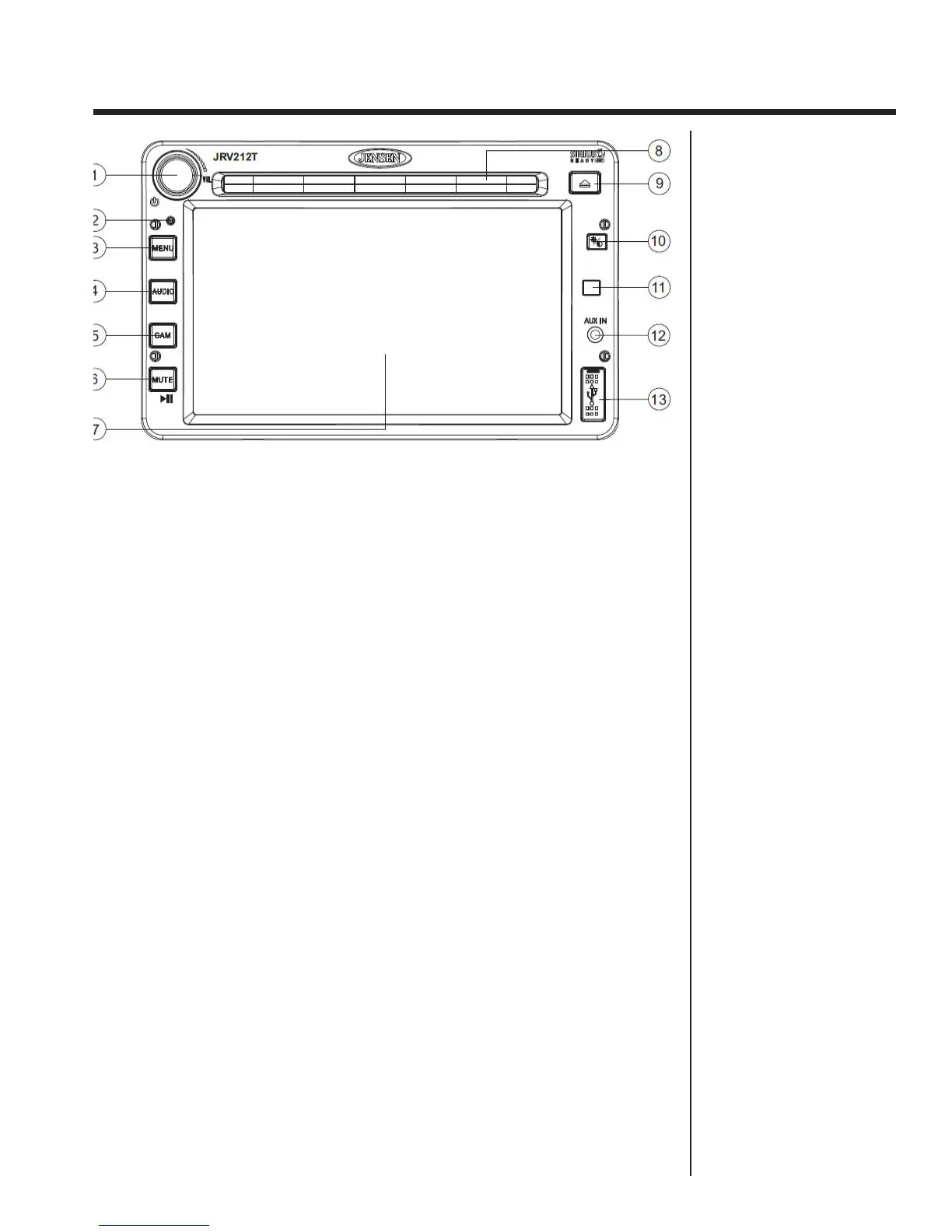
1. Power On/Off
• Press to turn the unit on/off.
• Press and hold to turn the touch screen backlighting off when driving at night.
Audio playback is not interrupted.
• Touch any area of the screen to resume the previous display lighting and mode.
1. Volume Control
• To increase the volume, rotate the VOL control clockwise.
• To decrease the volume, rotate the VOL control counter-clockwise.
2. Reset - Use a ball point pen or thin metal object to press the RESET button.
The reset button should be activated for the following reasons:
• Initial installation of the unit when all wiring is completed
• Function buttons do not operate
• Error symbol on the display
3. Menu
• Press the MENU button to access the “System Menu”.
4. Audio
• Press the AUDIO button to access Audio Mode and select a source for
playback.
• Press and hold the AUDIO button to enter the “Audio Menu” menu.
5. Camera (CAM)
• Press the CAM button to access camera mode.
• Press and hold to view the “System Menu” Camera setup options.
6. Mute
• Press the MUTE button on the control panel to mute the audio output.
“MUTE” will appear on the display.
• Press MUTE again to restore the audio output to the previous level.
7.Touch Screen Display
8. Disc Slot
9. Eject - Press to stop disc play and eject the disc.
10. Day/Night button - Press to toggle between dimming levels for day or nightime
viewing.
11. Remote Sensor - Thor Motor Coach does not provide remote controls for this
radio.
12. Auxiliary Input - Use to connect an external audio source.
13. USB Port.
Jensen
Controls and Operations



 To Next Page