Page 11<&(%$*4.8"4,7%H'*#$"&8#I%/7*,#*%4,77%JKLLLKLMMKNOPO1Item 63585
?@<6AQRS6;@ACRED@CEA6E@ET6 ?6AFS
F#"83%J^%!&7$%G"3.$#%,89%@44*##&("*#
ERACT6- TREA;RGG6;%DF?A%W6%TREE6TA6X%AR%@%TB@;V6X%%
J^!%G6@XK@TCX%W@AA6;Q%AR%SRU6;%AB6%XC?SG@Q1
1. Press the Load Button to toggle
the 12V output on/off.
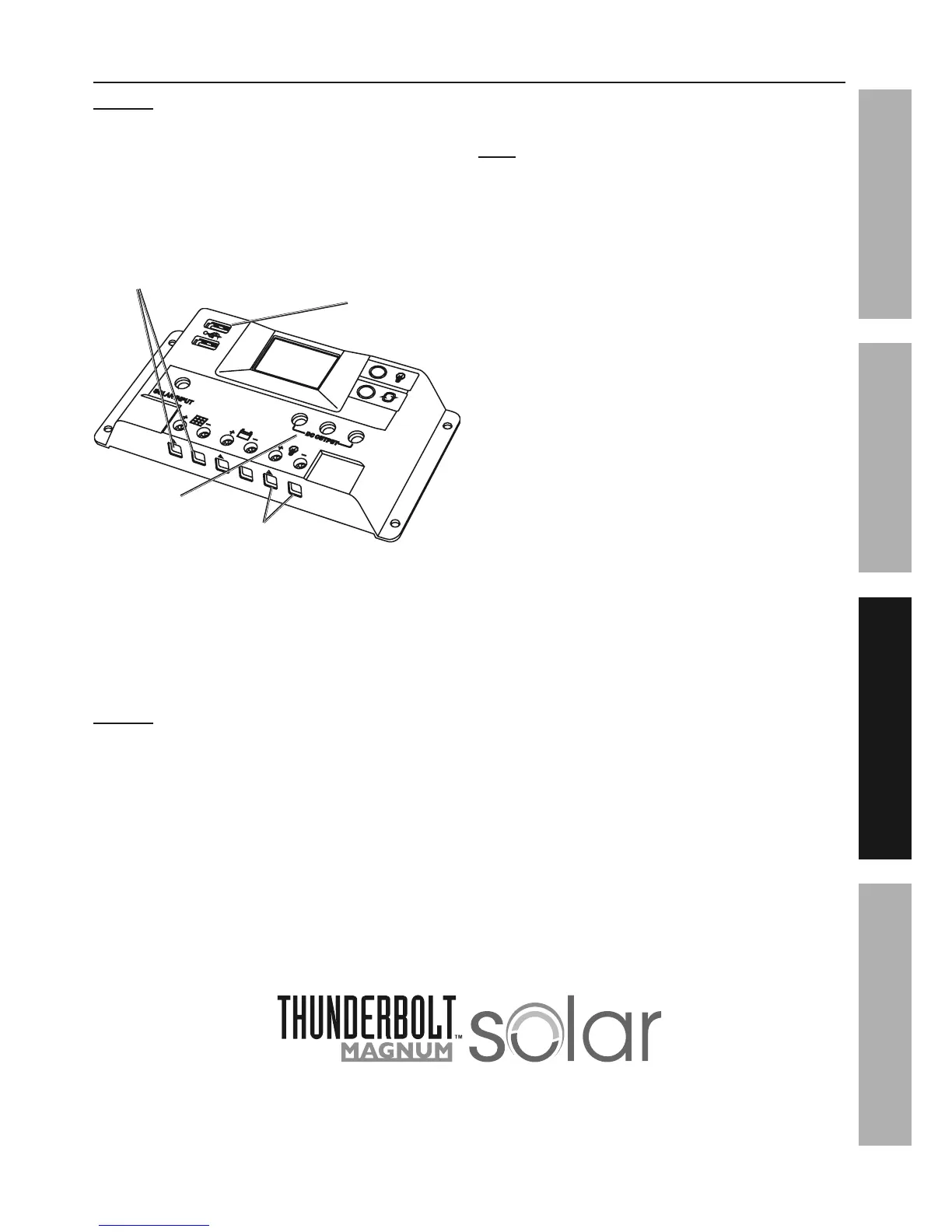
2. Plug the end of the LED Light’s cable into
one of the 12V DC outlets on the Charge
Controller as shown in Figure J.
J^!%XT%R'$7*$#
F?W%
R'$/'$#
J^!%@//7",84*%A*(5"8,7#
?&7,(%S,8*7%
A*(5"8,7#
<"3'(*%c
3. Connect a DC adapter cable (not
included) to the appliance.
4. Insert the plug on the other end of the cable into one
of the 12V DC Outlets on the Charge Controller.
5. Activate your appliance.
ERACT6- Only use one appliance at a
time with this Charge Controller.
6. When finished, unplug the DC adapter cable
(not included) from the Charge Controller and
then unplug the cable from the appliance.
7. To charge a cell phone or other small electronic
item, plug the item’s power cord into the USB
Port on the front of the Charge Controller.
E&$*-%?&7,(%/,8*7#I%7"3.$#I%,89%,44*##&("*#%
4,8%+*%.,(9)"(*9%&8$&%$.*%$*(5"8,7#%&8%$.*%
+&$$&5%&2%$.*%4.,(3*%4&8$(&77*(%"8#$*,9%&2%
'#"83%$.*%"847'9*9%/7'3#1%%?**%<"3'(*%c1%


 To Next Page