Page 9<&(%$*4.8"4,7%H'*#$"&8#I%/7*,#*%4,77%JKLLLKLMMKNOPO1Item 63585
?@<6AQRS6;@ACRED@CEA6E@ET6 ?6AFS
%R/*(,$"83%C8#$('4$"&8#
;*,9%$.*%6EAC;6%CDSR;A@EA%?@<6AQ%CE<R;D@ACRE%#*4$"&8%,$%$.*%+*3"88"83%&2%$."#%5,8',7%
"847'9"83%,77%$*Z$%'89*(%#'+.*,9"83#%$.*(*"8%+*2&(*%#*$%'/%&(%'#*%&2%$."#%/(&9'4$1
%%E&$*-%%Performance of the Solar Panels will vary dependent on site location, angle
of the panels in relation to the arc of the sun, and available sunlight.
T.,(3*%T&8$(&77*(%?*$$"83#
ERACT6- TREA;RGG6;%DF?A%W6%TREE6TA6X%AR%@%TB@;V6X%
J^!%G6@XK@TCX%W@AA6;Q%AR%SRU6;%AB6%XC?SG@Q1
X"3"$,7%!&7$,3*%D*$*(
X"#/7,>%
W'$$&8
G&,9%W'$$&8
<"3'(*%C%
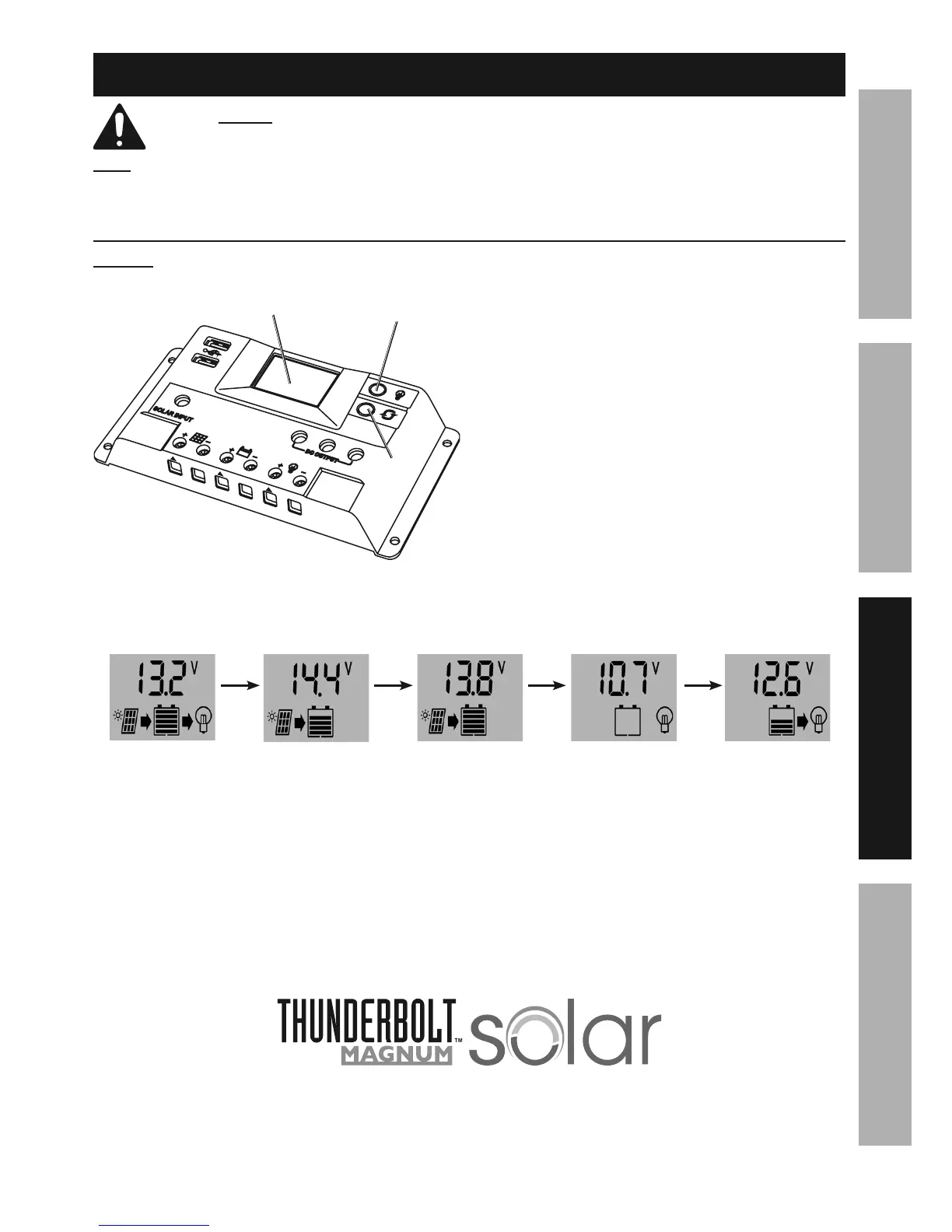
1. Press the Load Button to toggle
the 12V output on/off.
2. Press the Display Button to cycle the Display
between the 5 different settings shown below.
3. Each of the below settings can be set
manually by the user. To do this:
a. Press and hold the Display Button
while the setting is shown until the
voltage display starts blinking.
b. While the Display is blinking:
• Press the Display Button to increase setting.
• Press the Load Button to decrease setting.
c. When setting is complete, press and
hold the Display Button until the voltage
Display stops blinking. The set value
will be saved by the controller.
d. Press Display button again to
cycle to next setting.
E&(5,7
Target charging
voltage. Can also
be used to access
advanced settings.
W&&#$
Maximum
charging output
voltage to finish
charging battery.
<7&,$
Maintenance
charge voltage.
G&)
Battery voltage is
too low to charge
without damaging
battery. Battery will
need to be charged
separately first,
but may already
be ruined from
over-discharge.
;*4&Y*(>
Minimum battery
voltage where
normal charging
can resume.


 To Next Page