Page 4 I User Guide I English
Turning on and connecting to the
network
Press and hold for two seconds and when the Thuraya XT-
PRO is powered on, the phone will search for the network and
acquire location information. If the SAT and location icons are
ashing, the phone is yet to receive the location information and
once the ashing stops, you will be able to make a call or send a
message. Upon successful registration to the network, the phone
will display the country and the signal strength.
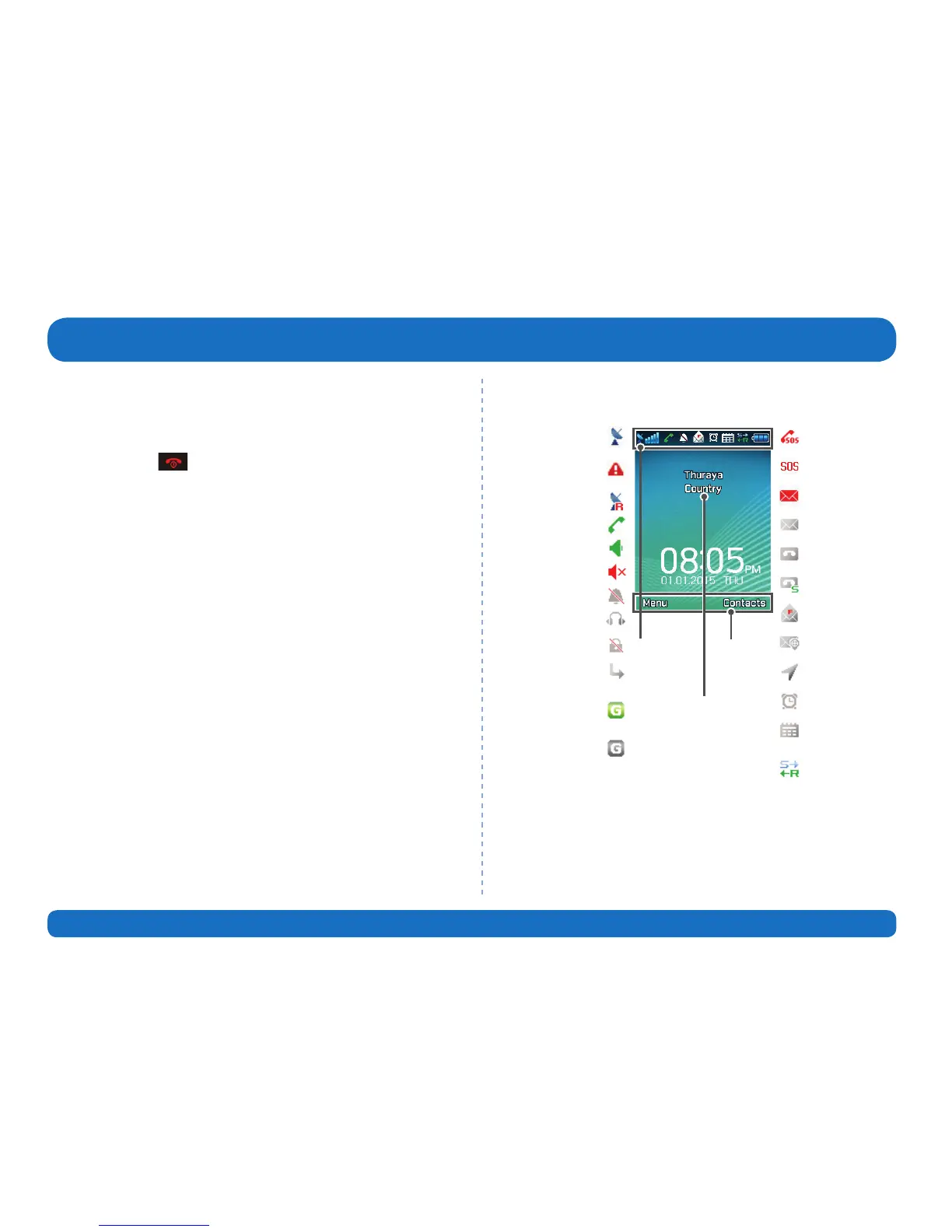
XT-PRO home screen
Status bar
Network information
Available
soft key
functions
Active call
Unread SMS
Satellite signal SOS call
Voice mail + SMS
Roaming
SOS message
Earphone connected
Tracking message
Call divert
Alarm
Speakerphone
Mute
Voice mail
Weak signal. Point
antenna towards
satellite
SOS activated
Silent
SMS inbox full
Ciphering (call
encryption) is o
Tracking activated
GmPRS connecting
(blinking icon
during a GmPRS
connection)
Schedule reminder
GmPRS paused
Sending and
receiving data from
an external device
Before you start



 To Next Page