33
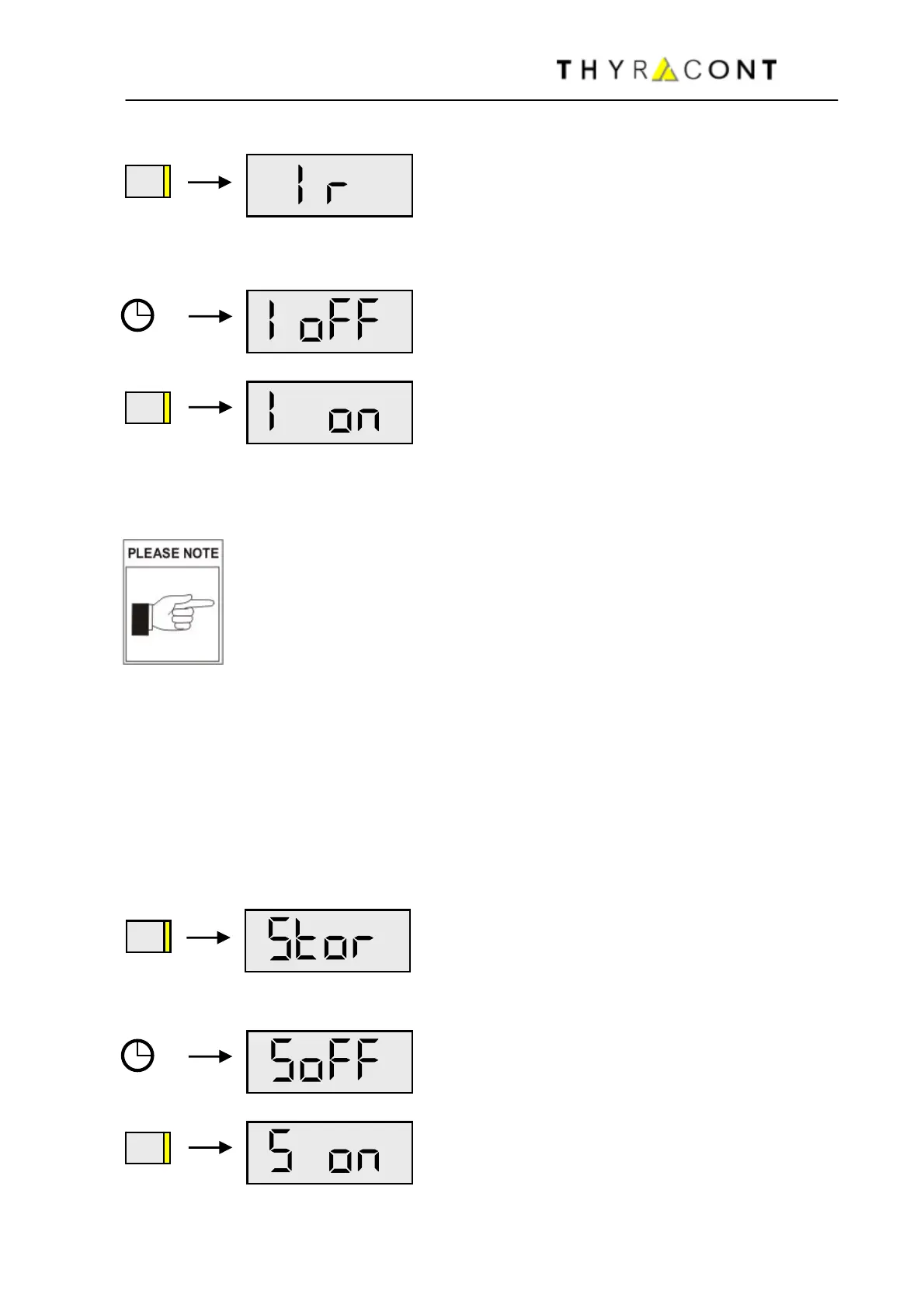
Then press Mode-Key several times, until the display shows "Ir":
After 5 more seconds the display shows the current status of the IR-interface:
Using the Mode-Key the IR-interface can now
be switched on and off.
Without further keystroke, the unit switches to Auto-Off-Mode after approx. 5
seconds. The last settings are saved.
Operation with active IR-interface requires additional power
and thus shortens battery lifetime. Therefore please switch off
the transmission-mode when it is no longer needed!. For longer
operation with active IR-interface we recommend use of an ex-
ternal mains adapter (accessory AVD8N2) instead of a battery.
5.4 Memory Function
To activate the memory function of your VD81 for saving minimum and maximum
pressure values, switch the unit into Configuration-Mode. For this the instrument
must be switched-off. Hold the Mode-Key pressed then, until the display shows
"rAtE".
Then press Mode-Key several times, until the display shows "Stor":
After 5 more seconds the current status of the memory function is displayed:
With the Mode-Key the memory function can
now be enabled or disabled.
MODE
MODE
MODE
MODE



 To Next Page