5
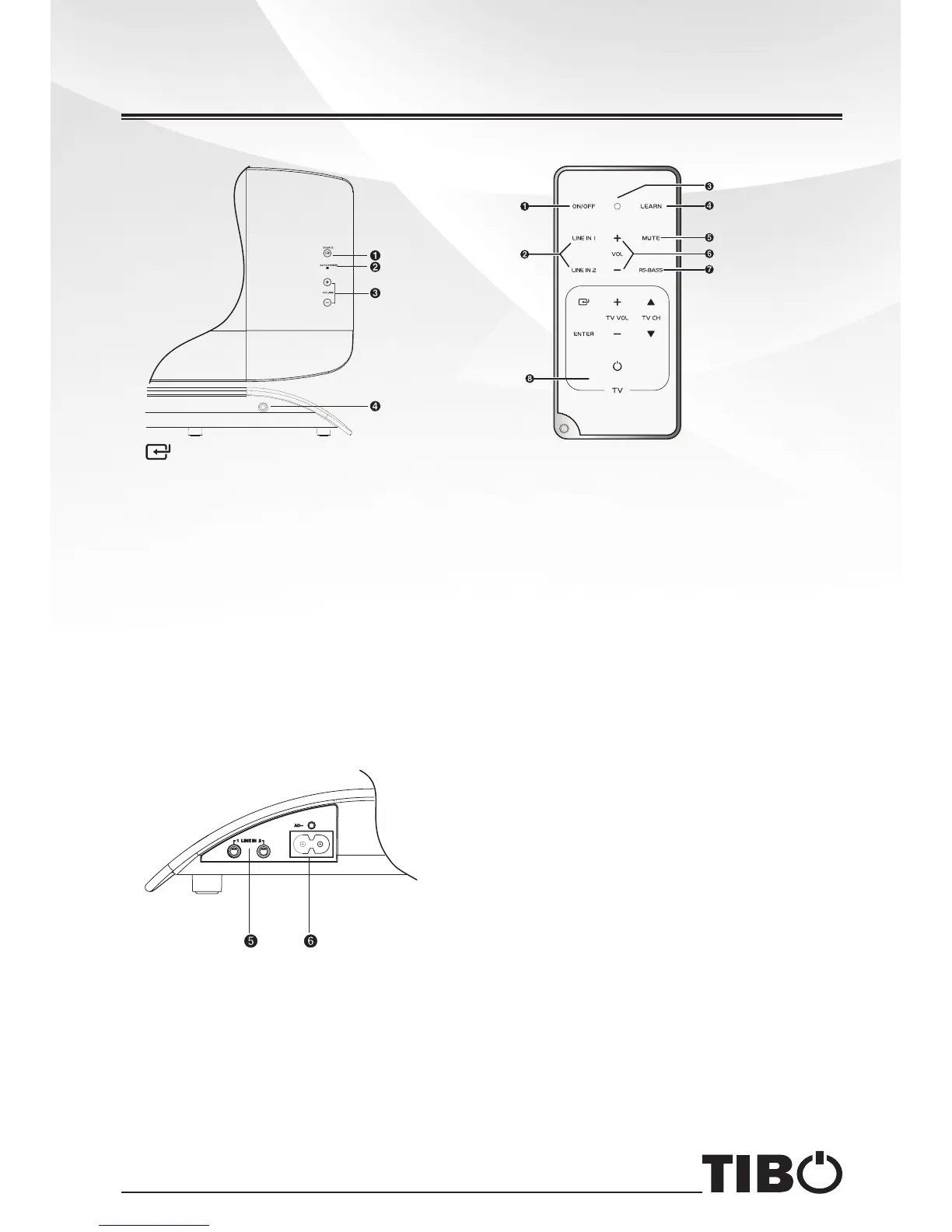
Main Unit: Top View & Front View
1 /SOURCE
Select LINE IN 1 or LINE IN 2.
2 AUTO POWER Light
Indicate mode of auto power.
Red light: Standby mode.
Green light: play through LINE IN 1.
Yellow light: play through LINE IN 2.
3 + VOLUME -
Increase or decrease the volume
level.
4 Remote Control Sensor
Rear View
5 LINE IN Terminal
Conn ec t to an ex te rn al au di o
device.
6 AC~
Connect to a power.
Smart Remote Control
1 ON/OFF
Turn on or turn off the unit.
2 LINE IN 1/LINE IN 2
Select LINE IN 1 or LINE IN 2.
3 Learning indication light.
4 LEARN
Activate learning mode to setup
commands from TV's remote
control, in order to control basic TV
functions.
5 MUTE
Mute or resume the sound of unit.
6 VOL+/VOL-
Increase or decrease the volume
level.
7 RS-BASS
Boost low end bass.
8 TV(Learning Zone)
You can store some functions of
TV in TV (learning zone) on smart
remote control.
Identifying the Parts
5


 To Next Page