8
Turn it back on
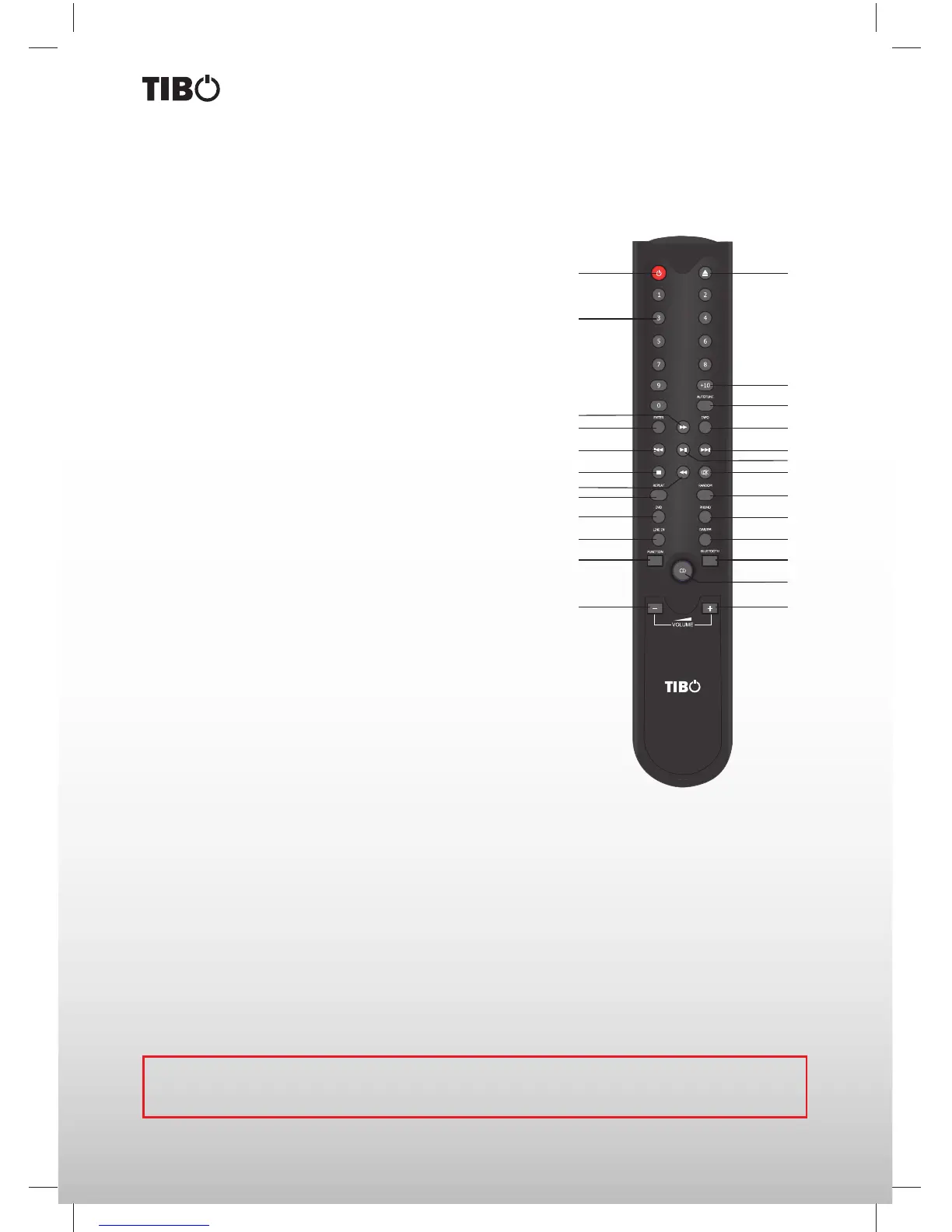
Remote control functions
1
13
2
14
3
15
16
4
175
6
10
18
7
11
19
8
22
25
20
23
9
12
21
24
1. Power: Sets TI430 BT/AMP, TI430 CDP, TI430 DAB/FM into
standby.
2. 0-9 digits: Selects tracks on the TI430 CDP and pre-set
stations on TI430 DAB.
3. Fast forward: Fast forward playback.
4. Enter: For TI430 DAB only. Con rms selection.
5. Previous: Select the previous track.
6. Stop: Stop playback.
7. Fast rewind: Rewinds playback.
8. Repeat: Repeat a single or all tracks on CD disc.
9. DVD: To activate the DVD source.
10. Line-in: To activate the Line-in source.
11. Function: Enters the menu on the TI430 BT/AMP.
12. Volume decrease: turns down the volume.
13. Eject: Opens and closes the disc tray on the TI430 CDP.
14. +10: Use this button along with the 0-9 digits to select tracks
on the TI430 CDP and pre-set stations on TI430 DAB above
10. For example press the +10 button and the 5 digit to select
track 15 on a disc.
15. Autotune: Press once to automatically tune for a station at a
higher frequency.
16. Info: Displays the RDS and DAB information for the tuner.
17. Next: Selects the next track on.
18. Play/Pause: Starts and pauses playback.
19. Mute: Mutes the sound.
20. Random: All tracks are played in a random order for TI430
CDP only.
21. Phono: To activate the phono function.
22. DAB/FM: To activate the TI430 DAB and FM function.
23. Bluetooth: To activate the Bluetooth audio function.
24. CD: To activate the TI430 CD Player and the TI430 AMP on
and selects the CD input on the TI430 BT/AMP.
25. Volume increase: Turns up the volume.
REMOTE CONTROL
Some of the functions of the unit can only be performed by means of the remote control. Some functions are
connected with the selected signal input source. Some buttons on the remote control may therefore not be
available if the corresponding signal input source has not been selected.


 To Next Page