9
Turn it back on
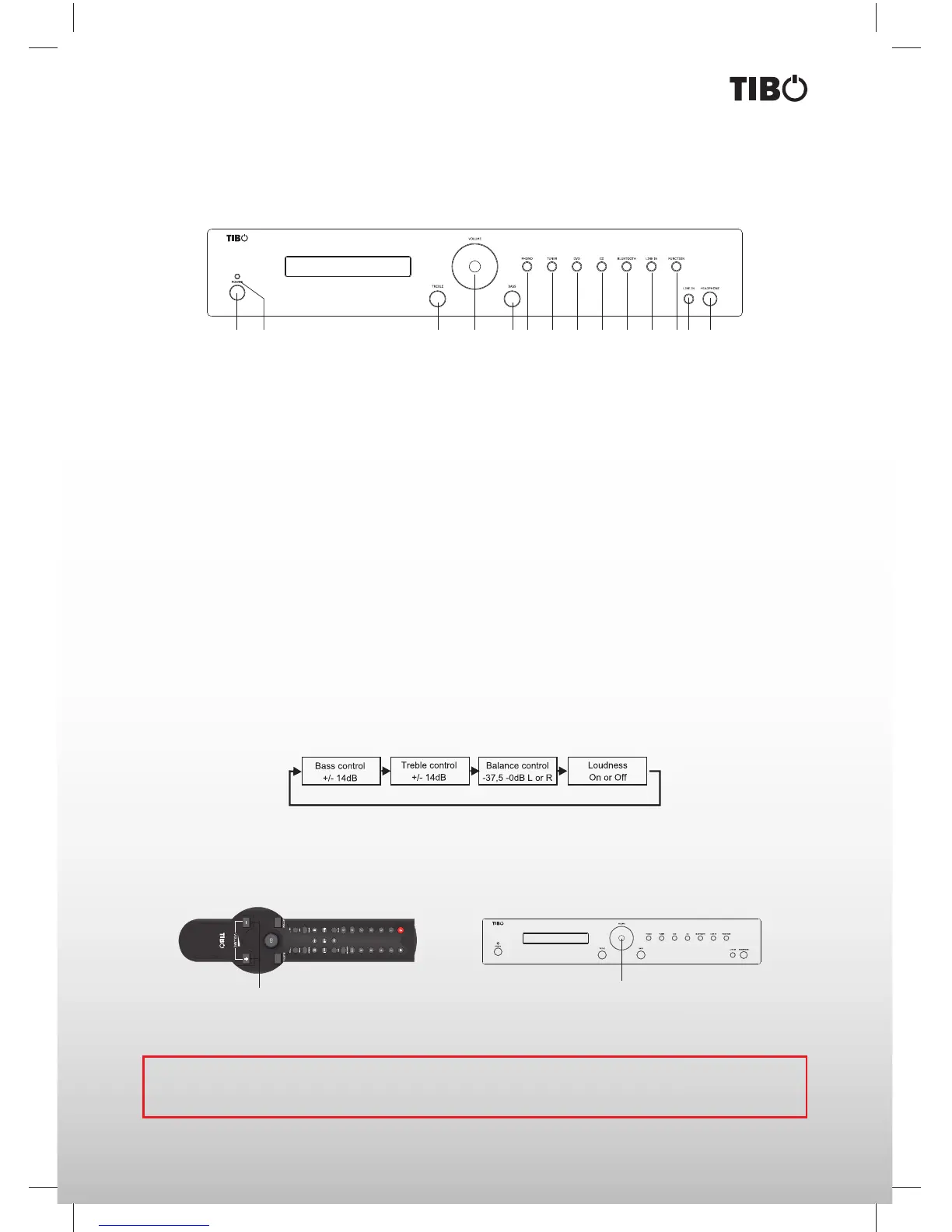
Front panel
TI 430 BT/AMPLIFIER
1
3711
5
913
2
481261014
1. Mains switch: Used to turn On/Off the mains power.
2. LED indicator: No light when the ampli er is turned On. Blue light in standby mode.
3. Treble: Adjusts the treble level.
4. Volume: Adjusts the master volume, Bass, Treble, Balance and Loudness.
5. Bass: Adjusts the Bass level.
6. Phono: Activates the phono input.
7. Tuner: Activates the tuner input.
8. DVD: Activates the DVD input.
9. CD: Activates the CD input.
10. Bluetooth: Activates the Bluetooth function.
11. Line-in: Activates the line-in.
12. Function: Gives access to menu functions such as Balance and Loudness.
13. Line-in: Connection for line-in input with mini jack.
14. Headphone: 6 mm jack that suits most headphones.
AMPLIFIER
Note: The volume control on the front panel can be turned both clockwise and anticlockwise to change the vol-
ume. The volume control includes 64 steps, from -78, -75 dB for minimum volume and up to 0 dB for maximum
volume.
TI 430 BT/AMPLIFIER
Volume
Using the function menu
The TI430 AMP features a “function menu” that allows the adjustment of the following when accessed via the
remote: Bass, Treble, Balance and Loudness (see menu structure on right side). A description of the individual
functions will follow on the next few pages.
1. Press the VOL+ button on the remote control to increase the volume and press VOL- to reduce the volume.
2. Turn the volume control to the right to increase the volume and turn the volume control to the left to reduce the
volume.
1 2


 To Next Page