9
Turn it back on
CD INPUT
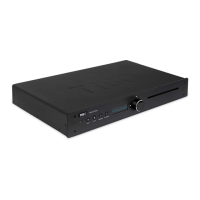
CD input is the default input of TI435 CD/USB Player.
Load a disc
If you want to play a disc, you must load a CD. To do this gently insert the disc into CD slot. The device will slide
the disc in automatically. When the disc has been read, the playback starts automatically with track number 1.
If there is no disc in the tray, the message No Disc will be displayed. If the unit has trouble reading a disc, you
must check if the disc is clean and free from dirt and scratches. If the disc is still not playing, you must contact
your dealer.
Play
Press the Play/Pause button on the remote control or on the front panel once to start playback. The counter on
the right side of the display will start to count up.
Selecting a track directly
You can select and play any track you choose by pressing numbered buttons on the remote control.
Key operation
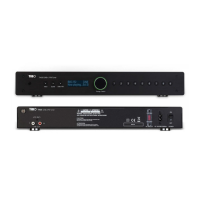
Tracks 1~5: press numeric key
Please note that the second page mark will remain there, if you want to select 1~5
again, you have to press “SHIFT” key again to remove the second page mark.
Tracks 10+
If you want to select track above 10, press “+10” key to increase 10 each time, then
1~5 (or 6~0). Please note that “+10” is able to trigger play, so when you press”+10”,
you have to follow a 1~5(6~0) key to complete the track number.
MP3/WMA track number selection (on both CD and USB)
Key in 1~5(6~0) for Hundreds digit
Key in 1~5(6~0) again for Tens
Key in 1~5(6~0) again for digit
If you select another track in the middle of the playback, the unit will wait for about 5 seconds for your next
number, then jump to the number of track you already pressed, and play.
If you want to select 2 digit track number, then you have to press “PLAY” key to complete selection. TI440 will
jump to the track immediately and play. (without waiting for more than 5 seconds to play)
Pause a disc
Press the Play/Pause button once more to pause playback of the current song. The time counter stops and the
playback status icon on the left changes to ||. To continue playback, press the Play/Pause button again.
Stop
To stop playback completely press Stop button once. The display will again display the number of tracks on the
disc and the total playback time.
Previous/Next
When a CD track is being played it is possible to switch to the previous track or to the next track. If you want to
continue to the next track, you must press the >>| (next) button on the remote control or turn the knob to the right
once (LED will blink). If you want to move on several tracks, you must press >>| until you reach the desired track.
If you want to go back to one of the previous tracks, you must use the same procedure but not the same button.
Use the |<< (previous) button or turn the knob to the left once instead.
CD-PLAYER
789
0
-
FOLDER
+
FOLDER
1
CD/USB
23
456
PLAY
MODE
PROG


 To Next Page