20
ⓒ 2019. this is engineering Inc. All Rights Reserved.
Powering On / Pairing with the Controller
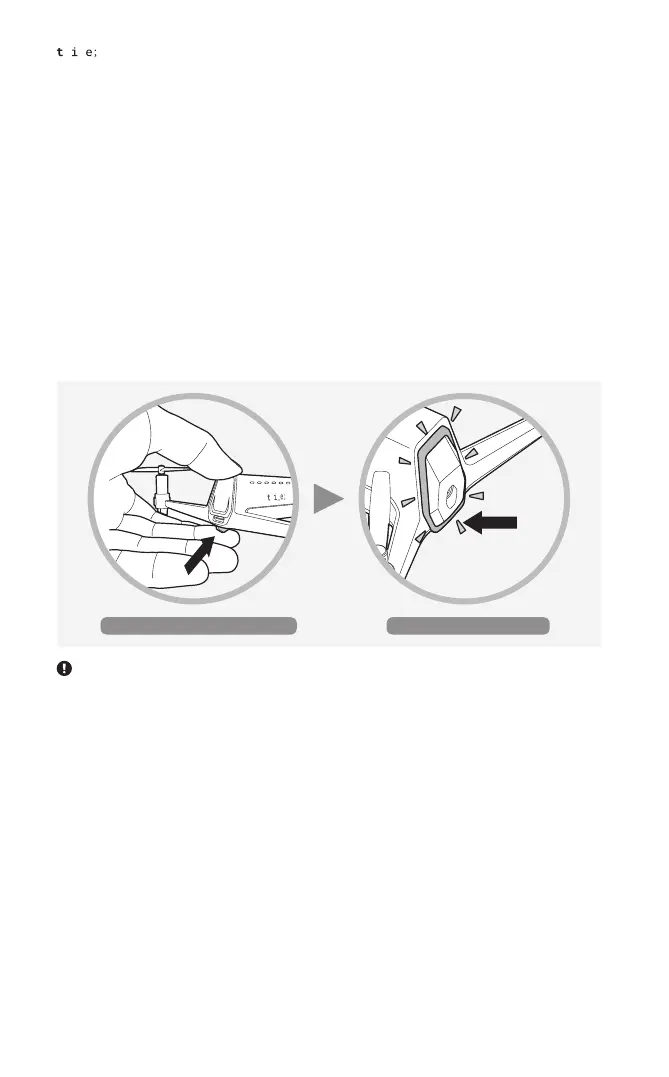
1. Press and hold the power button for two seconds after inserting the battery into
the aircraft, and the aircraft will power on with the power LED turning solid orange.
If the aircraft has successfully started up (taking approximately 9 to 10 seconds),
the front LED turns solid blue, indicating that it is ready for flight.
2. When the aircraft and controller are ready for flight, they are automatically paired.
The front LED and power LED on the bottom blink three times.
( For how to turn on the controller, see “Handling the Controller” > “Powering On/
Pairing with the Aircraft”)
After the power LED turns solid, the aircraft should be placed on a horizontal surface to start up with the front
LED turning solid.
Long-press the power button Powers on


 To Next Page