28
ⓒ 2019. this is engineering Inc. All Rights Reserved.
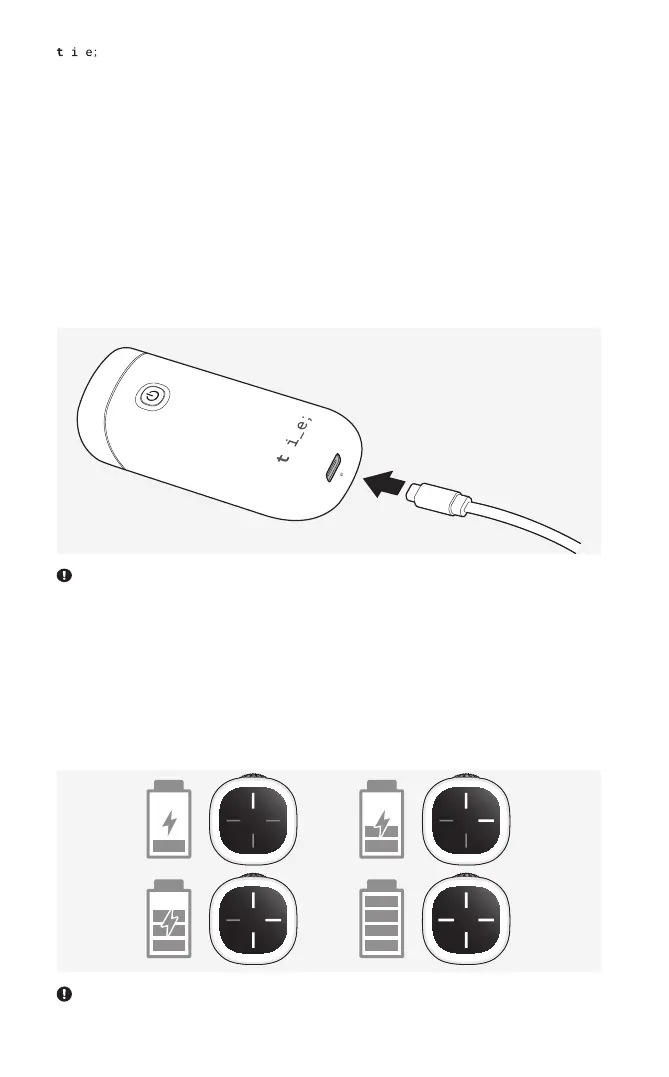
2. While the controller is being charged when powered off, the LED indicator on the
controller pad displays the charging status.
· Charging in progress: The number of bars blinking on the LED indicator shows
the battery level.
· Charging complete: All four LEDs turn solid white.
Charging
1. Connect the USB port of the controller to a USB charger using the provided USB
cable to begin charging.
A certified USB adapter rated at 5 V and 1.5 A is recommended for charging. Connecting to a PC may cause
delayed or unsuccessful charging.
The controller may be used while charging. In this case, the LED indicator does not display the battery level.


 To Next Page