54
ⓒ 2019. this is engineering Inc. All Rights Reserved.
5. To stop the selected Lezero Pilot mode, long-press the screen, or hold the
controller’s jog button.
The altitude must be at least 2 m (6.6 ft) in Following mode and Hero mode. In these modes, check the altitude of
the drone before designating a target. The appropriate altitude for the selected mode is indicated by the icon
turning active.
When designating a target, the drone should be in a well-lit environment. The target must stand out from the
background in terms of form and color to be successfully detected. The drone switches to hovering if the target
is moving too fast or if tracking has failed due to obstacles. If the target falls inside the red drag box while
maintaining a distance similar to the initial distance, tracking resumes after about two seconds.
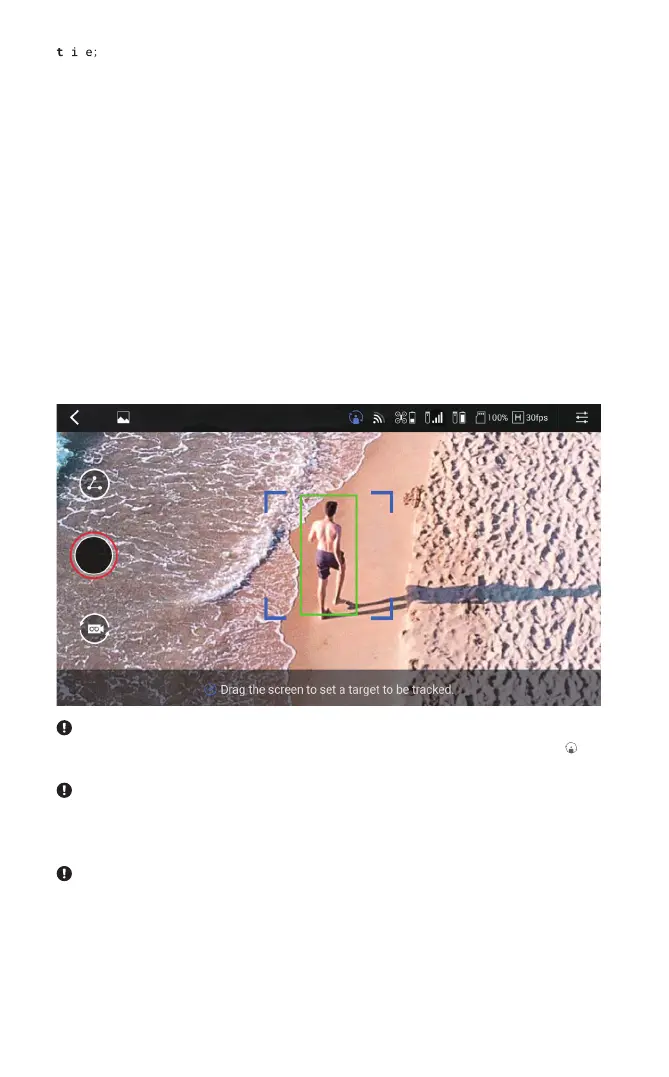
4. A target must be designated in the Following, Horizontal Tracking, Yaw Tracking
or Hero mode. Place the target in the center of the target box, and drag across
the screen to designate the target. When the target is successfully designated,
the border of the drag box changes from red to green and flight begins in the
selected mode.
When in a Lezero Pilot mode, make sure that the flight path is free of obstacles such as people, animals, trees, and
buildings. Since this product is not equipped with functions such as collision avoidance or speed control based on
obstacle detection, you need to be extremely careful.


 To Next Page