EasyManua.ls Logo

Timeguard LED200PIRBE - User Manual

Timeguard LED200PIRBE
12 pages
Print Icon
To Next Page IconTo Next Page
Loading...
Installation & Operating Instructions
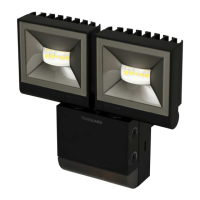
2x 10W LED Slimline
PIR Floodlight – Twin Flood
Model: LED200PIRBE – Black
Model: LED200PIRWHE – White
Question and Answer IconNeed help?

Do you have a question about the Timeguard LED200PIRBE and is the answer not in the manual?

Summary

General Information

Safety

Electrical Safety Precautions

Ensure mains supply is OFF before installation/maintenance. Qualified electrician recommended. Check circuit load.

Technical Specifications

Key Specifications Overview

230V AC 50Hz, Class I earthed. 2x 10W LEDs (840lm). Energy: 20KWh/1000H. Detection: 10m range, 180° angle.

Selecting a Location

PIR Sensor Detection Zones

PIR sensor has defined detection zones at various vertical and horizontal angles.

Optimizing Coverage

Optimal coverage achieved with floodlight mounted at 2.5m height, requiring human body to cross zones.

Avoiding False Activation

Avoid heat sources and light sources in detection area. Reflective surfaces can cause false activation.

Installation

Initial Power Disconnection

Ensure mains supply is switched off, circuit fuses removed, or circuit breaker turned OFF before starting.

Isolating Switch Installation

Install an isolating switch for maintenance and to activate manual/auto override function.

Back Box Separation

Disconnect the back box from the luminaire by releasing the lugs on the left or right side.

Mounting Hole Preparation

Use back box as template, mark holes, drill carefully, insert rawl plugs, and pass cables through grommets.

Installation

Terminating Mains Supply Cable

Terminate 230V 50Hz mains supply into terminal block, ensuring correct polarity and sleeving of conductors.

Re-connecting Luminaire to Back Box

Re-connect the luminaire to the back box, ensuring the 2 lugs latch firmly with a 'click'.

Connection Diagram

Mains Supply Wiring

Connect 3-core mains supply cable to terminal block: Live to L, Neutral to N, Earth to Earth symbol.

External Slave Lighting Connection

Connect external load for slave lighting: Live to L1, Neutral to N, Earth to Earth symbol.

Setting Up

Walk Test Procedure (Test Mode)

Set TIME ON to min, Lux to Sun. Power ON. Lamp illuminates during warm-up (30s), then extinguishes in Test Mode.

Testing Detection Zones

Unit operates day/night, illuminating for 2s per activation. Walk across zones to confirm detection pattern up to 10m.

Setting Up for Automatic Operation

TIME ON Adjustment

Controls illumination duration after motion ceases, adjustable from 2 seconds to 30 minutes.

LUX Level Adjustment

Determines darkness level for operation. Adjust clockwise (Sun) then slowly anti-clockwise until lamp illuminates.

Adjusting Operation Timing

Lamp Adjustment

Pan;Tilt Adjustment Details

Details pan/tilt adjustments with optional spacer and corner brackets for various coverage angles.

Manual Override

Activating Manual Override

Switch wall switch twice (OFF/ON, OFF/ON) within 2s at night to illuminate continuously for 6 hours.

Manual Override

Returning to Auto Mode

Switch wall switch once (OFF/ON) within 2 seconds to return to Auto Mode and normal operation.

Lens Mask Sticker

Purpose of Lens Mask Sticker

Sticker masks areas for restricted detection (left/right) or to cover a smaller detection zone.

Summary

General Information

Safety

Electrical Safety Precautions

Ensure mains supply is OFF before installation/maintenance. Qualified electrician recommended. Check circuit load.

Technical Specifications

Key Specifications Overview

230V AC 50Hz, Class I earthed. 2x 10W LEDs (840lm). Energy: 20KWh/1000H. Detection: 10m range, 180° angle.

Selecting a Location

PIR Sensor Detection Zones

PIR sensor has defined detection zones at various vertical and horizontal angles.

Optimizing Coverage

Optimal coverage achieved with floodlight mounted at 2.5m height, requiring human body to cross zones.

Avoiding False Activation

Avoid heat sources and light sources in detection area. Reflective surfaces can cause false activation.

Installation

Initial Power Disconnection

Ensure mains supply is switched off, circuit fuses removed, or circuit breaker turned OFF before starting.

Isolating Switch Installation

Install an isolating switch for maintenance and to activate manual/auto override function.

Back Box Separation

Disconnect the back box from the luminaire by releasing the lugs on the left or right side.

Mounting Hole Preparation

Use back box as template, mark holes, drill carefully, insert rawl plugs, and pass cables through grommets.

Installation

Terminating Mains Supply Cable

Terminate 230V 50Hz mains supply into terminal block, ensuring correct polarity and sleeving of conductors.

Re-connecting Luminaire to Back Box

Re-connect the luminaire to the back box, ensuring the 2 lugs latch firmly with a 'click'.

Connection Diagram

Mains Supply Wiring

Connect 3-core mains supply cable to terminal block: Live to L, Neutral to N, Earth to Earth symbol.

External Slave Lighting Connection

Connect external load for slave lighting: Live to L1, Neutral to N, Earth to Earth symbol.

Setting Up

Walk Test Procedure (Test Mode)

Set TIME ON to min, Lux to Sun. Power ON. Lamp illuminates during warm-up (30s), then extinguishes in Test Mode.

Testing Detection Zones

Unit operates day/night, illuminating for 2s per activation. Walk across zones to confirm detection pattern up to 10m.

Setting Up for Automatic Operation

TIME ON Adjustment

Controls illumination duration after motion ceases, adjustable from 2 seconds to 30 minutes.

LUX Level Adjustment

Determines darkness level for operation. Adjust clockwise (Sun) then slowly anti-clockwise until lamp illuminates.

Adjusting Operation Timing

Lamp Adjustment

Pan;Tilt Adjustment Details

Details pan/tilt adjustments with optional spacer and corner brackets for various coverage angles.

Manual Override

Activating Manual Override

Switch wall switch twice (OFF/ON, OFF/ON) within 2s at night to illuminate continuously for 6 hours.

Manual Override

Returning to Auto Mode

Switch wall switch once (OFF/ON) within 2 seconds to return to Auto Mode and normal operation.

Lens Mask Sticker

Purpose of Lens Mask Sticker

Sticker masks areas for restricted detection (left/right) or to cover a smaller detection zone.

Timeguard LED200PIRBE Specifications

General IconGeneral
Power20W
Motion Sensor Range12m
IP RatingIP65
Color Temperature4000K
Lumens1600 lm
PIR Detection Range12m
Colour Temperature4000K
Frequency50Hz
Weight0.6kg
ColourBlack
Luminous Flux1600 lm
Beam Angle120 degrees
PIR Detection Angle180°
Detection Angle180°
Operating Voltage220-240V
MaterialAluminium