6. Battery
• The time switch has a factory fitted
rechargeable battery to give clock operation
and programme memory back up during loss
of mains supply.
• Before programming for the first time,
connect the unit to the mains for at least
15 minutes prior to pressing the Rst button
and programming the unit.
• If the display is not visible or very faint,
charge for 4 hours prior to pressing Rst
and programming.
• Approximately 720 hour battery reserve.
7. Reset
The time switch must be reset before programming
for the first time, or after subsequent discharge
for more than 5 days, and following a 4 hour
period of charging.
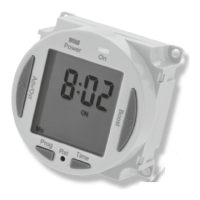
• Press the Rst button once using a pointed
object e.g. a pencil or a paper clip.
• The display will show all
characters/digits and then will
clear to show the following;
ASCO = Automatic Summer/
Winter Change Over.
• Use the Adv/Ovr button to change between
ON and OFF for the automatic summer time
adjustment and proceed to section 9.











 To Next Page