12
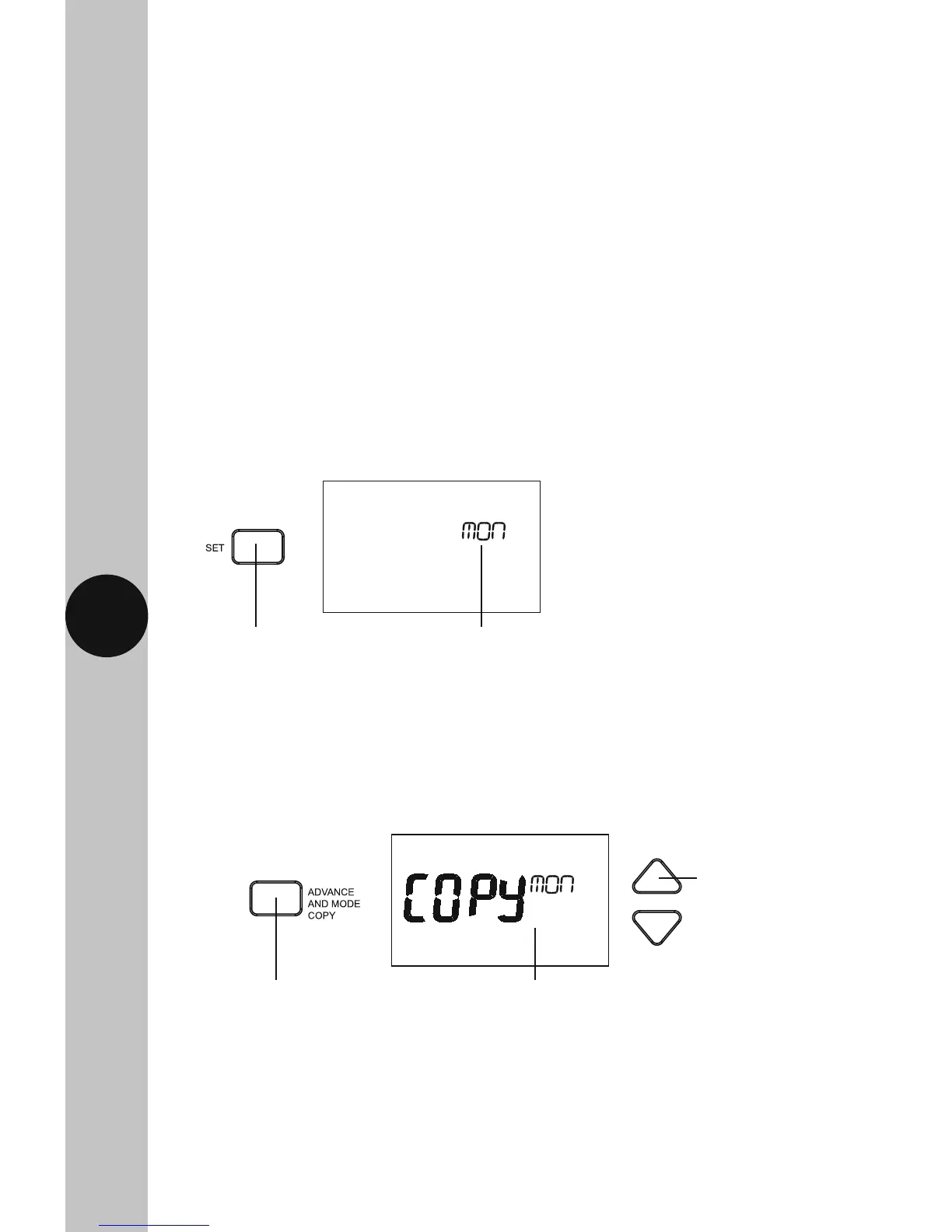
10.11 From the main screen, press and hold the Set button for 3 seconds,
so the day of the week is flashing e.g. Mon (or if you are already
in the programming screen, press Set once so the day flashes).
10.12 Press the Advance and Mode Copy button once. Use the Up/Down
arrow buttons to choose the day of the week you wish to copy,
and press the Select button once.
The day of the week
will flash e.g. Mon
Press and hold the
Set button for 3
seconds
Copy and the day of
the week will flash
Press the Advance
and Mode copy
button once
Use the Up/Down
arrow button if you
wish to change the
day of the week
to copy
• Unwanted days of the week need to be entered as the same time i.e. Wed
P1-P2-P3 ON 7:00AM, P1-P2-P3 OFF 7:00AM. Thu P1-P2-P3 ON 7:00AM,
P1-P2-P3 OFF 7:00AM etc.
• The Set button can be pressed twice to exit the programme entry
at any stage.
Copy Function
Note:
• The copy function can only be used after you have programmed at least
one day.



 To Next Page