12
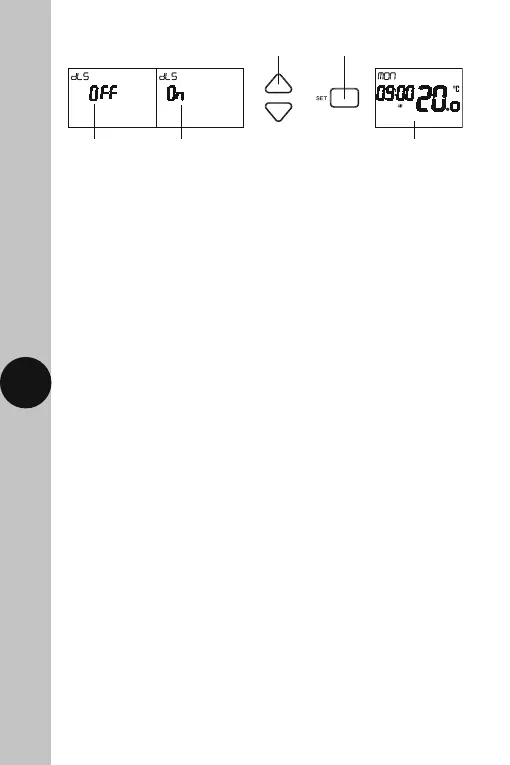
The DLS will
flash, OFF for
GMT by default
The DLS set to
ON for BST
Use Set to confirm
and exit
Use Up/Down arrow buttons
to alter if required
Main screen showing day,
time and output status
Note:
• If no button is pressed, it will time out after 60 seconds and return
to the main screen showing day, time and output status.
• The display light will also time out after 15 seconds after the last button
is pressed.
• The Set button can be pressed to exit the date and time entry at any stage.
10. Programming Time/Temperature
Periods
Note:
• There are no OFF periods with this controller. As soon as a Start time begins,
heat will be demanded until the temperature reaches/falls to the selected
set point, then it will move on to the next Start time/temperature period,
and so on. The closest you can get to turning the TRT037N programmable
thermostat OFF, will be to set the selected period(s) to 10°C, this way
the heating will not turn ON unless the temperature drops below these
set points.
• If you do not want a higher temperature period in the middle off the day,
adjust the temperature for this period downward, to match those of the
proceeding and subsequent period temperatures.
• There are 6 time/temperature controlled periods, and the default programme
for every day is as follows;
06:00AM 21°C
08:00AM 18°C
12:00PM 21°C
02:00PM 18°C
04:00PM 21°C
10:00PM 18°C



 To Next Page