EasyManua.ls Logo

Timex UFC KNOCKOUT - User Manual

Timex UFC KNOCKOUT
6 pages
Print Icon
To Next Page IconTo Next Page
Loading...
UFC KNOCKOUT
02542_PK23
USER GUIDE …..……..……..……..… 1
991097399 4.14.23
Register your product at https://www.timex.com/product-registration.html
Question and Answer IconNeed help?

Do you have a question about the Timex UFC KNOCKOUT and is the answer not in the manual?

Summary

Operating Instructions

Features and Functions

Lists the watch's main capabilities, including time, alarm, chronograph, and backlight.

Function Modes Overview

Explains basic operations using the watch's buttons like Light, Mode, Start, and Set.

Time and Date Setting

Setting Time and Date

Step-by-step guide to entering time setting mode and adjusting hour, minute, second, month, date, and format.

Chronograph Operation

Instructions on how to start, stop, and use the split mode of the chronograph function.

Timer Modes

Timer Mode Usage

How to start, stop, and reset the timer function.

Setting Timer Values

Procedure to enter timer set mode and adjust preset time values and repeat switch.

UFC Round Timer

UFC Timer Operation

How to select UFC-3/UFC-5 timers, start, pause, resume, and reset the countdowns.

Alarm Mode

Setting Alarm Time

Guide to entering alarm mode and setting the hour and minute for the alarm.

Battery Replacement

Battery Replacement Procedure

Instructions on replacing the battery and resetting the module.

Extended Warranty Information

Summary

Operating Instructions

Features and Functions

Lists the watch's main capabilities, including time, alarm, chronograph, and backlight.

Function Modes Overview

Explains basic operations using the watch's buttons like Light, Mode, Start, and Set.

Time and Date Setting

Setting Time and Date

Step-by-step guide to entering time setting mode and adjusting hour, minute, second, month, date, and format.

Chronograph Operation

Instructions on how to start, stop, and use the split mode of the chronograph function.

Timer Modes

Timer Mode Usage

How to start, stop, and reset the timer function.

Setting Timer Values

Procedure to enter timer set mode and adjust preset time values and repeat switch.

UFC Round Timer

UFC Timer Operation

How to select UFC-3/UFC-5 timers, start, pause, resume, and reset the countdowns.

Alarm Mode

Setting Alarm Time

Guide to entering alarm mode and setting the hour and minute for the alarm.

Battery Replacement

Battery Replacement Procedure

Instructions on replacing the battery and resetting the module.

Extended Warranty Information

Overview

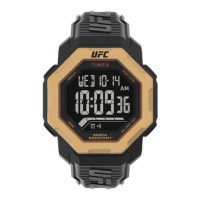
The Timex UFC Knockout watch is a versatile timepiece designed for both everyday use and specialized training, particularly for UFC enthusiasts. It combines traditional timekeeping functions with advanced features tailored for fitness and combat sports.

Function Description

The core functionality of the Timex UFC Knockout watch revolves around accurate timekeeping and a suite of specialized timers. It displays the time and date, offering both 12-hour and 24-hour formats for user preference. An alarm and hourly chime function provide practical reminders throughout the day.

For fitness and training, the watch includes a 1/100 second chronograph capable of timing events up to 10 hours. This allows for precise measurement of workout durations, sprints, or other timed activities. A standard countdown timer is also integrated, which can be set for durations up to 24 hours, useful for various tasks or training intervals.

A standout feature for combat sports enthusiasts is the dedicated UFC five-minute round timers. This function offers options for either three or five rounds, mimicking the structure of professional UFC bouts. Each round is preset to five minutes, with a one-minute rest period automatically integrated between rounds, providing a realistic training experience.

The watch is equipped with an Indiglo backlight, ensuring readability in low-light conditions. This feature is activated by a dedicated button and remains active for three seconds, providing sufficient illumination without excessive battery drain.

Usage Features

Operating the Timex UFC Knockout watch is intuitive, primarily relying on a combination of "Mode," "Start," "Set," and "Light" buttons.

General Navigation and Display:

  • Mode Button: This button is central to navigating through the watch's various functions. Each press advances to the next mode in a cyclical sequence, allowing users to access time, chronograph, timer, UFC timers, and alarm functions.
  • Light Button: A press of the Light button activates the Indiglo backlight for three seconds, illuminating the display for easy viewing in the dark.

Time and Date Setting:

  • To set the time and date, the "Set" button is pressed and held for three seconds from the normal Time mode.
  • Once in setting mode, the "Mode" button cycles through the adjustable parameters: Hour, Minute, Second, Month, Date, Year, and Hour Format.
  • The "Start" button is used to increment the selected value. For faster adjustments, holding down the "Start" button will accelerate the increment speed.
  • The hour format can be toggled between 12-hour and 24-hour display using the "Start" button when "Hour Format" is selected.
  • After all adjustments are made, pressing the "Set" button saves the settings and exits the setting mode.
  • The watch also supports two time zones (Time 1 and Time 2). Holding the "Start" button for three seconds allows switching between these zones, a convenient feature for travelers or those tracking different time regions.

Chronograph Mode:

  • Access the chronograph by pressing the "Mode" button until "Timer" (referring to the chronograph in this context) is displayed.
  • Pressing "Start" initiates the chronograph.
  • While the chronograph is running, the "Set" button can be pressed to enter split mode. In this mode, the display shows the split time, but the chronograph continues to count in the background. The display automatically resumes showing the running time after five seconds.
  • Pressing "Start" again will pause the chronograph. Another press of "Start" will resume it.
  • To clear the chronograph, stop it first, then press and hold the "Set" button for three seconds.

Countdown Timer Mode:

  • Navigate to the countdown timer mode using the "Mode" button.
  • Pressing "Start" begins the countdown.
  • The "Start" button can also be used to pause and resume the timer.
  • To reset the timer to its preset value, stop the timer and then press the "Set" button.

Setting the Countdown Timer:

  • When the countdown timer is not running, press and hold the "Set" button for three seconds to enter the timer setting mode.
  • The "Mode" button cycles through the adjustable parameters: Hour, Minute, Second, and Repeat Count Switch.
  • The "Start" button increases the selected value. Holding it down provides a fast-adjust option.
  • The "Repeat Count Switch" allows users to enable or disable the timer's repeat function, meaning it will automatically restart after completing a countdown if enabled.
  • Pressing "Set" saves the timer settings.

UFC Round Timer:

  • Access the UFC timer by pressing the "Mode" button. The watch offers two variants: UFC-3 (three rounds) and UFC-5 (five rounds). Subsequent presses of the "Mode" button will toggle between these options.
  • Pressing "Start" initiates the UFC timer. Each round is fixed at five minutes, followed by an automatic one-minute rest period before the next round begins.
  • The "Start" button can pause and resume the countdown during a round.
  • To reset the UFC timer to its initial settings while it is stopped, press and hold the "Set" button for three seconds.

Alarm Mode:

  • Navigate to the Alarm mode using the "Mode" button.
  • To set the alarm time, press and hold the "Set" button for three seconds.
  • The "Mode" button allows switching between setting the Hour and Minute.
  • The "Start" button is used to increase the alarm time value.
  • Pressing the "Set" button saves the alarm settings.

Maintenance Features

Battery Replacement:

  • The watch is designed for user-friendly battery replacement. When the display dims or becomes blank, it indicates that the battery needs to be replaced.
  • The recommended battery type is a CR2032 or an equivalent.
  • After replacing the battery, it is crucial to reset the watch module. This is done by touching the "AC" (All Clear) position on the module with a metal rod or a small metal tool for two to three seconds. This ensures the watch's internal functions are properly initialized after the power interruption.

Extended Warranty:

  • For customers in the U.S., Timex offers an extended warranty option. For an additional $5, the standard warranty can be extended by four years from the date of purchase.
  • To avail this, customers can contact Timex by phone within 30 days of purchase, providing their name, address, telephone number, purchase date, and the 5-digit model number of the watch. Payment can be made via AMEX, Discover, Visa, or MasterCard.
  • Alternatively, a check for $5 can be mailed to the Timex Extended Warranty department, along with the required personal and product information.

The Timex UFC Knockout watch is a robust and feature-rich device, blending everyday utility with specialized functions for a targeted user base. Its clear display, intuitive controls, and durable design make it a reliable companion for both daily activities and intense training sessions.

Timex UFC KNOCKOUT Specifications

General IconGeneral
BrandTimex
ModelUFC KNOCKOUT
CategoryWatch
LanguageEnglish

Related product manuals