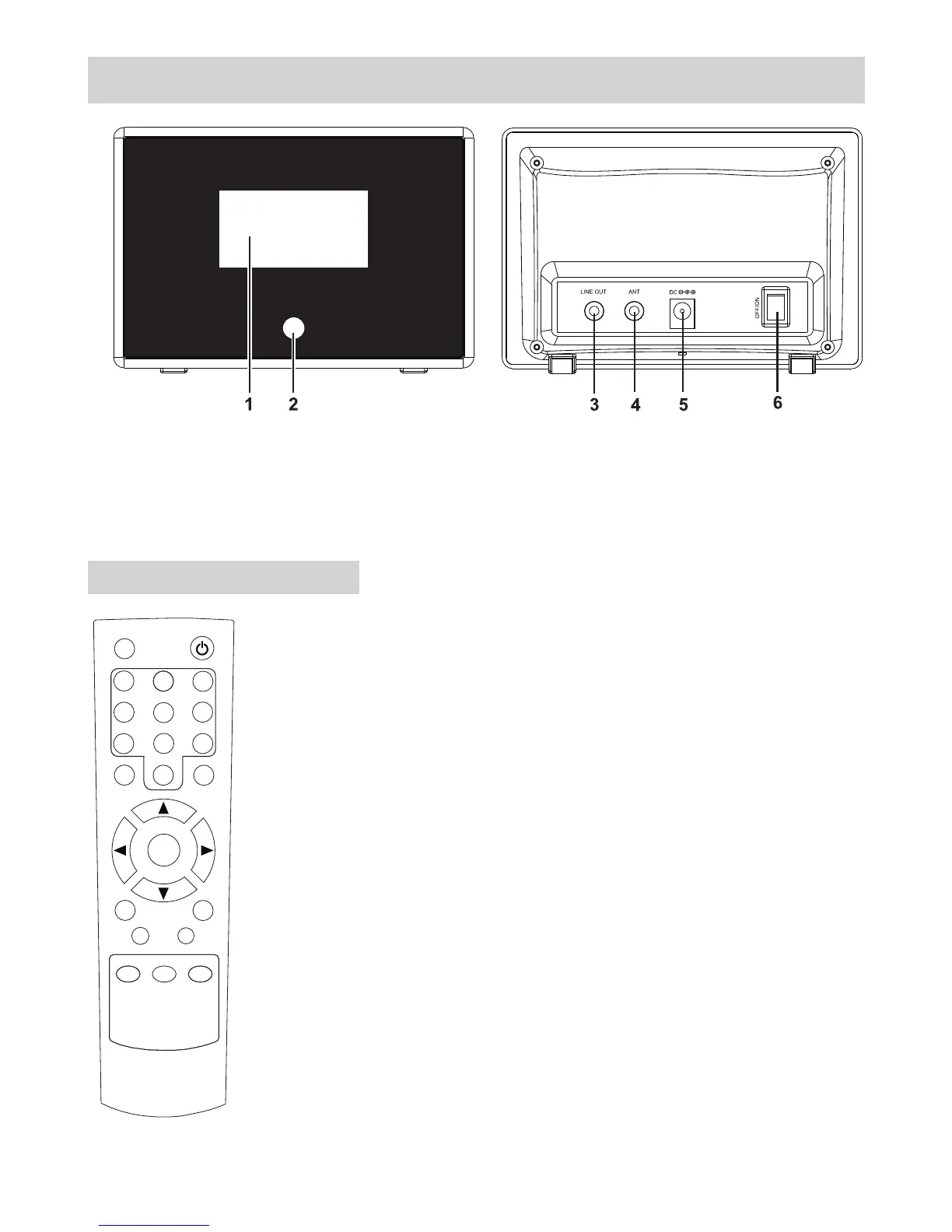
LOCATION OF CONTROLS
Remoter controller:
-1-
Mute
1
2
3
4
5
6
7
8
9
10
Select
CLK Set
Sleep
Menu
Scan
Power
Alarm1
Mode
Info
Alarm2
Dimmer
1. LCD Display Window 4. 3.5mm Antenna Input Socket
2. IR Remote Control Sensor 5. DC socket
3. 3.5mm Stereo Line Out Socket 6. Power Switch On/Off
1. POWER: Turns the radio on or into standby mode
2. MUTE: Audio mute on and audio mute off
3. Mode: Changes the mode from DAB+ to FM or from FM to
DAB+
4. Scan: Press it to scan FM or DAB station.
5. INFO: Press it to browse over the information
6. 0--10: Numeric buttons for Store and Recall functions.
7. Alarm1/2: Press it to set the alarm.
8. Menu: Press it to go for Menu settings.
9. Press for volume up and for volume down.
10. : Press it to scroll the previous station or frequency or
option.
11. : Press it to scroll the next station or frequency or
option.
12. Select: Press it to confirm the operation.
13. CLK Set: Hold it to set the clock.
14. Sleep: Hold it to set the sleep time.
15. Dimmer: Press to light the backlight, press again to
disable it.
p/q : p q
t
u


 To Next Page