Before you start
22
Assembly
2. Turn the product around.
3. Hold the pull lever (13) and pull the magazine slider (8a) out of the back of the
stapler until it stops (Fig. 3, step 1).
4. Fill the magazine (8) with the delivered staple strip (18) (Fig. 3, step 2). Ensure
that the staple tips pointing upwards.
5. After loading, slide the magazine slider (8a) back into the magazine (8) until
it clicks into place.
WARNING! Don’t load staples of different lengths into the magazine
(8) at the same time.
Don’t put nails into the magazine (8).
Don’t use excessive force when opening, loading or closing the
magazine (8).
Built-in battery
Charging the built-in battery
The built-in battery (5a) for this product
has been shipped in a low charge
condition. Charge it fully before rst
use.
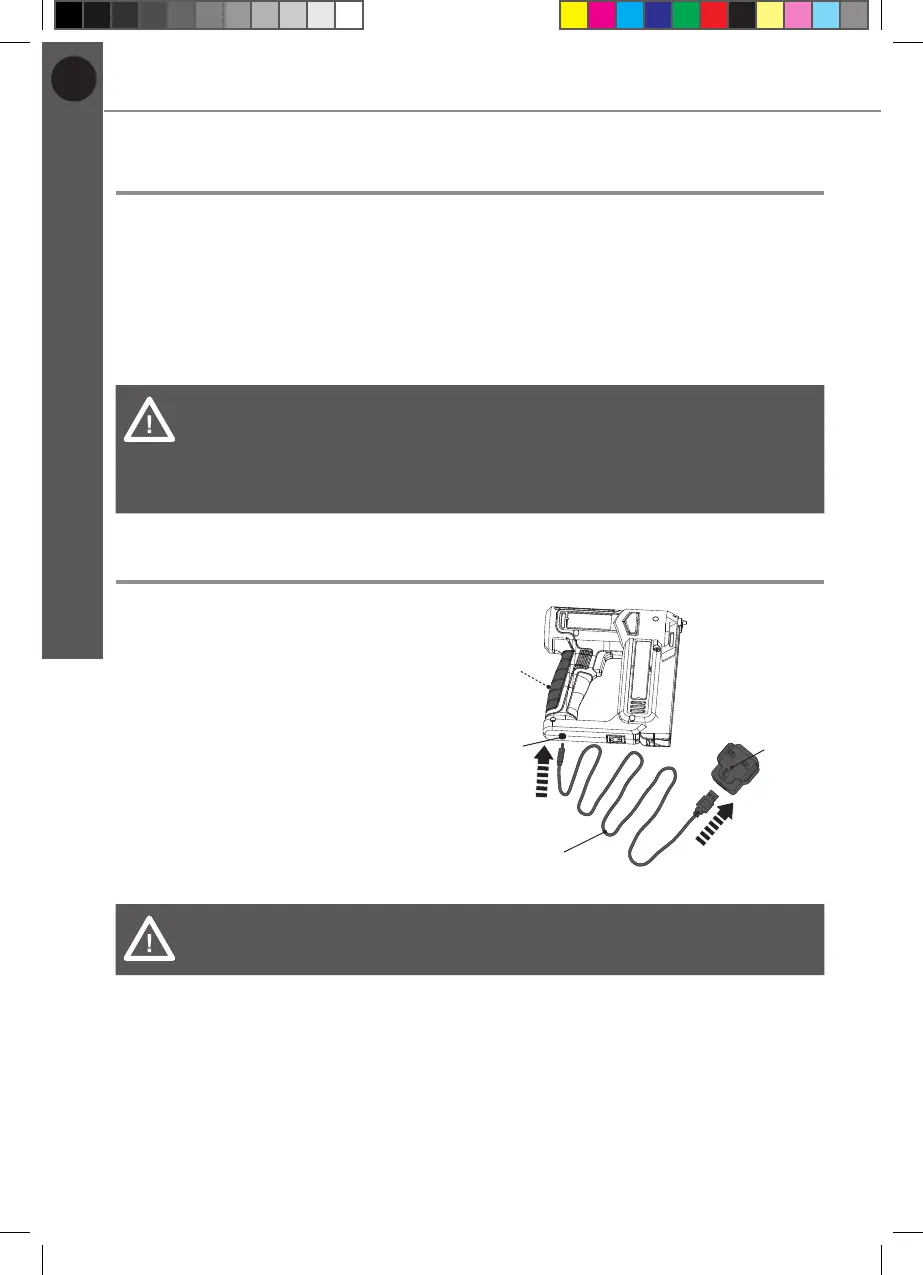
1. To charge the built-in battery (5a),
connect the Type-C USB port (10)
to the power adaptor (16) via the
USB charger cable (17) (Fig. 4).
2. Plug the power adaptor (16) into a
plug socket.
16
17
10
5a
Fig. 4
WARNING! Check the voltage! The voltage must comply with the
information on the rating label!
MNL_3.6 V Cordless 12mm Stapler_V2_230628.indd 22 6/28/23 5:43 PM


 To Next Page