EasyManua.ls Logo

TK-STAR TK906 - More Functions; Device Setting

TK-STAR TK906
20 pages
Print Icon
To Next Page IconTo Next Page
To Previous Page IconTo Previous Page
Loading...
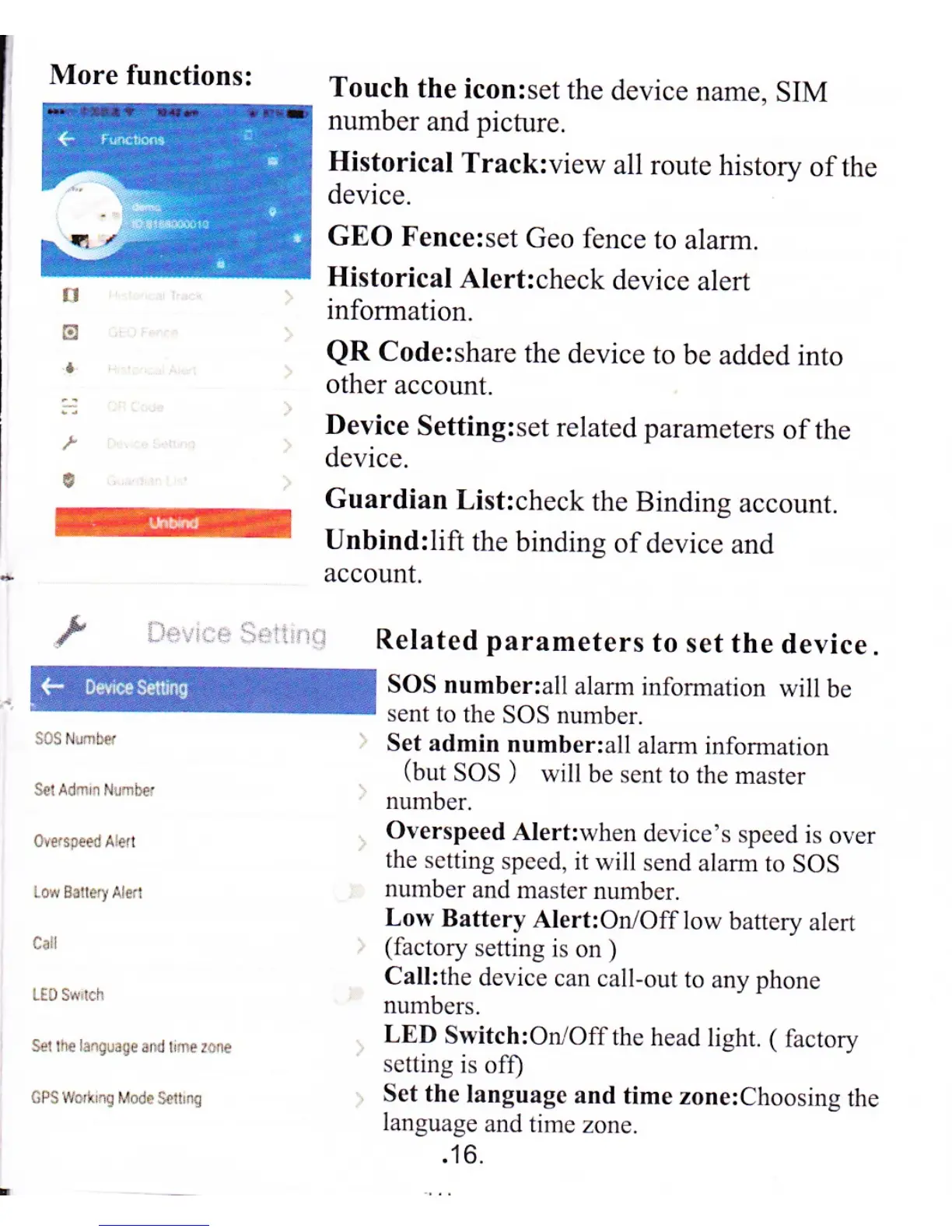
More
functions:
tl
:-l
ren
Touch
the
icon:set
the
device
name. SIM
number
and picfure.
Historical
Track:view
all route
historv
ofthe
device.
GEO
Fence:set
Geo
fence
to alarm.
Historical
Alert:check
device
alert
information.
QR
Code:share
the
device to
be added
into
other account.
Device
Setting:set
related parameters
ofthe
device.
Guardian
List:check
the
Binding
account.
Unbind:lift
the
binding
of device
and
account.
oirrsreedAlen
LowBatleryAled
Crll
LED S*i.h
Sllh€
ir.glagead
tnerane
GPSWo'tr.! Mode
set!n!
'
'i'
-'rr:
:,il
Related
parameters
to
set the
device.
SOS number:all
alam
infomation
will be
sent
to the
SOS number.
Set admin
number:all
alam
infomation
(but
SOS
)
will be
sent to the
master
number,
Overspeed
Alert:when
device's
speed is
over
the setting
speed, it
will send
alam to
SOS
number
and master
number.
Low
Battery
Alert:Or/Off
low battery
alert
(factory
setting
is on
)
Call:the
device
can call-out
to any phone
numbers.
LED
Switch:OrL/Offthe
head
light. (
factory
setting
is of0
Set the
language
and
time zone:Choosing
the
language
and time
zone.
.16.

Related product manuals