EasyManua.ls Logo

TK-STAR TK906 - SMS Tracking Functions; Get SMS Google Map Link; Set Admin Phone Number

TK-STAR TK906
20 pages
Print Icon
To Next Page IconTo Next Page
To Previous Page IconTo Previous Page
Loading...
3.
TURN
ON THE DEVICE
'
The
indicator light is on when SIM
card
is inserted, but the
light
is offin few seconds .
'
The
device
gets
GPS
location when there
is GPS signal
and
gets LBS location when
there is no GPS signal.
'
The
device automatically
turns off when
the SIM card
removed.
4. SMS
TRACKING
Notc
: The
yellow
space
is a
blank
in SMS
command.
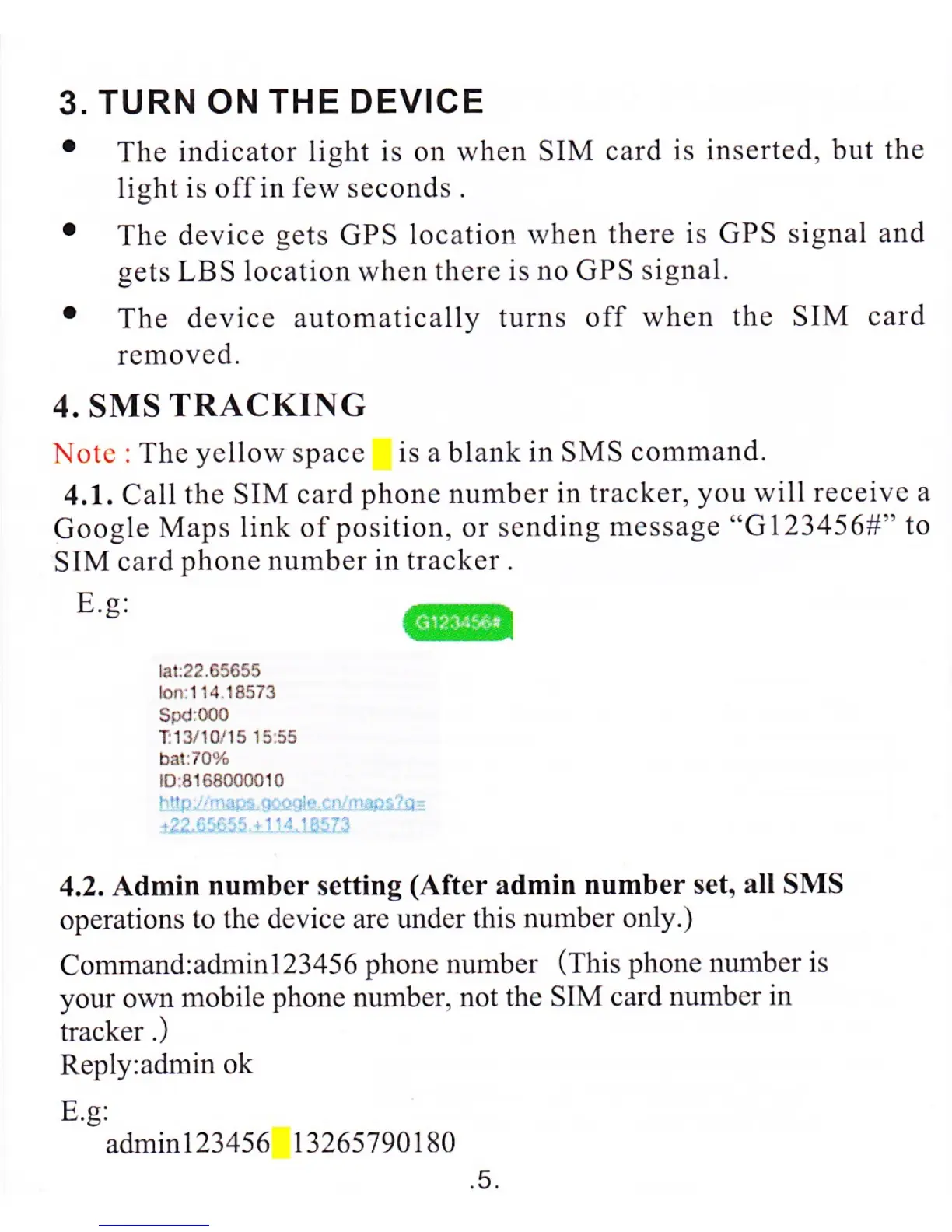
4.1. Call
the SIM card
phone number in
tracker,
you
will
receive a
Google
Maps
link
of
position,
or sending
message
"G123456#"
to
SIM
card
phone number in trackcr .
E.s:
@
lar:22.65655
lonil 14.18573
SPd
000
T:13/10i 15 1555
batr70%
lD:8163000010
4.2.
Admin
number
setting
(After
admin
number set,
all
SMS
operations
to the device are under this number
only.)
Command:admi
n123456
phone number
(This
phone number is
your
own
mobile
phone
number,
not the SIM card
numbcr in
tracker
.)
Reply:admin
ok
E.g:
admin123456
13265790180
.5.

Related product manuals