EasyManua.ls Logo

TK-STAR TK906 - Emergency Tracking; Platform Tracking

TK-STAR TK906
20 pages
Print Icon
To Next Page IconTo Next Page
To Previous Page IconTo Previous Page
Loading...
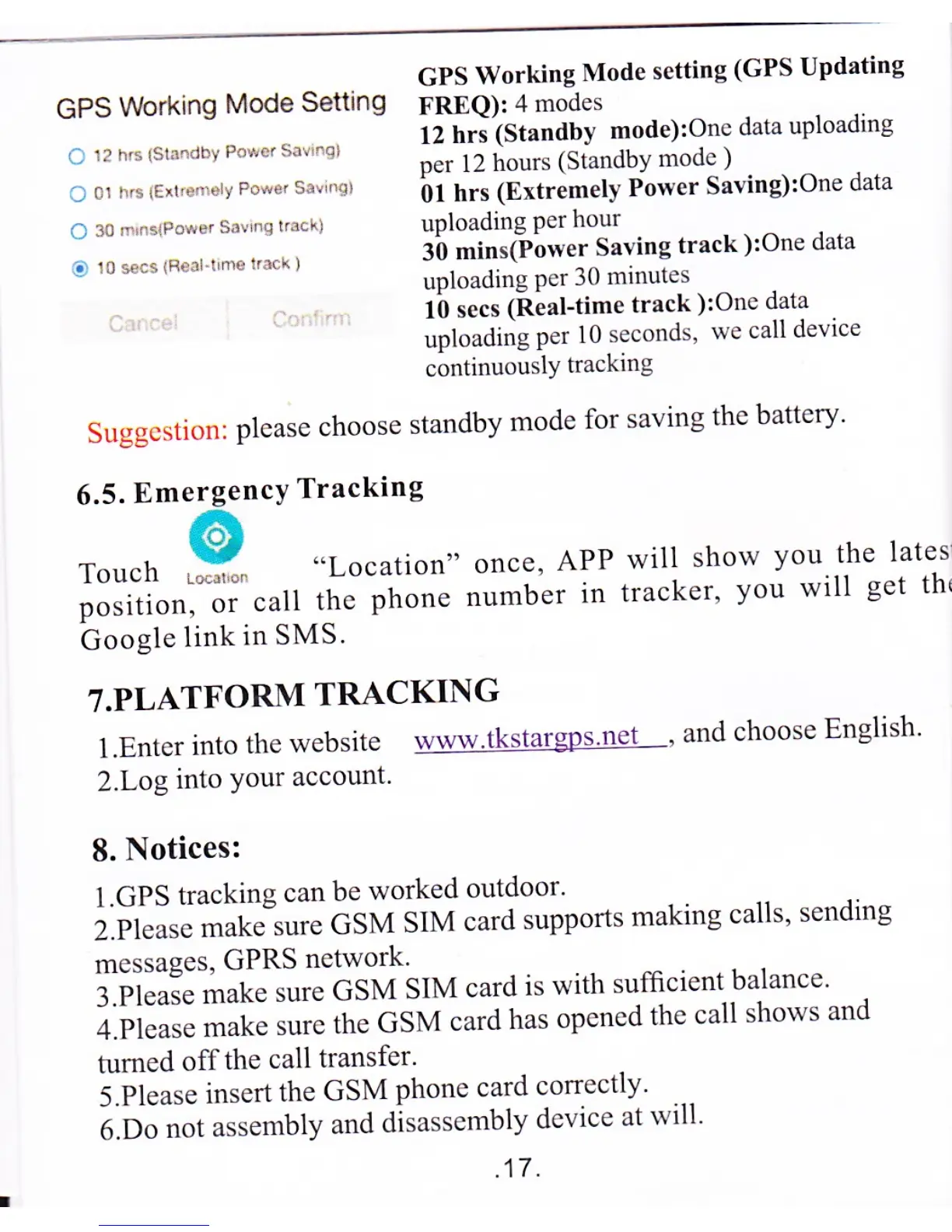
GPS
Working
Mode
setting
(GPS Updating
GPS
Working
Mode
Setting
FREQ):4
modes
c
12
h.s
{slnndby
po*er
siu.ql
::,tT
l::11t3[#r'rtil;?:;
ou'u
uo'o'o'"t
.t
0r
f,s
tEir,e.,eL,
Po*e,
sa!.q)
bi
hrs
(Extremely
Power
Saving):One
data
Cr'.,\lotrF,s.r!rqr.r!'.
uploadingperhour
c
10 *cs
(R{:rr-,
nre
k:ck
)
il,nng;;5.
;lins
track
):one
data
'
lb
secs
lReal-time
track
):One
data
uploading
per
l0
seconds
we
call
device
continuouslY
tracking
Suggcstion:
please
choose
standby
mode
for
saving
thc
battery'
6.5.
EmergencY
Tracking
ror.t
.9*
"Location"
once,
APP
position,
or
call
the
phone
number
in
Google
link
in
SMS.
T.PLATFORM
TRACKING
l.Enter
into
the
website
www
tkstargDs
net
'
and
choose
English
2.Log
into
Your
account.
8.
Notices:
l.GPS
tracking
can
be
worked
outdoor'
i.ii""r"."t.".rre
GSM
SIM
card
supports
making
calls'
sending
messages,
GPRS
network'
i.pi."'*
-"t.
sure
GSM
SIM
card
is
with
sufficient
balance'
;.i'i;;;;;;k.
sure
the
GSM
card
has
opencd
the
call
shows
and
tumed
off
the
call
transfer.
i.pi.ut"
insert
the
GSM
phone
card
correctly'
i.b"
,"a
assembly
and
disassembly
device
at
will'
.tt.
will
show
You
the
latesi
tracker,
You
will
get
tht

Related product manuals