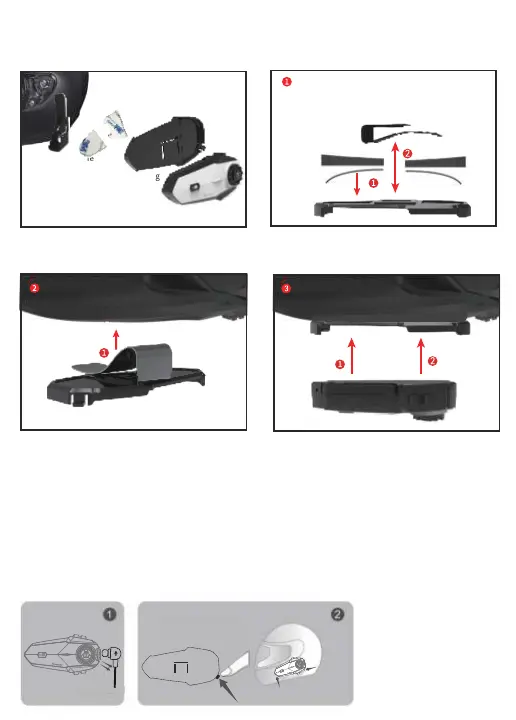
S nap the headset into the mounting bracket
把主机卡进底座上
Install the iron back clip w ith the base
into the helmet
把装好底座的铁背夹装入头盔
Mounting
bracket
Helmet
Headset
Metal clip
S ingle S ided
adhesive pad
Adhere the sing le- sided adhesive to the mounting bracket,
and then snap the metal clip into the mounting bracket
Put the metal clip into the helmet
S nap the headset into the base, the
installation is complete
Method 2: Use metal clip
Installation
Quickly remove the Bluetooth headset from the helmet
First unplug the headset cable, then one hand fixed
intercom, use your fingers to press down hard on the fixed
clips on the mounting bracket, you can hear the sound of
loose equipment to smoothly remove the headset from the
helmet.


 To Next Page