10
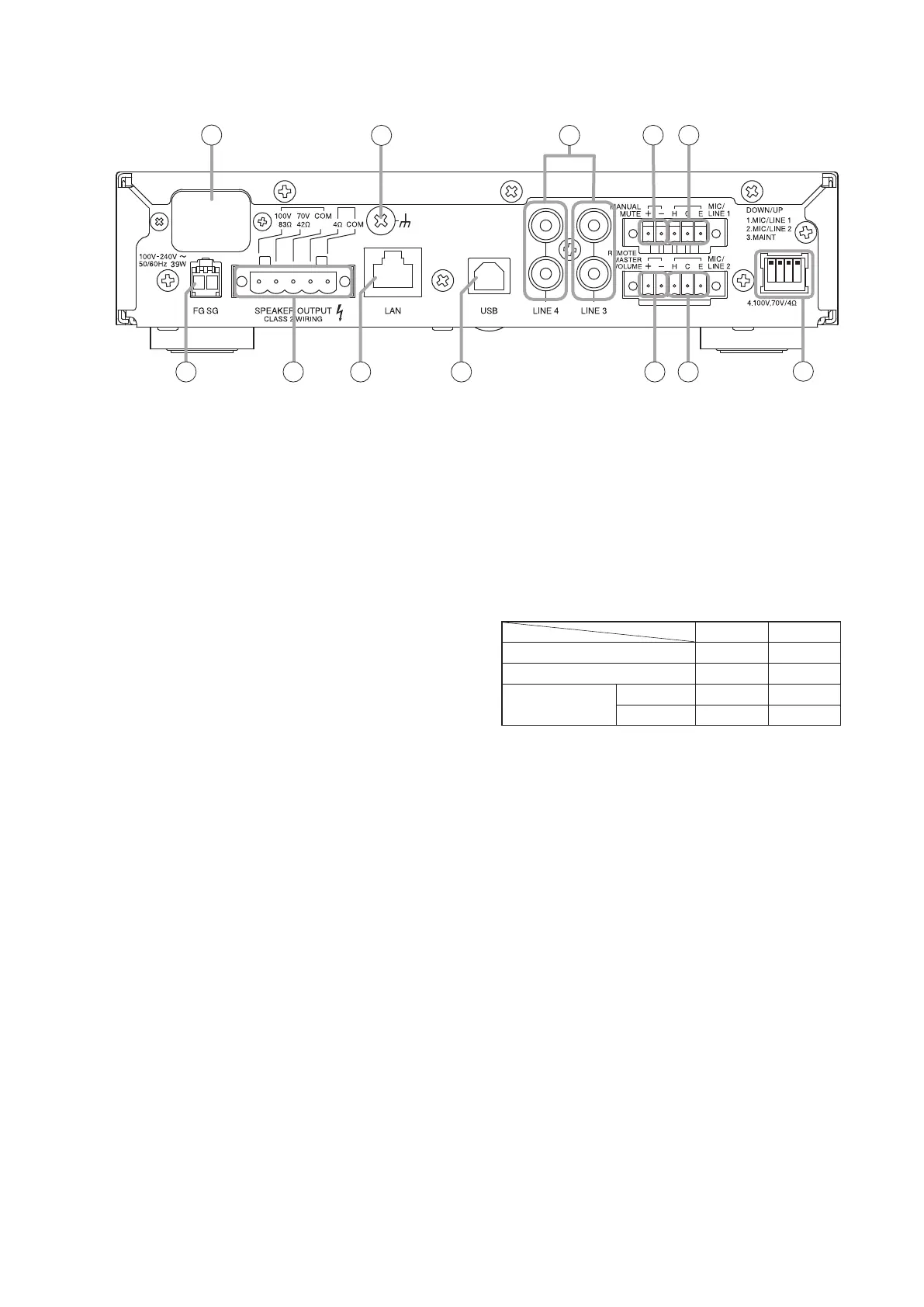
8. AC Power input terminal
Use the supplied power cord to connect the unit
to an AC power source.
9. Functional ground terminal
Connect this terminal to the functional ground of
external equipment if much noise is encountered
when the unit is connected to the external
equipment. The noise may be reduced.
Note: This ground is not for protective ground.
10. Line input jacks (3, 4)
RCA jack x 2
−20 dB, 10 kΩ, unbalanced
(See p. 14, "Inputs 3 and 4 connections.")
11. Manual muting terminals
Removable terminal block (5 pins).
Short circuit current: 3 mA or less
Release voltage: 24 V DC or less.
The muting function is enabled by connection of a
no-voltage contact (such as a switch).
(See p. 16, "Manual muting terminal connections.")
Note
A push-button switch or similar device must rst
be connected to the unit and settings performed
using the A-5000 PC Software.
12. MIC/LINE input terminals (1, 2)
MIC: –60 dB
LINE: –20 dB
Removable terminal block (5 pins).
2.2 kΩ, electronically balanced input.
Input sensitivity can be selected from LINE and
MIC input levels.
(See p. 14, "Inputs 1 and 2 connections.")
Note
Input sensitivity is selected at the DIP switch (18).
13. Ground lifting terminal
If the unit is connected to other equipment and a
resulting ground loop causes hum noise, remove
the plug connected to this terminal to reduce the
noise.
14. Speaker output terminals
Removable terminal block (5 pins).
(See p. 15, "Speaker Output Signal Connections.")
The following table shows each output’s specications:
A-5006 A-5012
Rated output 60 W 120 W
Low-impedance 4 Ω 4 Ω
High-impedance
100 V line
170 Ω 83 Ω
70 V line 83 Ω 42 Ω
Note
Avoid simultaneously using both the high - and low-
impedance terminals. Also, do not use the high-
impedance 100 V line terminal simultaneously
with the 70 V line terminal, as this could result in
unit failure.
Tip
Use the DIP switch (18) to switch between high-
and low-impedance output.
15. L AN por t
Ethernet RJ-45 port.
Use a Category 5 (or higher) straight LAN cable
to connect this port to a 100BASE-TX-compatible
network.
(See p. 16, "Connection to PCs.")
16. U SB po rt
Not used.
[Rear]
1 2 3 4
8
11 12
10
9
13 15 16
18
1214 17
The gure shows the A-5012.



 To Next Page