13
Configuring EMV for your Toast System in the Toast App
Your Toast system is EMV capable.
EMV is a credit card payment process
that checks cards embedded with a
computer chip for their legitimacy. Enabling
EMV will allow for dipping and tapping of
credit cards on the Toast Tap.
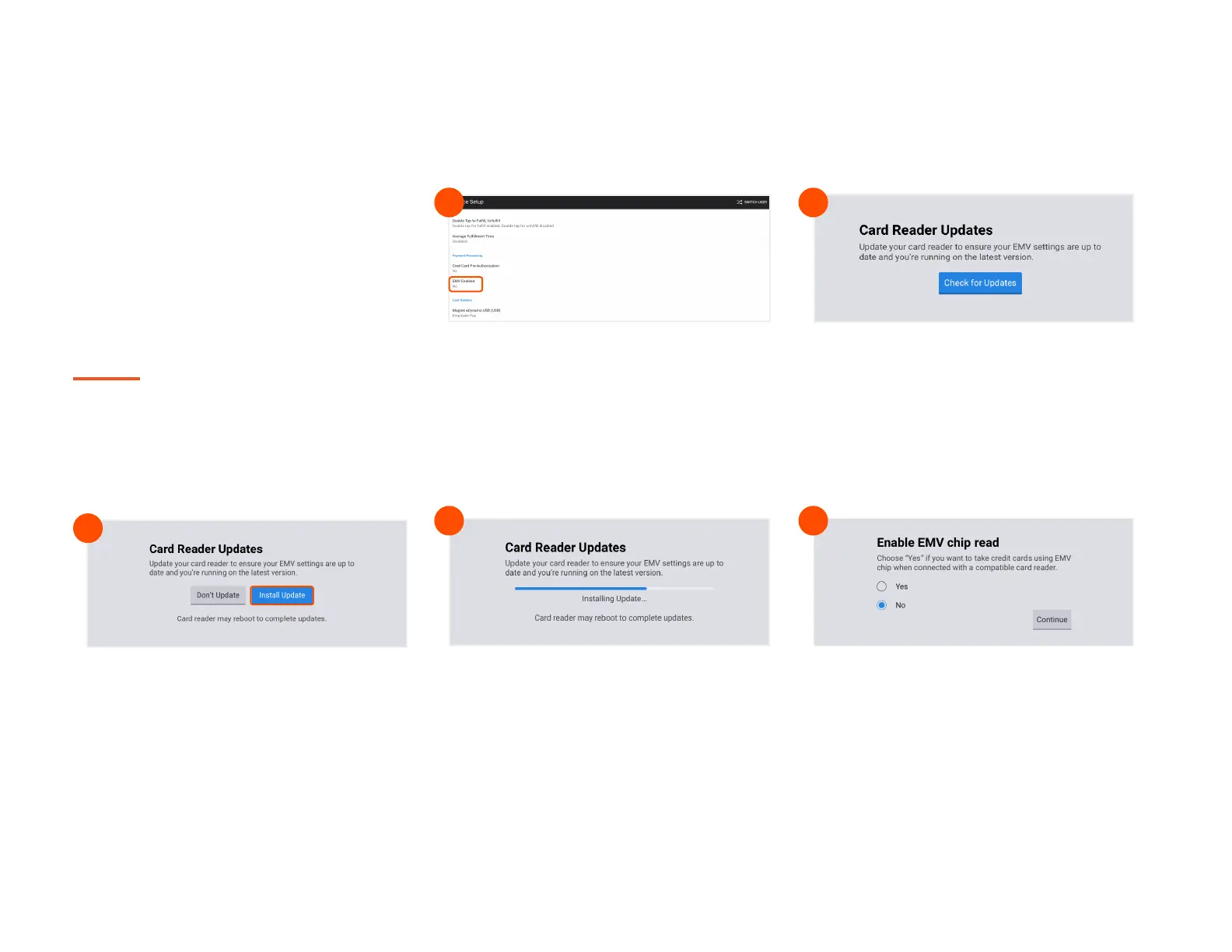
Using the Toast icon in the upper left corner
of the screen on your Toast Flex, navigate to
the Setup menu and select Device Setup.
Scroll to the Payment Processing section
and select EMV Enabled.
Select Check for Updates to look for
updates to your card reader. If you do not
see an update, skip to the last step.
1 2
You’ll see the screen below as the update
processes. If you get an error message,
please try again in a few minutes.
Make sure to not let your session log out.
4
If the update was successful, you’ll see this
next screen. Toggle the switch to Yes, and
you’re all set!
5
Select Install Updates. The update normally
takes a few minutes to complete. If you
decline the update, you will not be able to use
EMV until this update is installed.
3



 To Next Page