16
Toast Flex for Kitchen
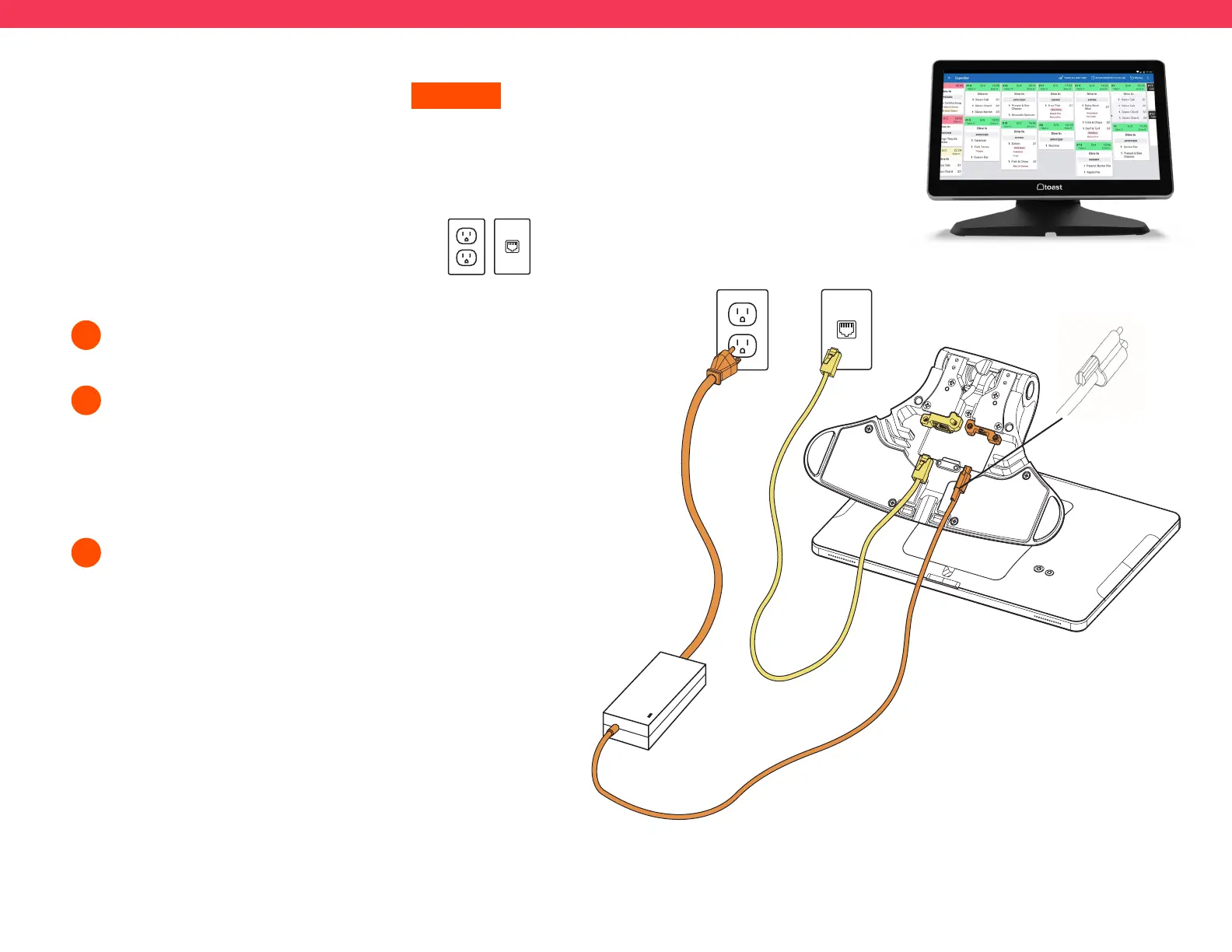
Unpack your Toast Flex for Kitchen terminal
and place it on your counter.
Remove the yellow box labeled “Connect.” This box
contains two yellow ethernet cables. One cord is 3 ft
and one is 7 ft. Choose the cord length that best suits
your restaurant and connect it from the wall to the
yellow port labeled “Internet IN” on the base of the
terminal stand.
Remove the orange power box labeled “Power.” Plug
in the power adapter from the wall into the orange port
located at the base of the Toast Flex terminal stand.
Use the thumb screw to secure it.
1
2
3
ON-STAND
Step 3 Step 2
Thumb
Screw
Follow these instructions if the
Toast Flex for Kitchen will be on-stand
Before you get started, identify where you want
your Toast Flex for Kitchen to be located. Make
sure there is a power outlet and wall port in reach.
If you are using a wall mount for your
Toast Flex for Kitchen, go to the next page!
Step 3 Step 2



 To Next Page