17
Step 4
Step 3
Toast Flex for Kitchen
MOUNTED
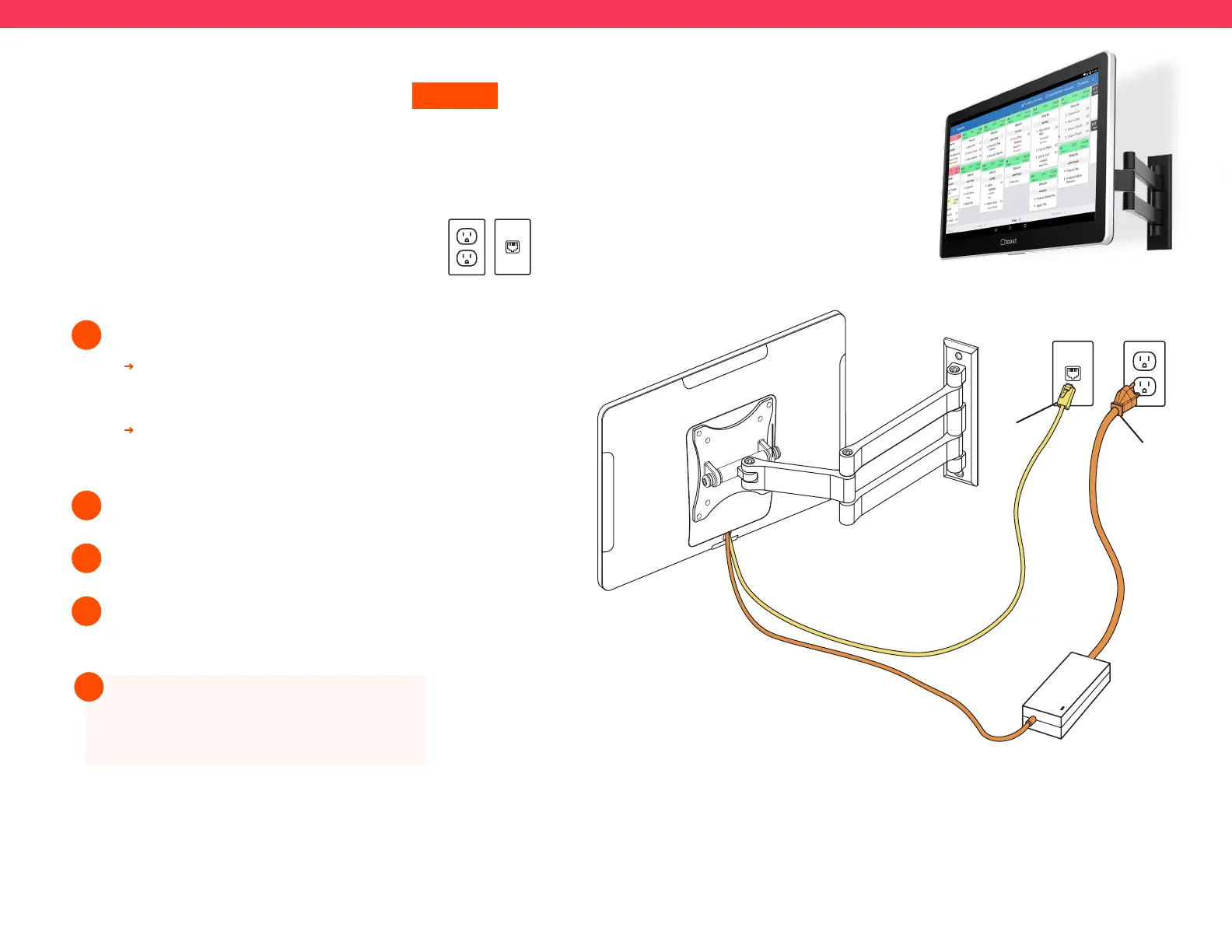
Follow these instructions if the Toast Flex
for Kitchen will be mounted on the wall
Before you get started, identify where you want
your Toast Flex for Kitchen to be located. Make
sure there is a power outlet and wall port in reach.
Unpack your Toast Flex for Kitchen and Wall Mount:
1
2
It will have the swing arm for the wall mount
already attached.
It will also have the power cable and internet cable
pre-plugged into your Toast Flex for Kitchen.
Plug the other end of the internet cable into the wall port.
Attach your wall mount to the wall. (See note below.)
Plug the other end of the power cable into the wall outlet.
3
4
Toast does not drill holes. You will need
to drill your own holes or have holes
pre-drilled in the desired location.
!
Step 3
Step 2
Step 4



 To Next Page