tojock@126.com
POPUP: Shows and hides the popup menu
(24) RIGHT: Navigates through the Menus
(25) RETURN: Return to a previous display menu
(26) DOWN: Navigates through the Menus
(27) CLEAR: To clear an entry
(28) GOTO: Jump to a user-specified time during playback
(29) A-B: Press A-B can repeat playback of a user-defined section
(30) ZOOM: zoom in or zoom out
(31) STOP: Stop play
(32) PLAY/ PAUSE: Start (resume) / pause play
(33) PREV: Skip to the previous title, chapter, or track
(34) NEXT: Skip to the next title, chapter, or track
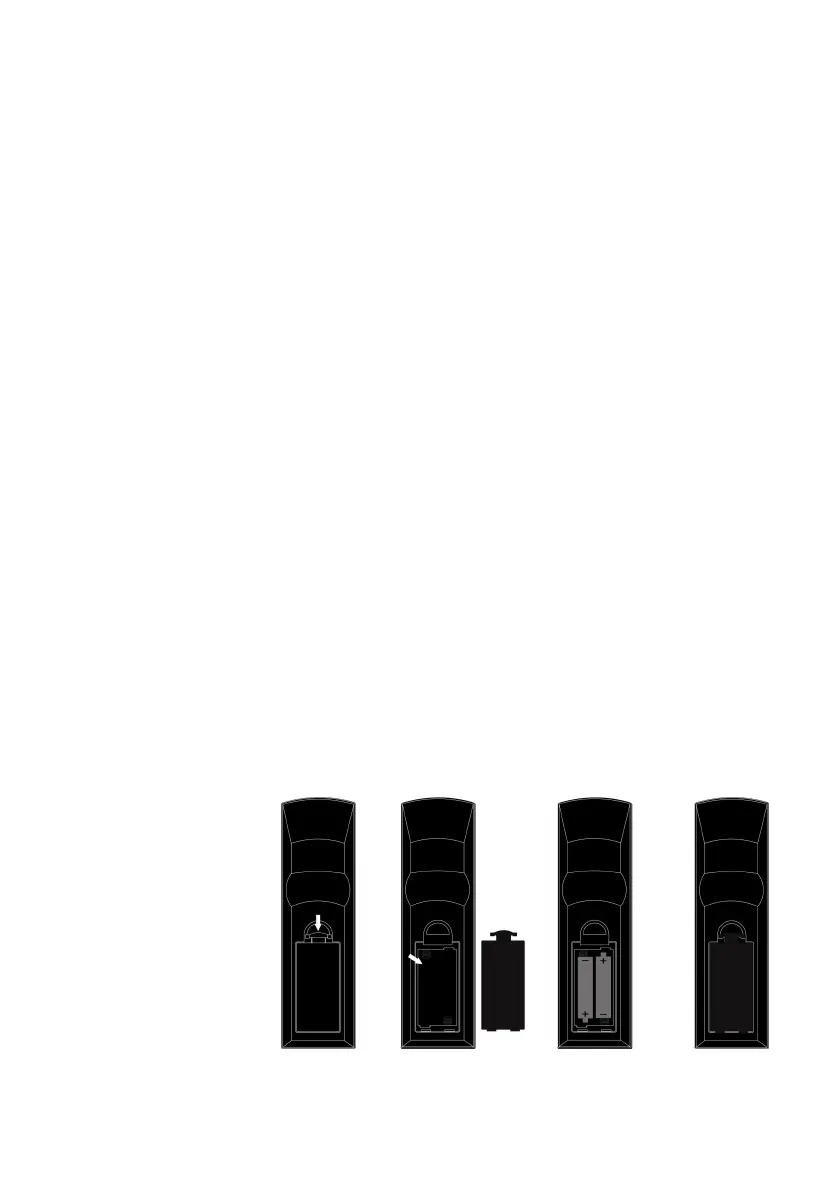
6.2 Installation of Batteries
1. Press and lift the back cover up to open the battery compartment of the remote
control.
2. Insert two AAA size batteries. Make sure that the polarities of the batteries ( + )
and ( - ) match those of the battery compartment.
3. Close the battery compartment cover.
NOTE:
Remove the batteries If
you don’t use the
remote control very
often.
Do not mix old and new
batteries.
Do not mix alkaline,
standard (carbon-zinc)
or rechargeable (ni-cad, ni-me, etc.) batteries. Batteries can contain corrosive


 To Next Page