tojock@126.com
substances, so they should be disposed of properly.
CAUTION
Due to a risk of explosion. Keep batteries away from heat, direct sunshine, or fire.
Never discard batteries in a fire.
7. Connections
When connecting this unit to other components, be sure that all devices are
turned off. Audio/Video cables are connected according to different color
identification and should be fitted firmly into the appropriate jacks.
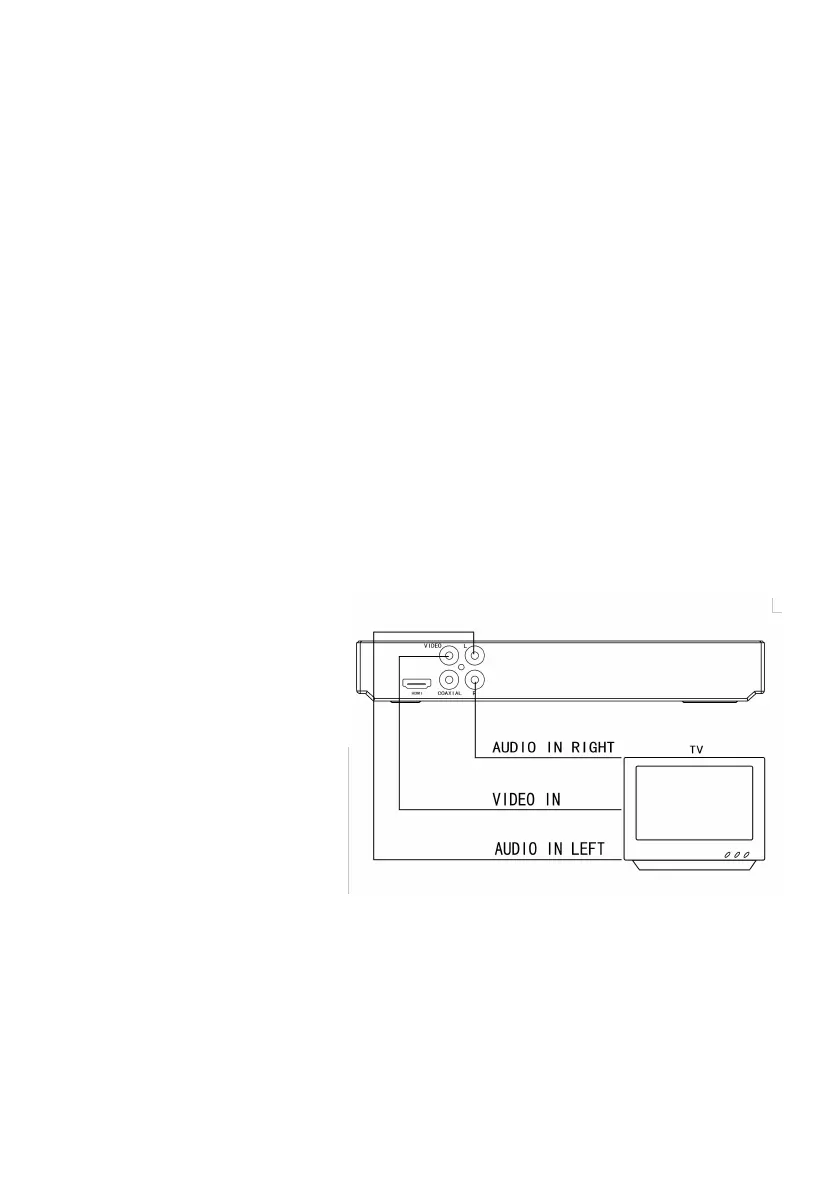
7.1 Connect to TV via standard Audio/ Video cable ( included)
A. Connect the supplied RCA Audio/Video cable using the red(right) and
white(left) cables to the Audio jacks on the rear of the DVD player and to the
Audio Inputs on your TV.
B. Connect the video cable
(yellow) to the Video jack
on the rear of the player
to the Video Input on your
TV.
C. Set your TV to its
appropriate Video input
7.2 Connect to an amplifier via coaxial digital audio output
A. Connect the supplied RCA Audio/Video cable using the red and white cables
to the Audio jacks on the rear of the player and to the Audio Inputs on your


 To Next Page