tojock@126.com
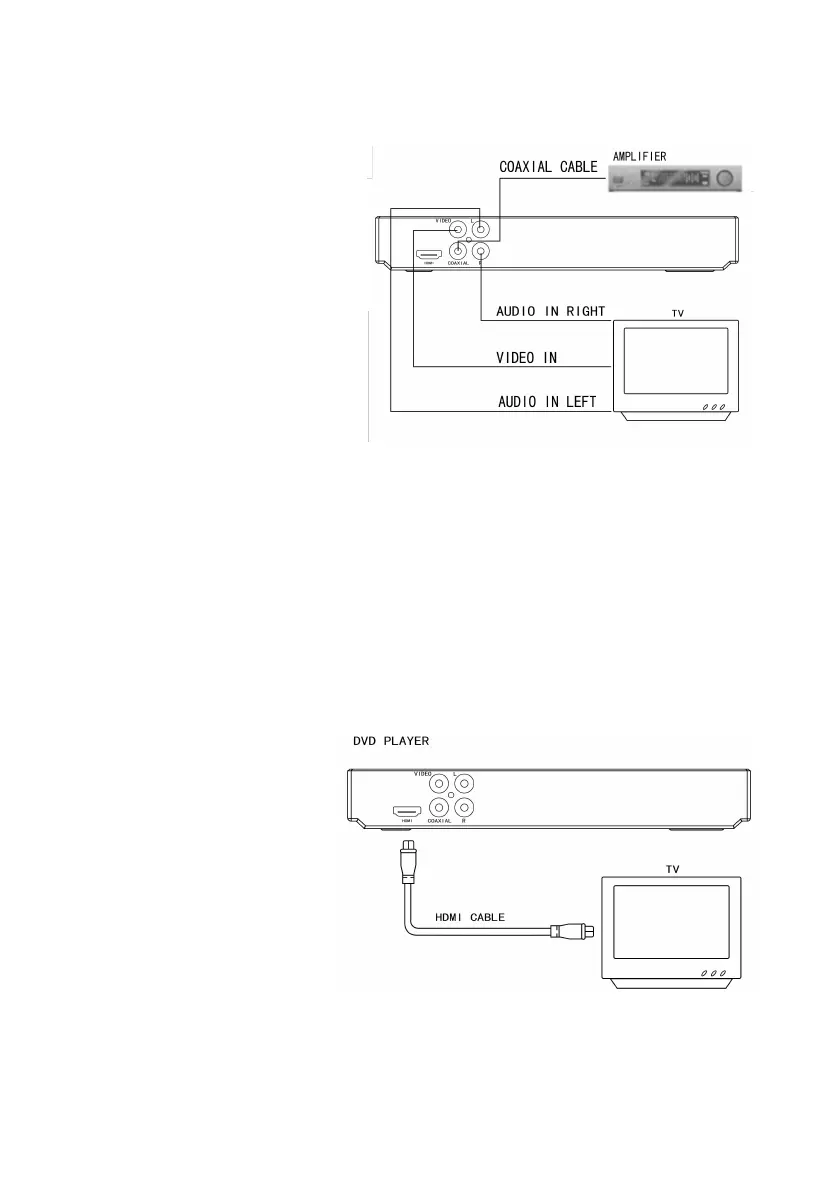
TV.
B. Connect the video cable (yellow) to the Video jack on the rear of the player
to the Video Input on your TV.
C. Connect a digital coaxial
cable (not included) to the
coaxial cable jack on the
rear of the player and to the
coaxial digital audio input on
your digital receiver or
amplifier.
Tips
This way of connection type provides standard image quality only.
7.3 Connect TV and Projector Via HDMI Cable (included)
A. Connect an HDMI cable to the HDMI jack located on the rear of the discs
player.
B. Connect an HDMI cable to the HDMI Input jack on your television.
User Tips
You can optimize the video
output by pressing the
“Resolution” button
repeatedly to select the best
resolution the TV can
support;
To play the digital video
images of a disc or video via an HDMI connection, it is necessary that both this
product and the display device (or an AV receiver/ amplifier) support a copyright


 To Next Page